Not every blob is read every day. Access tiers let an organisation pay less to store data it rarely touches, in exchange for paying more each time it is read.
An access tier is a setting on a block blob that balances storage cost against access cost and latency. Latency here means how long it takes to start getting data back. Access tiers apply only to block blobs, not to append or page blobs.
| Tier | Online or offline | Storage cost | Access cost | Minimum retention | Typical read latency | Typical use |
|---|---|---|---|---|---|---|
| Hot (the default) | Online | Highest | Lowest | None | Milliseconds | Data in active use |
| Cool | Online | Lower than Hot | Higher than Hot | 30 days | Milliseconds | Infrequently accessed data |
| Cold | Online | Lower than Cool | Higher than Cool | 90 days | Milliseconds | Rarely accessed data that still needs fast retrieval, such as short-term backups and disaster recovery data |
| Archive | Offline | Lowest | Highest | 180 days | Up to 15 hours to rehydrate | Historical data that mustn’t be lost but is rarely needed, such as compliance records |
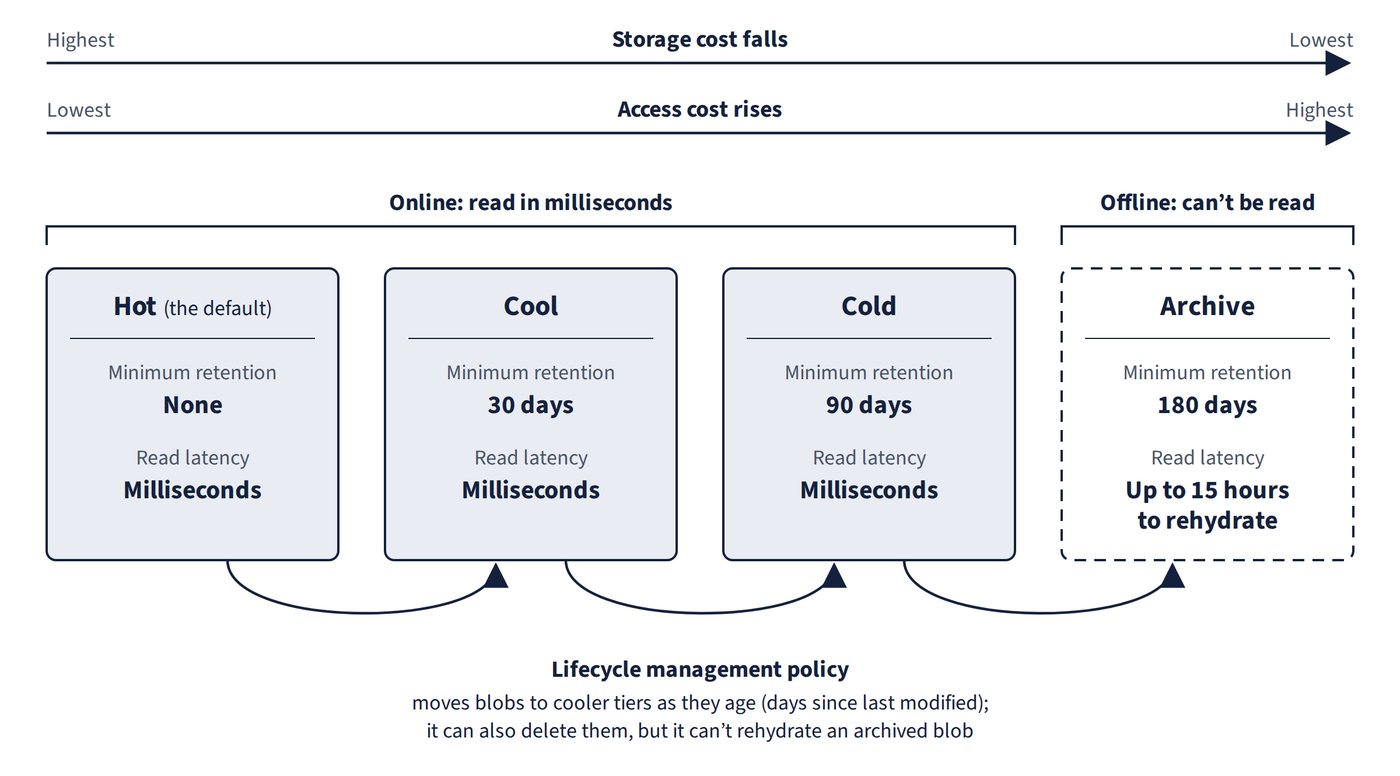
The minimum retention period is how long data should stay in a tier to avoid an early deletion penalty. Deleting, overwriting or moving a blob to another tier before then incurs a prorated charge for the remaining days. Figure 5.1 summarises the four tiers and how a lifecycle policy moves blobs between them.
The Archive tier and rehydration
Blobs in the Archive tier are effectively offline: they can’t be read or modified. To read one, its tier must be changed to Hot, Cool or Cold, which starts rehydration, the process of bringing the data back online. The blob can be read only after rehydration finishes, and that can take up to 15 hours. Archive also has two restrictions worth knowing: it can’t be the account’s default access tier, and it is supported only on accounts using LRS, GRS or RA-GRS, not on ZRS, GZRS or RA-GZRS accounts.
Common trap: Expecting an archived blob to be readable straight away, just more slowly - Archive is an offline tier; the blob must first be rehydrated to Hot, Cool or Cold, which can take up to 15 hours, and only then can it be read.
Default tier and smart tier
The storage account has a default access tier that new blobs inherit, and for a new general-purpose v2 account that default is Hot. It can be set to Hot, Cool or Cold (or to smart tier, described next), and any individual blob can be given a different tier.
Smart tier is a newer, generally available option (in public cloud regions with zone redundancy) set through the default account access tier. It moves block blobs automatically between Hot, Cool and Cold based on how they are used: a blob not accessed for 30 days moves to Cool, after 90 days of inactivity it moves to Cold, and any access returns it to Hot. Smart tier needs a Standard general-purpose v2 account with ZRS, GZRS or RA-GZRS, and it never moves data to Archive.
Lifecycle management policies
A lifecycle management policy is a set of rules on a storage account that moves blobs to cooler tiers as they age, for example from Hot to Cool, then Cold, then Archive, based on the number of days since the blob was last modified. A policy can also delete blobs that are out of date. Lifecycle policies can’t rehydrate an archived blob back to an online tier; the only move to a warmer tier they offer is an optional return from Cool to Hot when a blob is accessed.