Azure Storage always keeps multiple copies of data to protect it from hardware failures, outages and disasters. The redundancy setting chosen for a storage account decides where those copies are kept and applies to every service in the account.
Redundancy in the primary region
- Locally redundant storage (LRS) replicates data within a single physical datacentre in the primary region, keeping three copies. It is the cheapest option with the least durability (at least 11 nines per year). It protects against drive, server and rack failures but not against a disaster that affects the whole datacentre.
- Zone-redundant storage (ZRS) copies data synchronously across three or more availability zones in the primary region (at least 12 nines). Data stays readable and writable if a zone becomes unavailable. Microsoft recommends ZRS in the primary region for high availability and for Azure Files workloads.
Redundancy in a secondary region
For protection against a regional disaster, data can also be copied to a secondary region hundreds of miles away. The secondary region is the primary region’s pair (see the chapter “Azure’s core architecture: regions, zones and the resource hierarchy”); it is determined by the primary region and can’t be chosen. Figure 6.1 shows where the copies live for each option.
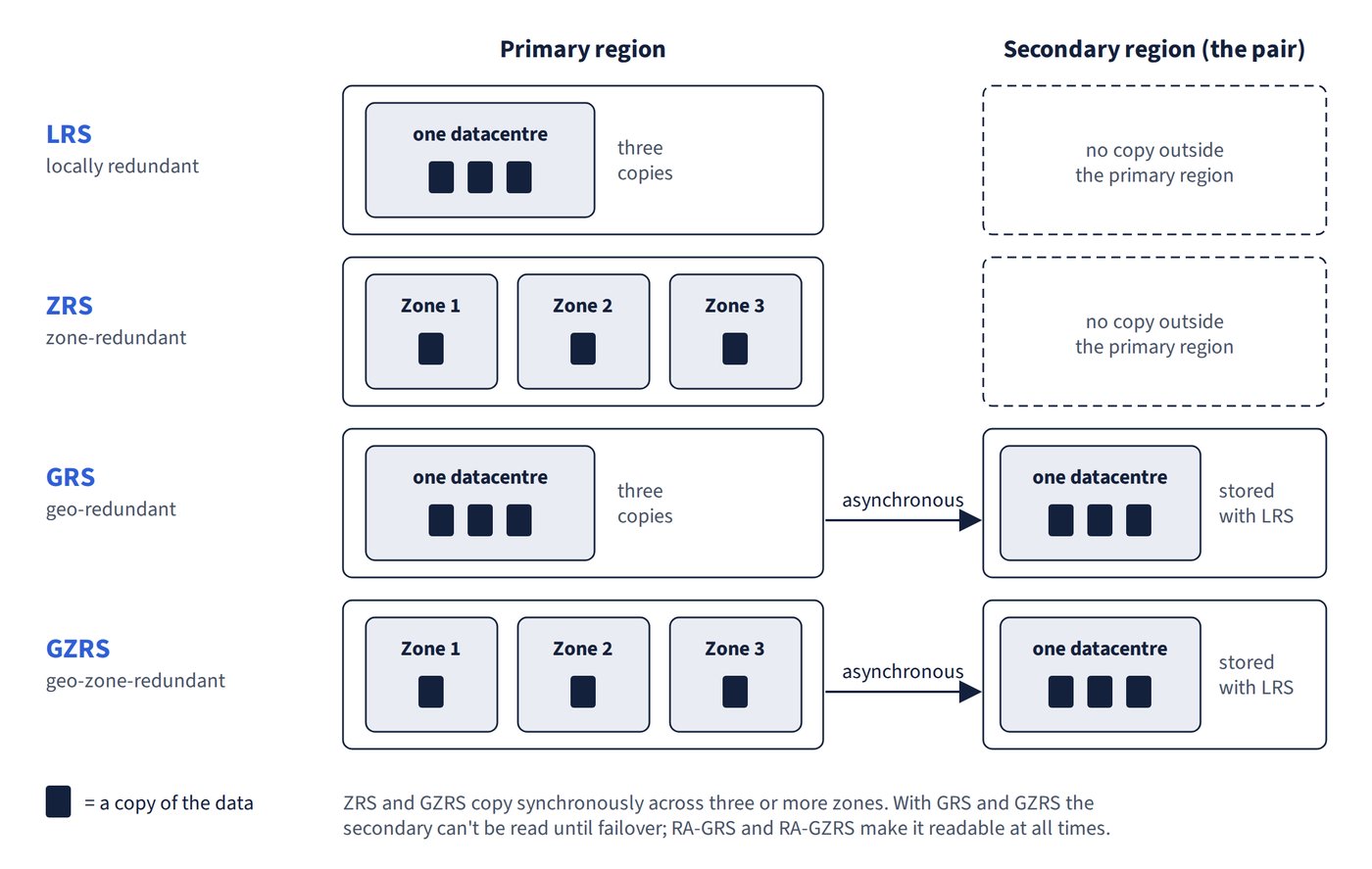
- Geo-redundant storage (GRS) uses LRS in the primary region, then copies data asynchronously to the secondary region, where it is stored with LRS. That gives six copies in total: three in the primary region and three in the secondary.
- Geo-zone-redundant storage (GZRS) uses ZRS in the primary region, then copies asynchronously to the secondary region (LRS there). To support GZRS a region must have availability zones and a paired region.
- Both offer at least 16 nines of durability.
- With GRS or GZRS the secondary copy can’t be read or written unless the account fails over to the secondary region. RA-GRS and RA-GZRS (read-access) make the secondary readable at all times through a separate endpoint whose account name ends in -secondary.
Summary
| Option | Copies kept in | Survives datacentre failure | Survives region outage | Read from secondary without failover |
|---|---|---|---|---|
| LRS | One datacentre in the primary region | No | No | No |
| ZRS | Three or more availability zones in the primary region | Yes | No | No |
| GRS | One datacentre in primary plus secondary region | Yes (failover restores writes) | Yes (failover restores writes) | No |
| RA-GRS | As GRS | Yes (reads continue; failover restores writes) | Yes (reads continue; failover restores writes) | Yes |
| GZRS | Zones in primary plus secondary region | Yes | Yes (failover restores writes) | No |
| RA-GZRS | As GZRS | Yes | Yes (reads continue; failover restores writes) | Yes |
Service and account limits:
- Blob, Queue and Table Storage support all six options.
- Azure Files supports LRS, ZRS, GRS and GZRS but not the read-access options RA-GRS and RA-GZRS.
- Managed disks support LRS and ZRS only.
- Premium storage accounts support LRS and ZRS only.
- Redundancy protects against hardware and site failures, not against data being deleted or overwritten: deletions are applied to every copy.
Common trap: Assuming GRS lets an application read the secondary copy during an outage - plain GRS and GZRS keep the secondary unreadable until a failover; continuous read access needs RA-GRS or RA-GZRS.
Common trap: Treating redundancy as a backup - every replica reflects the current state, so an accidental deletion or overwrite is replicated too; recovering old data needs features such as soft delete, snapshots or backups.