A KQL database can query data it ingested itself (native tables) or data that stays in OneLake or external storage (shortcuts). Two outline objectives sit here: native tables versus shortcuts, and accelerated versus standard shortcuts.
OneLake shortcuts in a KQL database
A OneLake shortcut in a KQL database appears under Shortcuts and behaves as an external table. You query it with the external_table() function. Shortcuts can point to internal items (KQL databases, lakehouses, warehouses) and to external storage such as ADLS Gen2, Amazon S3 and Google Cloud Storage. Rules to remember:
- One shortcut connects to one subfolder or table; create more shortcuts for more data, one at a time.
- Shortcuts created in a KQL database can’t be renamed.
- A table with an asterisk in any column name can’t be the target.
- Shortcut table schemas sync automatically (added, removed, renamed or retyped columns) unless
AutoUpdateSchema=falseis set. - Delta types map to KQL types; for example
struct,arrayandmapbecomedynamic,datebecomesdatetime, andfloatanddoublebecomereal.
Queries over shortcuts can be slower than over ingested data because of network calls to storage and the absence of indexes.
Query acceleration
Query acceleration adds a policy to an external delta table (a shortcut) that caches and indexes its data for a number of days, giving performance comparable to ingested data while the data stays in OneLake. It can be switched on when creating the shortcut (Accelerate toggle) or later under Manage > Data policies. Prerequisites are a Fabric capacity, the Admin, Member or Contributor workspace role, and the relevant OneLake security permissions on the shortcut target. The policy properties are:
| Property | Meaning |
|---|---|
IsEnabled |
Turns acceleration on or off |
Hot |
Number of days to accelerate (minimum 1 day); by default eligibility is based on each file’s modificationTime in the delta log, and the UI default is the database caching period |
HotWindows |
Optional extra date ranges to accelerate |
MaxAge |
Maximum staleness: accelerated data is used if the last index refresh is newer than now minus MaxAge; default 5 minutes, minimum 1 minute; overridable per query |
HotDateTimeColumn |
Optional datetime column used instead of file modification time to decide which files are hot |
.alter external table SalesShortcut policy query_acceleration
'{"IsEnabled": true, "Hot": "30.00:00:00", "MaxAge": "00:05:00"}'

external_table('SalesShortcut')
| where OrderDate > ago(7d)
| summarize Revenue = sum(Amount) by Region
The first command accelerates the last 30 days of the shortcut and tolerates five minutes of staleness; the query reads through external_table(), and because its filter falls inside the hot period it runs against cached data. A query that reaches outside Hot or HotWindows reads the remote delta files directly and is slower.
Limitations to know: no more than 900 columns; delta tables with checkpoint V2 aren’t supported; more than 2.5 million data files may not perform well; very large Parquet files aren’t cached; advanced Delta features (column mapping, partitioning) must not change while the policy is enabled; and OPTIMIZE or frequent MERGE/UPDATE/DELETE on the source can force re-acceleration. Accelerated shortcuts still behave like external tables, so you can’t define materialized views on them. Acceleration is billed under the OneLake Premium cache meter like native eventhouse data, plus CU for indexing; check progress with .show external table operations query_acceleration statistics.
Making the choice
| Need | Native table (ingested) | Standard OneLake shortcut | Accelerated shortcut |
|---|---|---|---|
| Data copy in the eventhouse | Yes | No | Cached copy for the hot period |
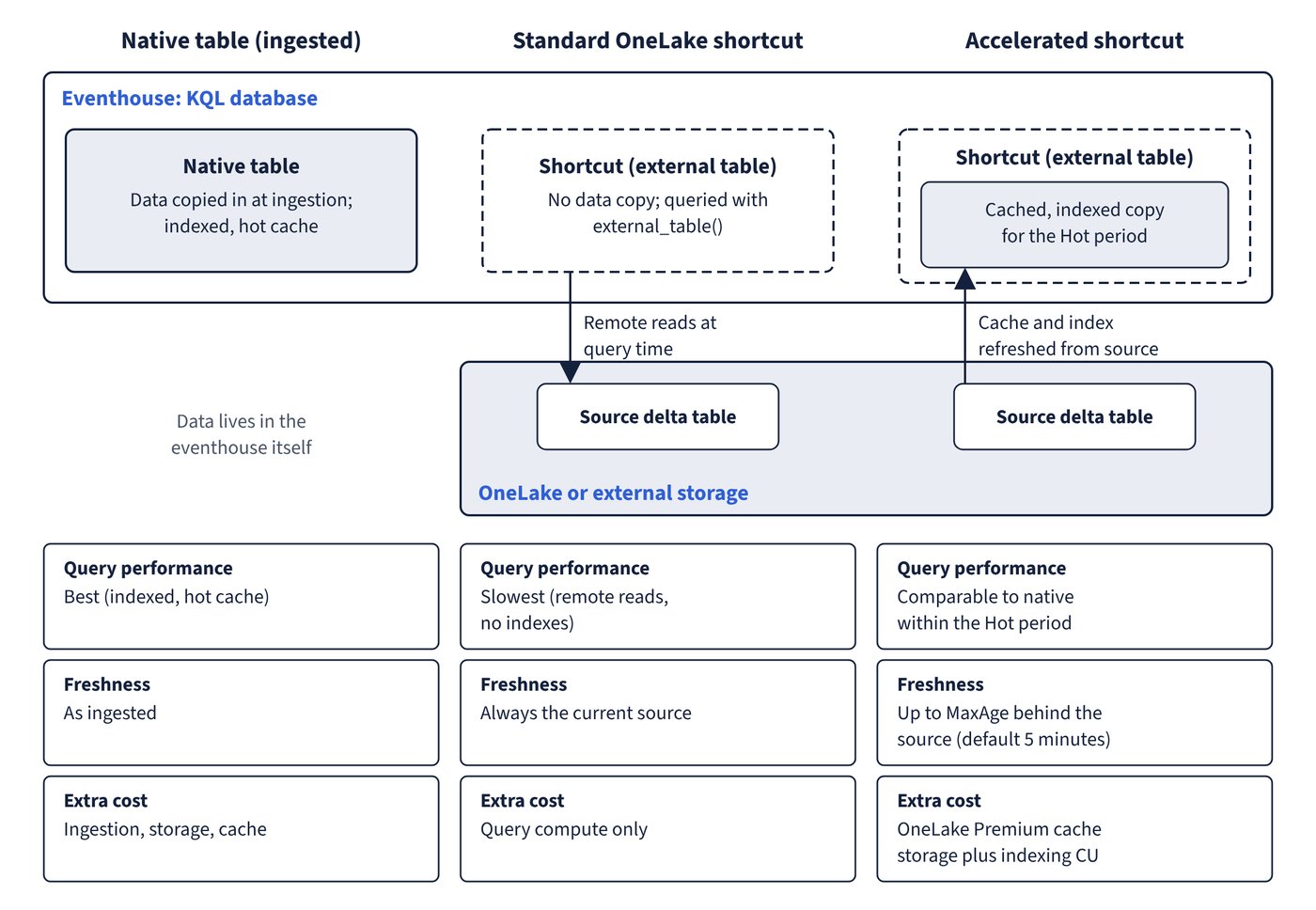
| Query performance | Best (indexed, hot cache) | Slowest (remote reads, no indexes) | Comparable to native within the hot period |
| Freshness | As ingested | Always current source | Up to MaxAge behind the source (default 5 minutes) |
| Update policies and materialized views on it | Yes | No (external table) | No materialized views; can be an update policy source (preview) |
| Retention and caching policies | Yes | Source system owns lifecycle | Hot period controls the cache |
| Extra cost | Ingestion, storage, cache | Query compute only | OneLake Premium cache storage plus indexing CU |
| Typical use | Streaming events, low-latency dashboards | Occasional queries, large historical data owned elsewhere | Frequent queries or joins over OneLake data such as mirrored dimension tables |
Learn’s scenarios for acceleration are querying OneLake data at high performance, combining historical data in OneLake with real-time streams in the eventhouse, and joining small dimension data that’s mirrored into OneLake from SQL, Cosmos DB or Snowflake. Figure 11.2 shows where the data lives in each option and what that means for speed, freshness and cost.
Common trap: Accelerating a shortcut so that you can build a materialized view over it - accelerated shortcuts keep the capabilities and limitations of external tables, and materialized views aren’t supported on them; ingest into a native table if you need a materialized view.
Common trap: Expecting an accelerated shortcut to reflect a source change instantly - acceleration returns data no older than
MaxAge(five minutes by default), so a query can lag the latest delta version unless you lowerMaxAgeor useMaxAgeOverride.