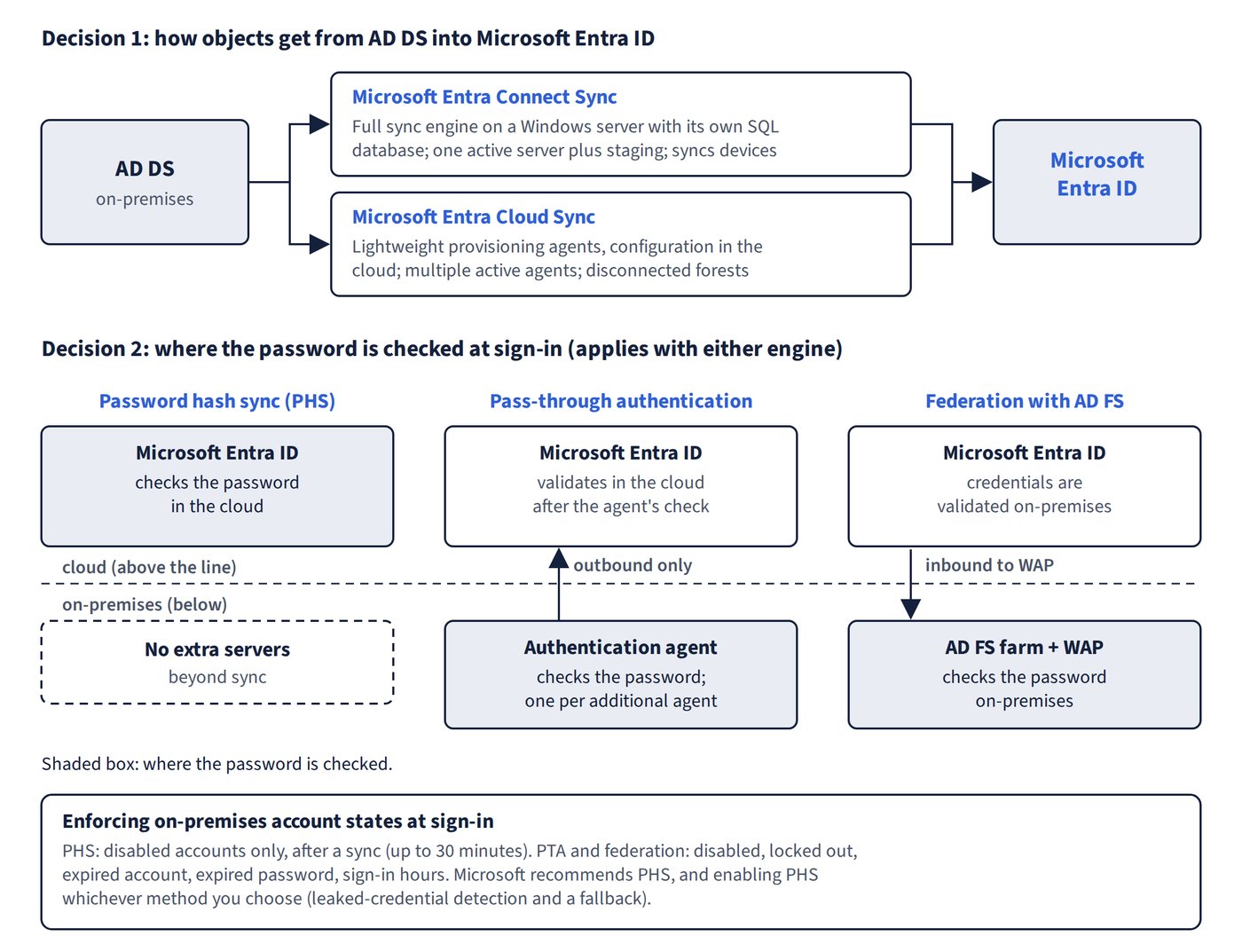
Hybrid identity involves two separate decisions: how objects get from AD DS into Microsoft Entra ID, and where passwords are checked when users sign in. The authentication method applies whichever sync engine you use. Figure 4.1 shows the two decisions and where each sign-in method checks the password.
Sync engines
Microsoft Entra Connect Sync (formerly Azure AD Connect) is a full sync engine installed on a Windows server, with its own SQL database and rules engine. Microsoft Entra Cloud Sync uses lightweight provisioning agents on-premises, with configuration and orchestration held in the cloud. Microsoft describes Cloud Sync as its strategic direction for hybrid identity, and new sync features are being built mainly on Cloud Sync.
| Capability | Connect Sync | Cloud Sync |
|---|---|---|
| Users, groups and contacts | Yes | Yes |
| Disconnected forests (no trust or line of sight) | No | Yes |
| Multiple active instances / automatic failover | No (one active server plus staging) | Yes (multiple active agents) |
| Device objects (needed for Microsoft Entra hybrid join) | Yes | No |
| Objects per AD domain | Unlimited | 150,000 |
| Group size | 250,000 members | 50,000 members |
| Password hash sync and password writeback | Yes | Yes |
| Configure pass-through authentication or AD FS | Yes | No (configured separately; existing PTA and seamless SSO keep working) |
| Advanced sync rules and cross-forest references | Yes | No (expression builder; basic attribute filtering) |
| Group provisioning from Microsoft Entra ID to AD | No | Yes |
| On-demand provisioning | No | Yes |
| Where configuration is stored | On the sync server | In Microsoft Entra ID |
Sign-in methods
| Consideration | Password hash sync (PHS) | Pass-through authentication (PTA) | Federation with AD FS |
|---|---|---|---|
| Where credentials are validated | In the cloud | In the cloud, after an on-premises agent checks the password | On-premises |
| Extra on-premises servers | None | One per additional authentication agent | AD FS farm plus Web Application Proxy servers in the perimeter |
| Network | None beyond sync | Outbound only from agents | Inbound to WAP, load balancing, TLS certificate |
| On-premises account states enforced at sign-in | Disabled accounts only (up to 30-minute delay) | Disabled, locked out, expired account, expired password, sign-in hours | Same as PTA |
| Third-party MFA, sAMAccountName sign-in | No | No | Yes |
| Leaked credentials detection (ID Protection, P2) | Yes | Only if PHS is also enabled | Only if PHS is also enabled |
Microsoft recommends PHS for cloud authentication, and recommends enabling PHS whichever method you choose: it gives leaked-credential detection and a fallback if on-premises infrastructure fails. Federation is needed only for requirements Microsoft Entra ID can’t meet natively, such as third-party MFA that relies on a federated IdP, sign-in with sAMAccountName, or third-party authentication solutions.
Common trap: Choosing PHS when the requirement is that on-premises logon hours and lockouts must apply immediately to cloud sign-ins - PHS only reflects disabled accounts, after a sync; PTA (or federation) enforces on-premises account states at sign-in.