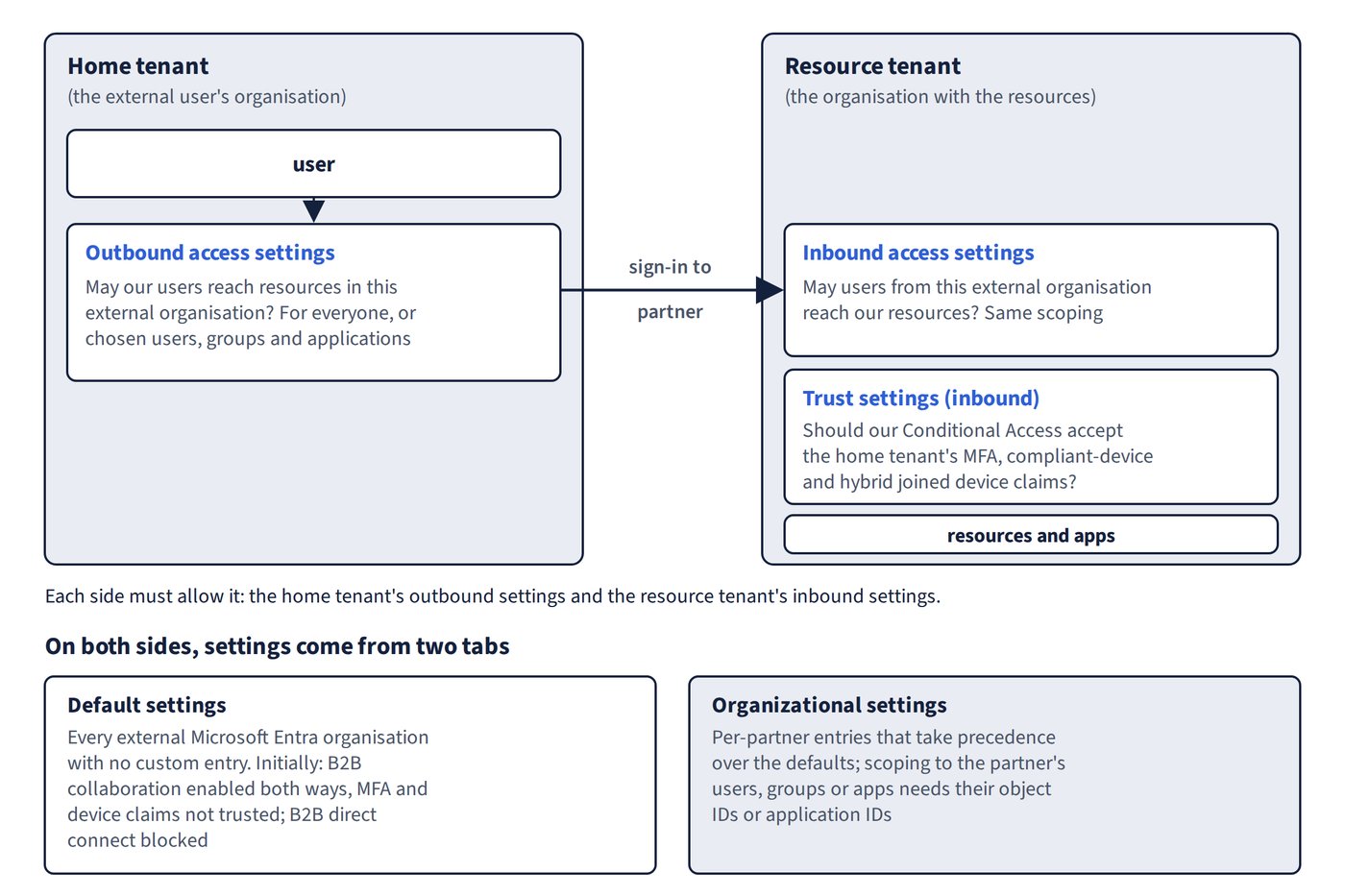
Cross-tenant access settings govern B2B collaboration and B2B direct connect with other Microsoft Entra organisations, including organisations in other Microsoft clouds. They’re under Entra ID > External Identities > Cross-tenant access settings, and there’s no limit to the number of organisations you can add. Figure 3.1 shows which tenant holds each setting.
Inbound, outbound and trust
- Outbound access settings control whether your users can reach resources in external organisations, for everyone or for chosen users, groups and applications.
- Inbound access settings control whether users from external organisations can reach your resources, with the same scoping.
- Trust settings (inbound) decide whether your Conditional Access policies accept MFA, compliant-device and Microsoft Entra hybrid joined device claims from the user’s home tenant.
Defaults and organisational settings
The Default settings tab applies to every external Microsoft Entra organisation that has no custom entry:
| Area | Initial default |
|---|---|
| B2B collaboration | Enabled inbound and outbound for all users; MFA and device claims not trusted |
| B2B direct connect | Blocked inbound and outbound for all tenants |
| Organisational settings | None added |
| Cross-tenant sync | No users synchronised into your tenant |
The Organizational settings tab holds per-partner entries, which take precedence over the defaults. To scope settings to specific external users, groups or apps, you need their object IDs or application IDs from the partner. User/group settings and application settings must not conflict: for example, blocking inbound access for all external users also requires blocking all applications.
Roles and licences
- At least Security Administrator (or a custom role) configures cross-tenant access settings.
- A Microsoft Entra ID P1 licence in the tenant you configure is needed for trust settings or for scoping settings to specific users, groups or applications. B2B direct connect needs P1 in both tenants.
- Changes are logged in the audit log under the category CrossTenantAccessSettings. Modifying these settings is a protected action that Conditional Access can additionally protect.
How MFA and device trust work
When an external Microsoft Entra user signs in, your Conditional Access policies are evaluated together with the partner’s outbound settings and your inbound settings:
- MFA trusted: Microsoft Entra ID looks for an MFA claim from the home tenant. If it’s missing, the MFA challenge happens in the home tenant.
- MFA not trusted: B2B collaboration users complete MFA in your (resource) tenant, consuming your licensing. B2B direct connect users are blocked, so MFA trust is effectively required for direct connect when your policies require MFA. The resulting error is AADSTS90071.
- Device compliance required but not trusted: access is blocked for both collaboration and direct connect users, because your tenant can’t evaluate a foreign device.
- Users signing in with granular delegated admin privileges (GDAP) always perform MFA in their home tenant, and it’s always trusted.
Trusting MFA doesn’t exempt guests from your policies. The policy still applies; it simply accepts the home tenant’s MFA. If you trust MFA, consider excluding external users from the ID Protection MFA registration policy, or they can’t satisfy both.
Automatic redemption
Automatically redeem invitations with the tenant suppresses the first-time consent prompt and invitation email. It works only when it’s selected in the home tenant’s outbound settings and the resource tenant’s inbound settings. It’s optional for B2B collaboration and direct connect, and required for cross-tenant synchronization. With B2B collaboration the user still receives a notification email.
Microsoft cloud settings
Microsoft cloud settings enable B2B collaboration between the commercial cloud and Microsoft Azure Government, or between the commercial cloud and Microsoft Azure operated by 21Vianet. B2B direct connect isn’t supported across clouds.
Common trap: Enabling MFA trust and assuming guests no longer face your MFA policy - the policy still applies; trust only lets an MFA claim from the home tenant satisfy it.
Common trap: Ticking automatic redemption in the resource tenant only and expecting the consent prompt to disappear - the box must be ticked in the home tenant’s outbound settings and the resource tenant’s inbound settings.