Conditional Access lets an organisation apply the right access controls only when they are needed, so users stay productive and the organisation’s assets stay protected. Microsoft describes it as its Zero Trust policy engine: it brings together signals from many sources, makes a decision and enforces the organisation’s policy.
If-then policies
At its simplest, a Conditional Access policy is an if-then statement: if a user wants to access a resource, then they must complete an action. For example, if a user wants to access Microsoft 365, then they must perform multifactor authentication (MFA). Each policy has two parts:
- Assignments: who, what and where the policy applies to (users, target resources, network and other conditions).
- Access controls: what happens when the assignments match (block access, grant access with requirements, or limit the session).
A policy needs at least a name, users or groups, target resources and a grant or block control before it can be enforced.
When Conditional Access runs
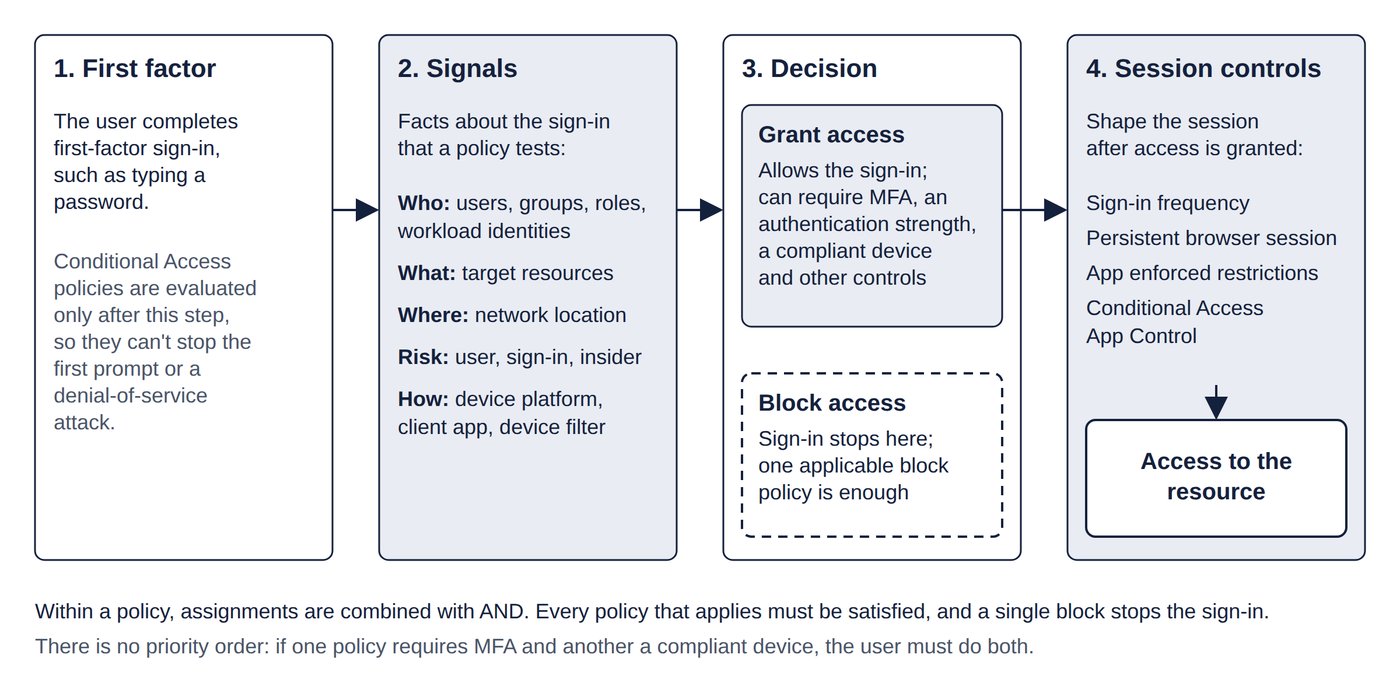
Conditional Access policies are enforced only after first-factor authentication has completed. It is therefore not designed to be an organisation’s front-line defence against attacks such as denial of service (flooding a service with traffic to knock it over), although it can use signals from such events in its decisions. The same timing explains why an authentication strength can’t stop a user typing a password first: the policy is evaluated after that initial step. Figure 4.1 shows where Conditional Access sits in a sign-in.
Licences
Conditional Access requires Microsoft Entra ID P1 (also included in Microsoft 365 Business Premium). Policies based on sign-in risk or user risk need Microsoft Entra ID Protection, which is a P2 feature. If the licences lapse, existing policies are not disabled or deleted; they can be viewed and deleted but not updated. Tenants without P1 can use the free security defaults instead (Chapter 3: Authentication: methods, MFA and passwords).
Common trap: Relying on Conditional Access to stop a denial-of-service attack or to block the password prompt itself - policies are evaluated only after the first factor is complete; they decide what happens next, not whether the first sign-in step occurs.