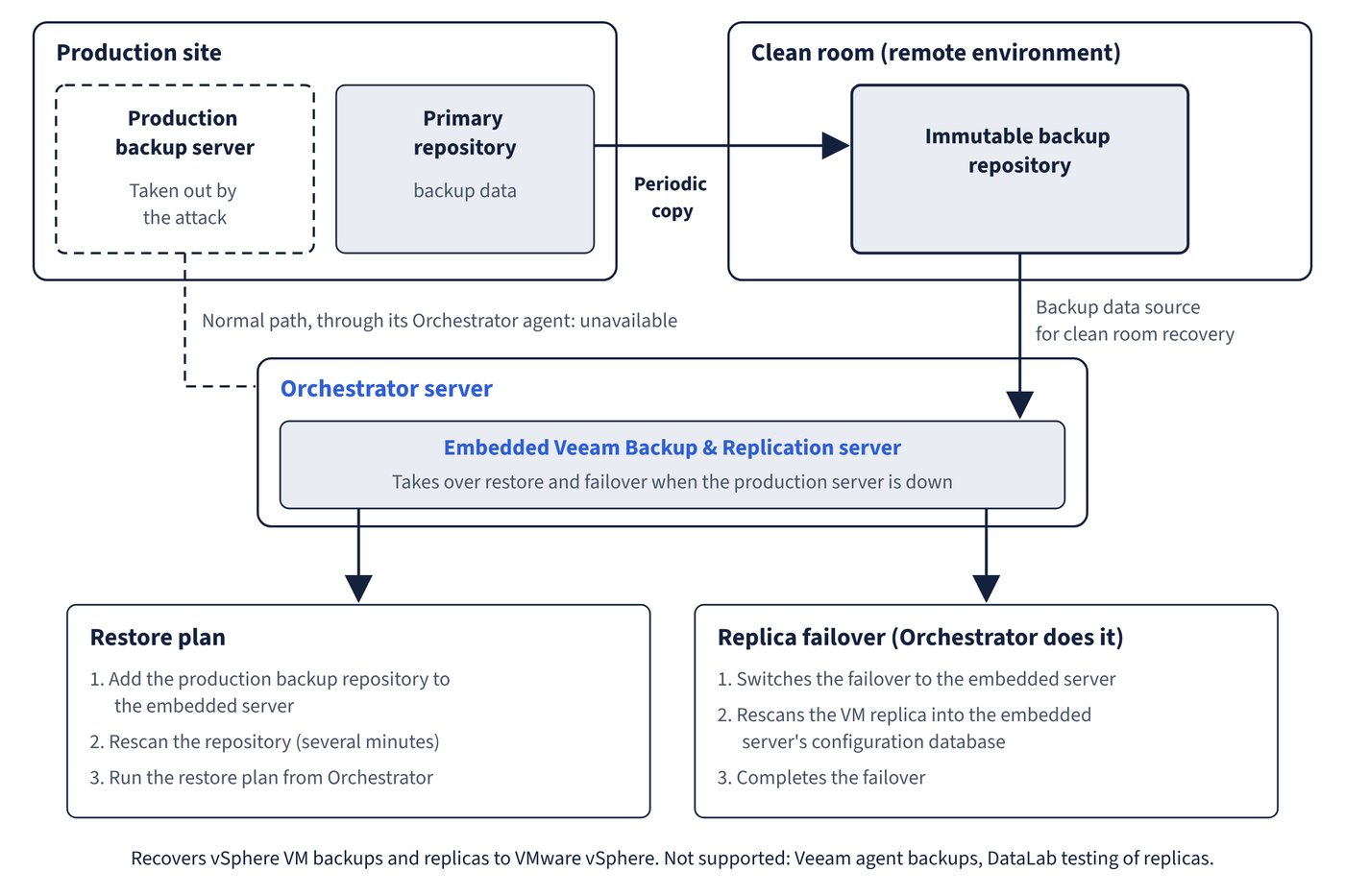
A ransomware attack may take out the production Veeam Backup & Replication server itself. Deployment Scenario 6 in the User Guide uses Orchestrator’s embedded backup server to restore and fail over in a separate, clean environment. Figure 9.1 shows how the embedded server takes over restore and failover in the clean room.
The scenario
- Veeam Backup & Replication periodically copies backup data from the primary repository at the production site to an immutable backup repository in a remote environment, the clean room.
- If the production backup server goes down, Orchestrator switches to the embedded Veeam Backup & Replication server installed with it to perform restore and failover. The embedded server is installed with the Orchestrator server to supply Veeam PowerShell libraries and support certain DR scenarios, and works as a fully functional Veeam Backup & Replication server.
- The same scenario also covers recovery when the production vCenter Server goes offline, or when Orchestrator has to be disconnected from the network temporarily for security reasons.
Replica failover in the clean room
If replica failover runs while the production backup server is unavailable, Orchestrator:
- switches the failover process to the embedded Veeam Backup & Replication server;
- rescans the VM replica to add it to the embedded server’s configuration database;
- completes the failover.
Restore in the clean room
Before running a restore plan in the clean room, do the following in the embedded Veeam Backup & Replication console:
- Add the production backup repository to the embedded server.
- Rescan the repository (this can take several minutes).
- Run the restore plan from Orchestrator.
Limitations
| Limitation | Detail |
|---|---|
| Testing | VM replicas cannot be tested in DataLabs in the clean room scenario |
| Backup types | Only vSphere VM backups can be recovered; Veeam agent backups are not supported |
| Platform | The scenario describes recovery to VMware vSphere from vSphere replicas and backups |
Clean room versus normal recovery
| Aspect | Normal recovery | Clean room recovery |
|---|---|---|
| Backup server doing the work | Production Veeam Backup & Replication server, through its Orchestrator agent | Embedded Veeam Backup & Replication server on the Orchestrator server |
| Backup data source | Production repositories | Backup data copied to the immutable repository in the remote environment; for restores, the backup repository must first be added to and rescanned on the embedded server |
| Replica handling | Replicas known to the production server | Orchestrator rescans the replica into the embedded server’s database |
| DataLab testing of replicas | Supported | Not supported |
| Veeam agent backups | Supported for restore plans | Not supported |
Common trap: Expecting a restore plan to find clean room backups automatically when the production server is down - the production repository must first be added to and rescanned on the embedded Veeam Backup & Replication server; only replica failover performs its own rescan.
Common trap: Planning to prove the clean room failover with a DataLab test - DataLab testing of VM replicas is not supported in the clean room scenario.