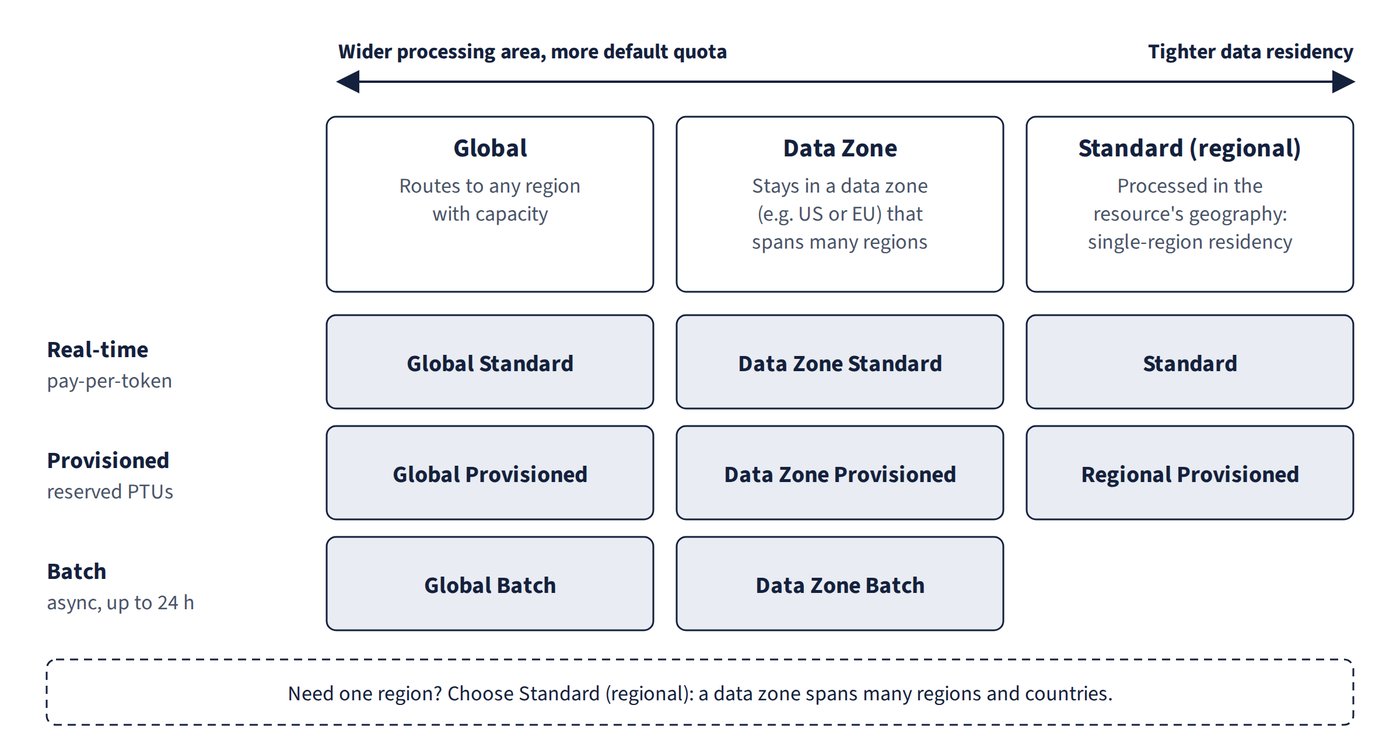
A deployment type decides where your prompts are processed, how much quota you get and whether requests are served interactively or in batches. Pick the type from the workload’s residency and latency requirements first, then from cost. Figure 7.1 lays the types out from the widest processing area to the tightest residency.
| Deployment type | Behaviour |
|---|---|
| Global Standard | Routes to any region with capacity; highest default quota; for workloads used across many regions |
| Standard (regional) | Processes data within the resource’s Azure geography (possibly across regions in that geography); the option when data must stay in one geography |
| Data Zone Standard | Real-time pay-per-token within a data zone (e.g. US or EU); more quota than a Standard (regional) deployment |
| Global Batch / Data Zone Batch | Asynchronous, target turnaround up to 24 hours; not interactive |
| Developer | Evaluating fine-tuned models only; no SLA, not for production |
The provisioned equivalents of Global, Data Zone and regional deployments are covered under provisioned throughput later in this chapter.
Common trap: choosing Data Zone Standard to keep a workload in one geography - a data zone spans many regions and countries; to keep processing within one Azure geography use Standard (regional).