The workspace and the registry are the two places Azure Machine Learning keeps versioned assets. Knowing which one owns an asset, and which neighbouring services do not manage assets at all, is the foundation for everything else in this chapter.
- The Azure Machine Learning workspace is the top-level resource. It holds models, environments, components and data assets, keeps job history, and references datastores and compute. It must exist before anything can be registered or deployed, so creating a shared workspace is the first step to standardising asset management.
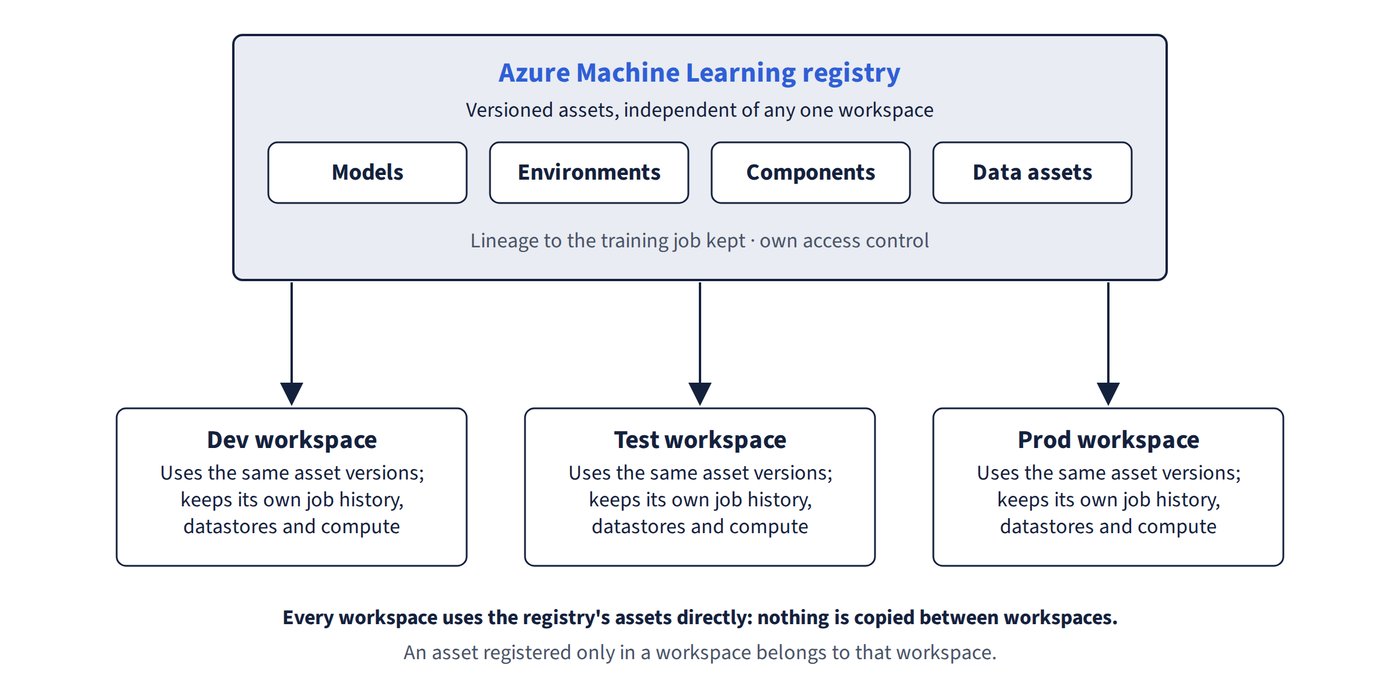
- An Azure ML registry holds models, environments, components and data assets centrally, independent of any one workspace. Dev, test and prod workspaces then use the same versioned assets without copying them. Assets keep lineage to their training job, and the registry has its own access control. A registry complements workspaces; it doesn’t replace them. Figure 1.1 shows one registry serving several workspaces.
- Anything registered in a workspace belongs to that workspace unless it is placed in a registry. Git integration versions code, not registered assets.
- A Microsoft Foundry (formerly Azure AI Foundry) project is for generative AI apps, not for governing traditional ML assets. A managed online endpoint is a deployment target, not asset management.
The asset types a workspace or registry can hold:
| Asset | What it is |
|---|---|
| Model | The artifact a training run produces; registered with name, version, tags and lineage to the job |
| Environment | Docker image plus conda/pip specification |
| Component | Reusable pipeline step |
| Pipeline | Workflow of components |
| Data asset | Reference to data (URI file/folder, MLTable) |