The topology choice is the network decision with the longest tail, so make it against Learn’s criteria rather than habit.
CAF frames the choice as two approaches. A Virtual WAN topology is Microsoft-managed and reduces overall network complexity; a traditional topology lets you build customised large-scale networks where you manage routing and security. The criteria on CAF’s topology page are:
| Requirement | Points to Virtual WAN | Points to traditional hub-spoke |
|---|---|---|
| Regions | Several regions with global connectivity between virtual networks and multiple on-premises locations | One or several regions, some cross-region traffic but no full mesh |
| Branches | SD-WAN integration of a large branch network, or more than 30 branch sites for native IPsec termination | A low number of branches per region and fewer than 30 IPsec site-to-site tunnels |
| Transit | Transitive routing between VPN and ExpressRoute, for example remote users reaching an ExpressRoute-connected datacentre | No need for VPN-to-ExpressRoute transit |
| Routing control | Managed routing; minimise network management overhead | Full control and granularity to configure routing by hand |
The traditional topology page adds that Virtual WAN is the recommended managed global transit architecture when you need hub-spoke across more than two regions with global transit between landing zones and want to minimise management overhead.
Other Learn pages add constraints that can decide it for you. Virtual WAN hubs host only Microsoft-managed resources (gateways, Azure Firewall through Firewall Manager, route tables and qualified NVAs), so your own shared services such as DNS servers go in a spoke. Virtual WAN doesn’t support IPv6 in the hub or its gateways, so the Architecture Center says to choose a self-managed hub if workloads, hybrid links or remote users need IPv6. In return, the Architecture Center credits Virtual WAN with less operational overhead (Microsoft manages hub peerings and in-hub configuration) and improved security through centrally managed secured hubs. If you already run a traditional hub, Microsoft publishes a migration path to Virtual WAN for brownfield estates. Figure 9.1 sets the two hubs side by side.
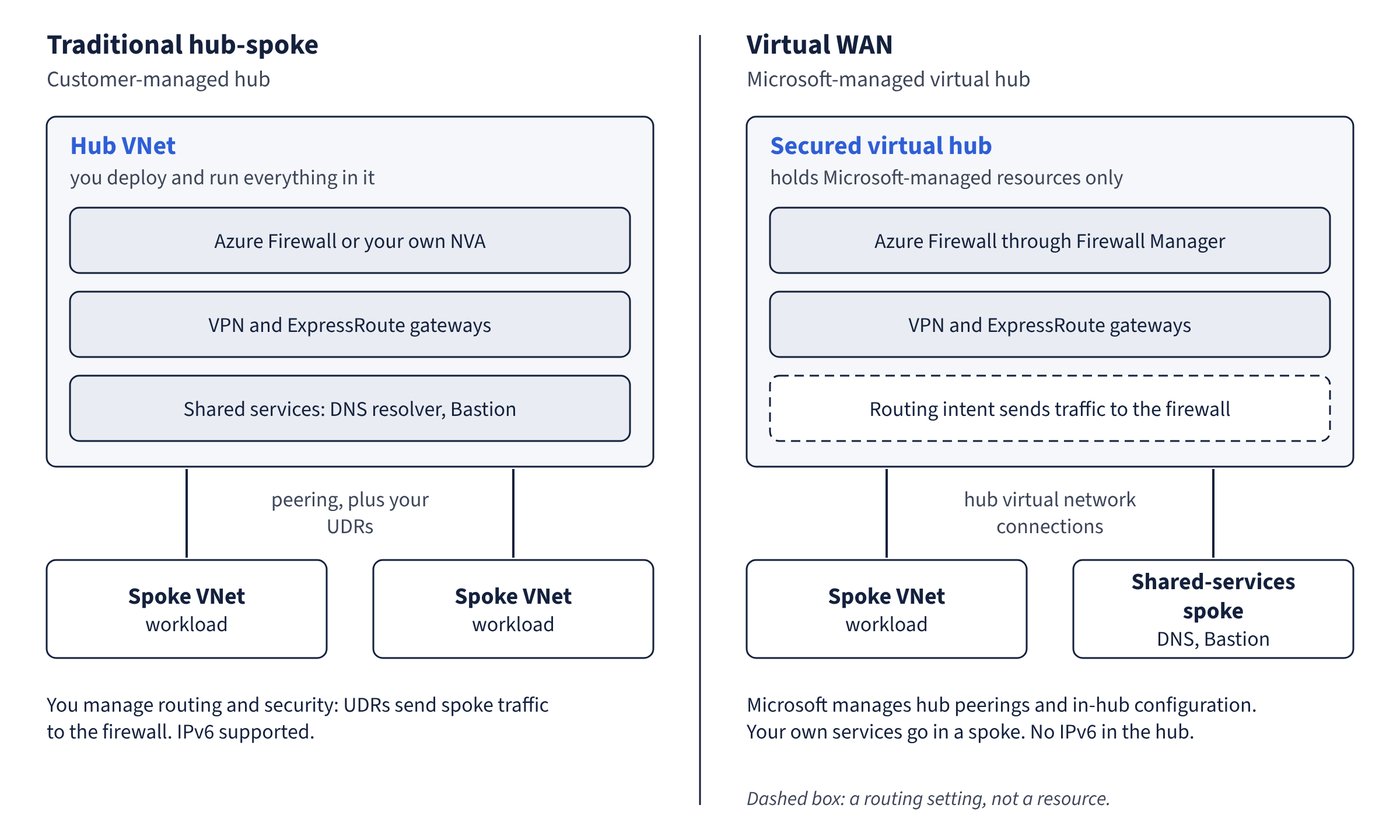
Common pitfall: Choosing Virtual WAN for a single region with a handful of sites because it is “the modern option” - CAF’s criteria for Virtual WAN are multi-region global connectivity, large branch estates or VPN-to-ExpressRoute transit; without them a traditional hub gives more control, IPv6 support and freedom over NVAs.