The reference hierarchy is deliberately shallow and organised by what workloads need, and most organisations should start from it unchanged. Figure 6.1 shows the whole hierarchy before the sections below take each branch in turn.
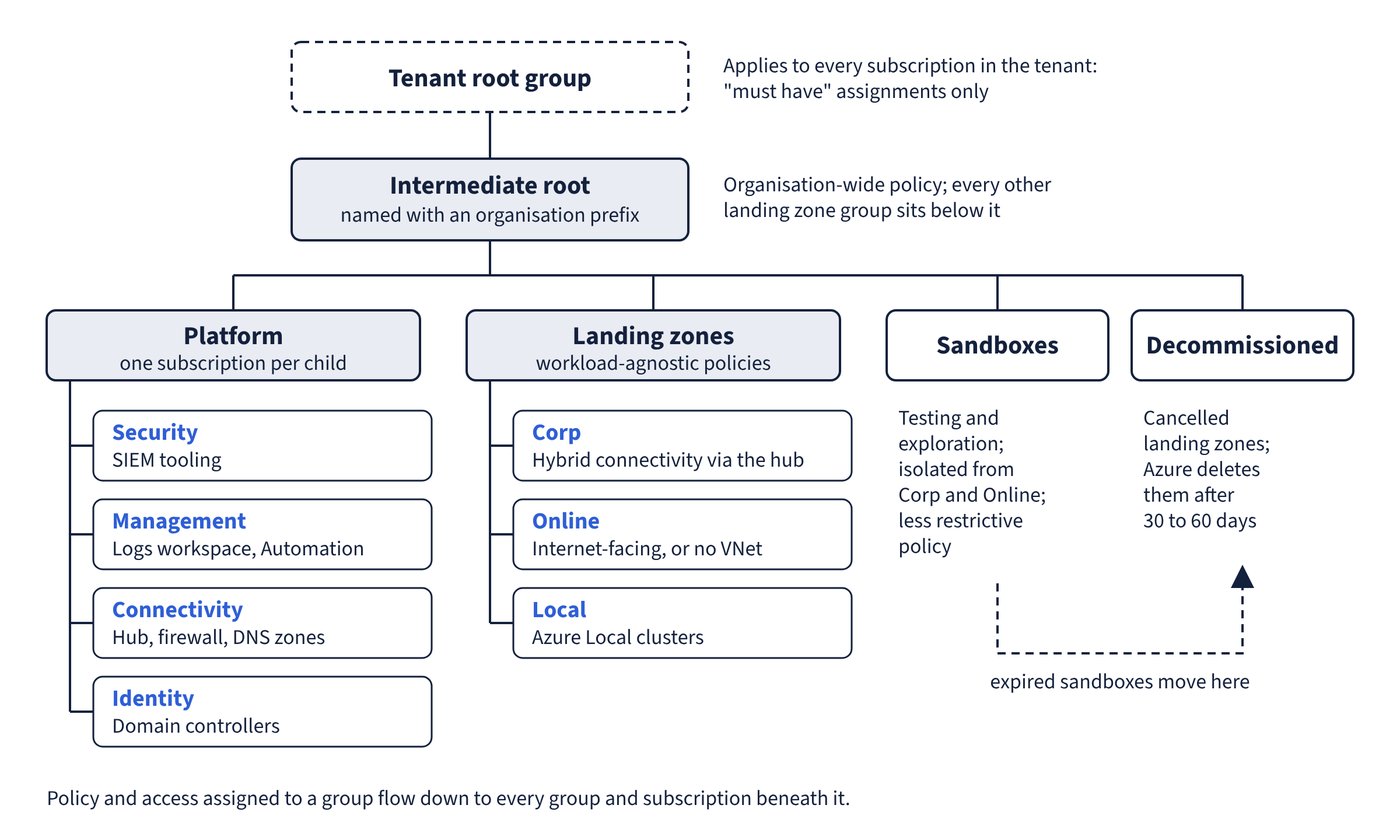
Management groups provide a governance scope above subscriptions: conditions applied to a management group cascade to every subscription beneath it. Each directory has exactly one root management group, displayed as “Tenant root group” by default, whose ID is the Microsoft Entra tenant ID. It can’t be moved or deleted, every management group and subscription folds up into it, and anything assigned there applies to every resource in the tenant. No one has default access to it; a Global Administrator must elevate access first and can then assign Azure roles to others. Learn’s own advice is that user access and policy assignments at the root should be “must have” only.
The intermediate root
The Azure landing zone reference architecture doesn’t build under the tenant root directly. It creates an intermediate root management group under the tenant root, named with an organisational prefix, and every other landing zone management group sits beneath it. This gives you a scope for organisation-wide policy that isn’t the tenant root itself, lets you move existing subscriptions into the hierarchy deliberately, and leaves room for future scenarios. The tailoring guidance confirms that settings which must apply to all workloads are assigned at this level, with more specific assignments lower down.
The platform branch
The Platform management group holds the platform’s own subscriptions and lets you apply common platform policies and role assignments to them. Learn notes that it also centralises billing for common resources in one set of foundational subscriptions. Its children each hold a dedicated subscription:
| Child management group | Its subscription hosts | Why it is separate |
|---|---|---|
| Security | Microsoft Sentinel, syslog collectors and other SIEM tooling | A security operations team can have its own access and policy |
| Management | The Azure Monitor Logs workspace and associated solutions, Azure Automation runbooks | Monitoring is managed and billed apart from networking and identity |
| Connectivity | Virtual WAN or hub networks, Azure Firewall, Azure DNS private zones, ExpressRoute circuits | Network resources need different policy and a network team’s access |
| Identity | Active Directory Domain Services virtual machines or Microsoft Entra Domain Services | Identity servers get specific hardening policies |
Learn tells you not to combine platform responsibilities into a single subscription, so each area can carry its own policies, role assignments and billing. Large deployments that hit subscription quota limits for connectivity resources can add dedicated connectivity subscriptions per region. A small organisation with one platform team can start more compactly, as Chapter 2: What a landing zone is (and isn’t) describes, and split later.
The landing zones branch
The Landing zones management group is the parent of every workload landing zone archetype. It carries workload-agnostic policies that keep all workloads secure and compliant. Beneath it sit Corp (workloads that need connectivity or hybrid connectivity with the corporate network through the hub), Online (workloads that might need direct internet inbound or outbound connectivity, or might need no virtual network at all) and Local (workloads on Azure Local clusters and the clusters themselves, which have different policy requirements). Learn calls these three an ideal starting point for many organisations and accepts that some will need more. Chapter 14: Workload landing zones owns the placement decision for individual workloads.
Sandboxes and Decommissioned
Two groups sit beside the main branches. Sandboxes hold subscriptions for testing and exploration, securely isolated from Corp and Online and given a less restrictive policy set. The sandbox guidance adds the controls that keep them safe: deny virtual network peering outside the sandbox subscription, deny ExpressRoute, VPN and Virtual WAN hub creation, stream the activity log to the central workspace, give each sandbox a budget (a default one can be applied by policy at the management group) and an expiry date, and move expired sandboxes to Decommissioned. Decommissioned holds cancelled landing zones; the CAF management group design page says you move cancelled landing zones there and Azure deletes them after 30 to 60 days.
Common pitfall: Building the landing zone directly under the tenant root group and loading the root with assignments - the root affects every subscription in the tenant, including ones nobody has reviewed; create the intermediate root, keep root assignments to the genuine “must haves”, and limit assignments at the root scope so you aren’t later debugging inherited policies everywhere.