An independent study guide for Microsoft Certified: Windows Server Administrator Associate · by Tony Rough
Know which Windows Server role, tool or Azure service fits the task, on-premises or hybrid, and why.
Free to read with Kindle Unlimited. Opens Amazon in a new tab.
Free glossary of the book's terms
First edition · published October 2026
This independent study guide for the Microsoft Certified: Windows Server Administrator Associate exam, which replaced AZ-800 and AZ-801, distils what AZ-802 really expects you to understand into the comparisons, configuration choices and traps that Windows Server decisions turn on, with short PowerShell examples throughout.
Fifteen chapters, each readable on its own and together covering all seven AZ-802 skill areas:
Windows Server keeps changing. This edition reflects Microsoft's documentation as of October 2026, with Windows Server 2025 as the current release: the new functional level, delegated managed service accounts, SMB over QUIC on every edition, hotpatch for Arc-enabled servers, Credential Guard on by default and the current names Microsoft Entra ID and App Control for Business.
This book contains no exam questions. It explains the knowledge the exam expects, so you can answer questions you have never seen and apply the same judgement on real servers.
Written by Tony Rough, a cloud architect with more than twenty years in IT infrastructure who holds the Azure Solutions Architect Expert, Azure Administrator and Azure Security Engineer certifications.
Part of the Ultra Transcenders series from Distilled Press. An independent publication, not affiliated with, sponsored by or endorsed by Microsoft Corporation.
Every skill area in Microsoft's AZ-802 outline (as of unknown), and the chapters that cover it.
| Skill area | Weight | Chapters |
|---|---|---|
| Deploy and manage AD DS | 20–25% | 1, 2, 3 |
| Manage Windows Server instances and workloads in a hybrid environment | 10–15% | 4, 5 |
| Manage VMs | 10–15% | 4, 6, 7 |
| Implement and manage an on-premises and hybrid networking infrastructure | 10–15% | 8 |
| Manage storage and file services | 15–20% | 9, 10, 11 |
| Secure Windows Server infrastructure | 10–15% | 12, 13 |
| Monitor and troubleshoot Windows Server environments | 15–20% | 1, 14, 15 |
Plus an appendix glossary of 600+ terms, each linked to Microsoft Learn, with the same terms explained free online for print readers.
Short excerpts from the book, exactly as they appear in it, so you can see how it explains things.
The opening of chapter 1 · Chapter 1: Deploying and managing domain controllers
Domain controllers (DCs) are the servers that hold the Active Directory Domain Services (AD DS) database and answer every sign-in, lookup and Group Policy request in a domain. This chapter covers the logical building blocks that the rest of the book relies on, how to install and promote DCs on premises and in Azure, how virtualisation safeguards protect the directory, when to deploy read-only domain controllers, and how to place, transfer and seize the five operations master (FSMO) roles. Sites and trusts are covered in Sites, replication and trusts.
A comparison table · Chapter 1: Deploying and managing domain controllers · AD DS building blocks
| Object | Scope | Main purpose | Replicates to |
|---|---|---|---|
| Forest | Whole directory | Security boundary; shared schema, configuration and global catalog | Schema and configuration partitions go to every DC in the forest |
| Domain | Partition of the forest | Identity, authentication, domain-wide policy | Domain partition goes to DCs of that domain only |
| Tree | Contiguous DNS namespace | Naming hierarchy for parent and child domains | Not a replication unit |
| OU | Inside one domain | Group Policy linking and delegation | Part of the domain partition |
A common trap · Chapter 1: Deploying and managing domain controllers · AD DS building blocks
Common trap: Assuming an in-place upgraded Windows Server 2025 DC can take part in 32k database pages straight away - DCs that were feature-updated keep their 8k-page database format; only DCs installed new or promoted over the wire (or restored from a 32k backup) have a 32k-capable database, and every DC in the forest must have one before the feature can be enabled.
Want more? Amazon offers a longer free sample of the Kindle edition on its Kindle page.


Some sections of the book, free to read online:
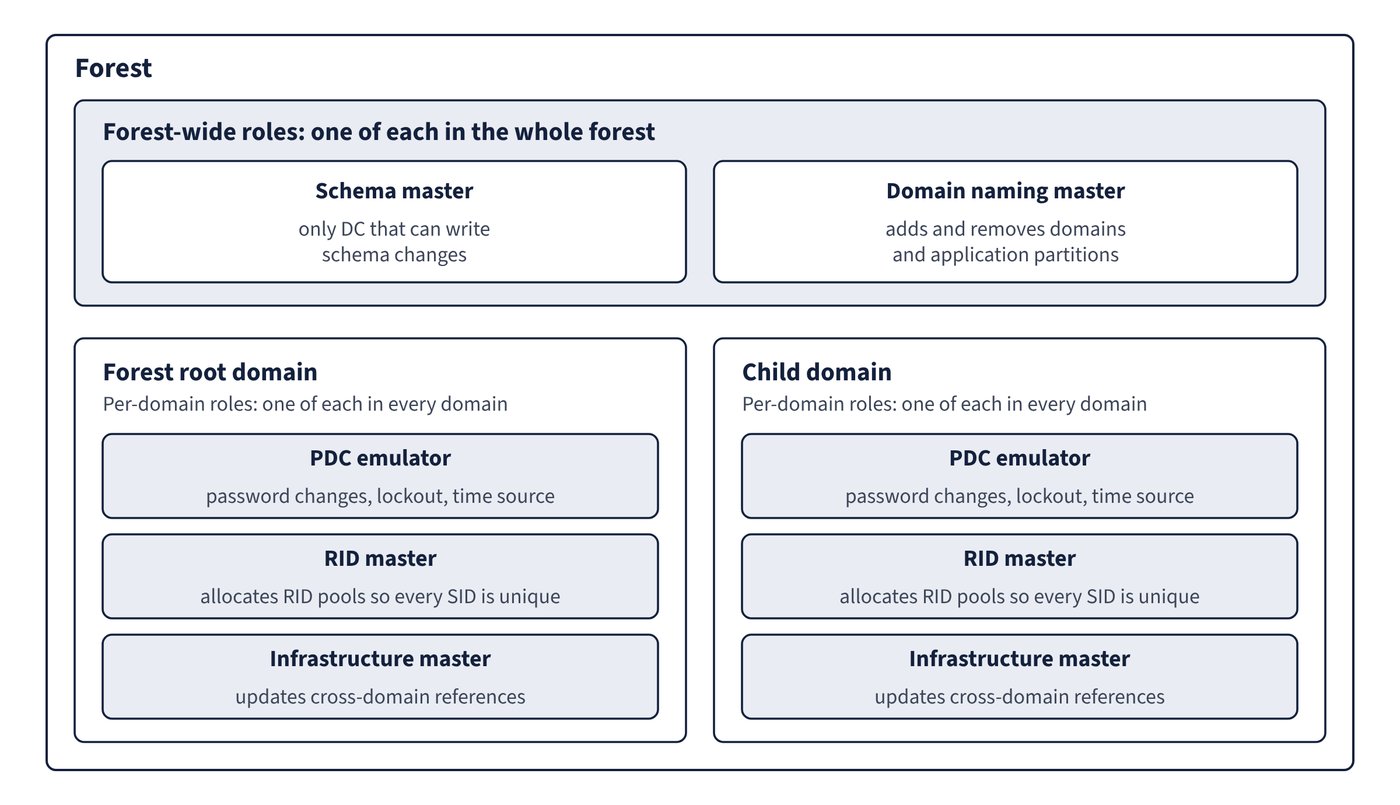
Which operations master roles exist per forest and per domain, what each does and the placement guidance for each.
When to deploy an RODC, how staged installation works and how the allowed and denied groups decide which passwords are cached.
Which managed service account type fits a service, its requirements such as the KDS root key, and how Windows Server 2025 delegated MSAs migrate old accounts.
The LSDOU order, which GPO wins a conflict, and how Block Inheritance, Enforced and link order change the result.
How the two DHCP failover modes split or reserve addresses, what MCLT does and how relay agents fit in.
What SMB over QUIC needs on the server, the certificate rules, which editions support it and how client access control works.
The Storage Replica topologies, when to use synchronous or asynchronous mode, log volume requirements and the Standard edition limits.
How Windows LAPS rotates and stores local administrator passwords, its policy settings, encryption and the cmdlets to retrieve them.
A free week-by-week plan through the book at a 4-week or 8-week pace, with the study notes and exam skill areas for each week.
Support for .NET 8 and .NET 9 ended on 10 November 2026 for Azure Functions and Static Web Apps managed functions. Azure Front Door gained post-quantum TLS key exchange and edge actions, both now generally available, and previews of native gRPC and rate limit grouping for Front Door Premium WAF.