Storage Replica replicates volumes at block level, below the file system, between servers or clusters for disaster recovery. It runs over SMB 3 and replicates every change, including deletions.
Synchronous and asynchronous
| Mode | Write acknowledged when | Data loss on failure | Network guidance |
|---|---|---|---|
Synchronous (default for New-SRPartnership) |
Log written at both source and destination | Zero (crash-consistent) | Average round trip of 5 ms or less, enough bandwidth for the write workload |
| Asynchronous | Log written at source only | Possible (near zero, depends on lag) | No latency recommendation; suits longer distances |
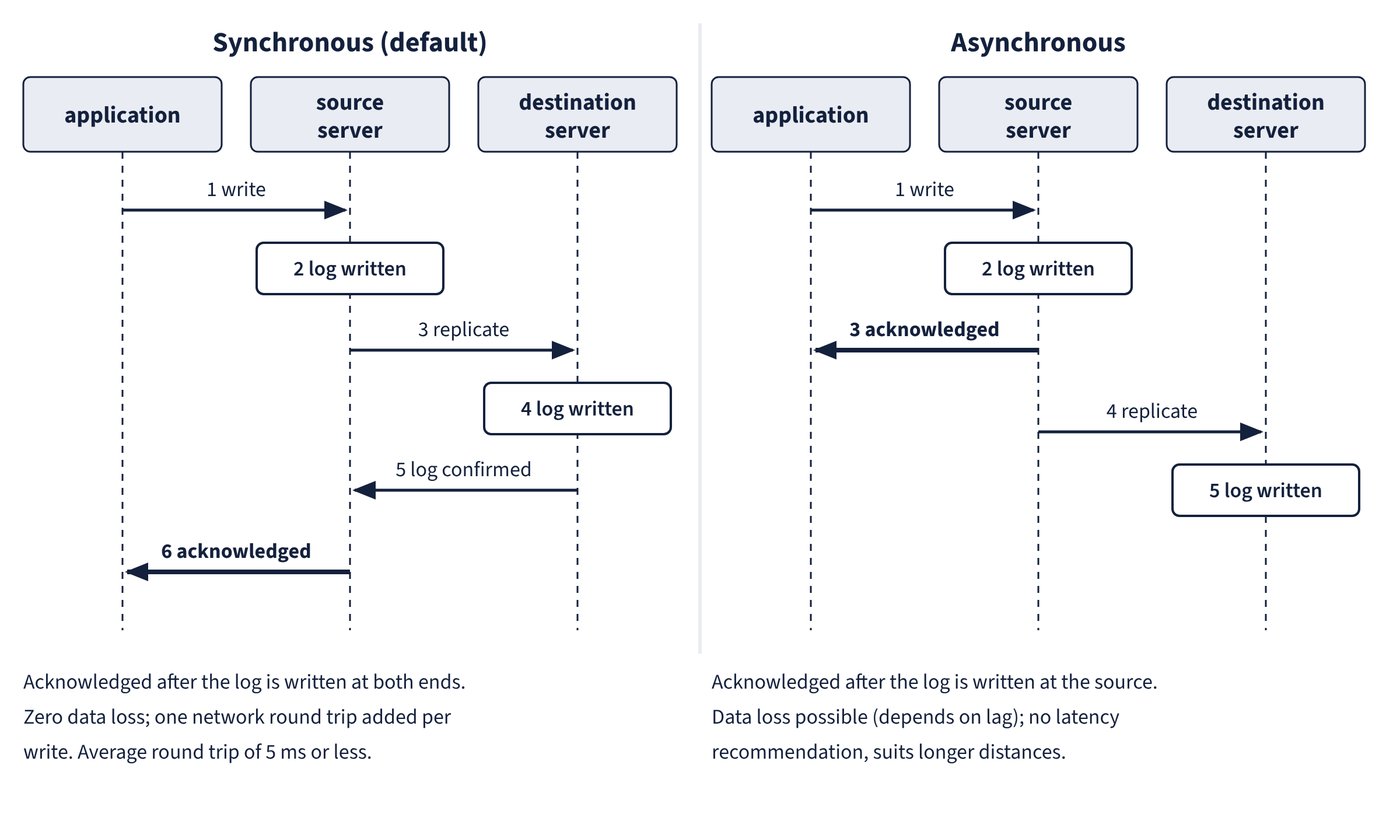
Asynchronous mode replicates continuously rather than shipping snapshots; synchronous mode adds a network round trip to every write. Figure 11.1 shows when the application gets its acknowledgement in each mode.
Topologies
| Configuration | Storage supported | Managed with | Failover |
|---|---|---|---|
| Stretch cluster (one cluster, two sites, asymmetric storage) | Storage Spaces with shared SAS, SAN LUNs, iSCSI LUNs | Failover Cluster Manager, PowerShell | Automatic |
| Cluster-to-cluster | Storage Spaces Direct, Storage Spaces with shared SAS, SAN LUNs, iSCSI LUNs | Windows Admin Center, PowerShell | Manual |
| Server-to-server (two standalone servers) | Storage Spaces with shared SAS, SAN LUNs, iSCSI LUNs, local drives | Windows Admin Center, PowerShell | Manual |
Cluster-to-cluster needs Grant-SRAccess on each side first. Windows Admin Center in the Azure portal can’t manage Storage Replica.
Requirements
- An Active Directory Domain Services forest.
- At least 2 GB RAM and two cores per server; at least one Ethernet/TCP connection (RDMA preferred).
- Two volumes per side: one for data, one for logs. Data and log disks must be initialised as GPT. The two data volumes must be the same size, all replicated data disks must share a sector size, and all log disks must share a sector size.
- Log volumes on SSD or faster storage than the data, never shared with other workloads. The default log size is 8 GB; the log volume should be at least 10 GB.
- The File Server role, needed only so that
Test-SRTopologycan open its firewall ports. - Firewall: replication uses a single port, TCP 445 (SMB) or 5445 (iWARP SMB Direct); setup and management also need ICMP and WS-Man (TCP 5985) between the nodes.
Run Test-SRTopology before creating a partnership; it checks requirements and can measure the workload to recommend a log size.
Edition limits
| Capability | Datacenter | Standard (Windows Server 2019 and later) |
|---|---|---|
| Replicated volumes | Unlimited | One volume |
| Volume size | Unlimited | Up to 2 TB |
Windows Server 2016 Standard has no Storage Replica at all.
What Storage Replica is not
- It isn’t a backup: a deletion on the source is replicated instantly to the destination. Keep point-in-time backups.
- It isn’t application-aware replication such as Hyper-V Replica or SQL Server Always On availability groups.
- The destination volume is dismounted and inaccessible while it replicates.
Test-Failover(Windows Server 2019 and later) temporarily mounts a writable snapshot of the destination for testing or backup. - Change replication direction with
Set-SRPartnership; Windows Server blocks a role switch while initial sync is still running.
Windows Server 2025 enhancements
Enhanced Log is an opt-in, higher-performance log format introduced in Windows Server 2025. The original format, now called Traditional Log, is based on the Common Log File System; Enhanced Log writes a raw format and lets multiple I/O records be written to the destination concurrently. You choose it with New-SRPartnership -LogType Raw (-LogType FileBased gives Traditional Log). There’s no migration path in either direction, so the log type is fixed when the partnership is created.
Compression reduces the data sent between source and destination; it is enabled with -EnableCompression on New-SRPartnership. The Windows Server 2025 What’s New page lists Storage Replica compression as a WS2025 storage feature, while the Storage Replica overview states compression is supported only on Datacenter: Azure Edition (build 20348.1070 and later); check the edition before relying on it.
New-SRPartnership -SourceComputerName SRV1 -SourceRGName rg01 `
  -SourceVolumeName D: -SourceLogVolumeName E: `
  -DestinationComputerName SRV2 -DestinationRGName rg02 `
  -DestinationVolumeName D: -DestinationLogVolumeName E: `
  -LogType Raw
Common trap: Converting an existing partnership to Enhanced Log after upgrading to Windows Server 2025 - there’s no migration between Traditional and Enhanced Log; the partnership must be created with
-LogType Raw.