Group Policy applies computer and user settings from GPOs linked to sites, domains and OUs. Knowing exactly which GPO wins is the core Group Policy skill.
Processing order (LSDOU)
By default Group Policy is inherited and cumulative. GPOs are processed in this order, and each later GPO can override earlier settings:
- The local GPO.
- GPOs linked to the site.
- GPOs linked to the domain.
- GPOs linked to OUs, parent OUs first, then child OUs.
The container closest to the user or computer wins. Where several GPOs are linked to the same container, the GPO with the lowest link order number in the Group Policy Object Links list has precedence. Computer-related settings override user-related settings when they conflict.
Enforced and Block Inheritance
| Feature | Property of | Effect |
|---|---|---|
| Enforced | The GPO link | Lower-level GPOs can’t override the linked GPO’s settings; if several enforced links exist at different levels, the highest enforced link takes precedence |
| Block Inheritance | The domain or OU (the GPOptions attribute) | Stops GPOs linked to higher-level sites, domains and parent OUs from applying |
| Disable GPO, computer settings or user settings | The GPO | Turns off the whole GPO or one half; disabling an unused half also speeds up processing |
Enforced beats Block Inheritance: a blocked OU still receives settings from enforced links above it. Set-GPInheritance -Target <DN> -IsBlocked Yes blocks inheritance from PowerShell. Figure 3.1 shows the processing order and how the two settings interact.
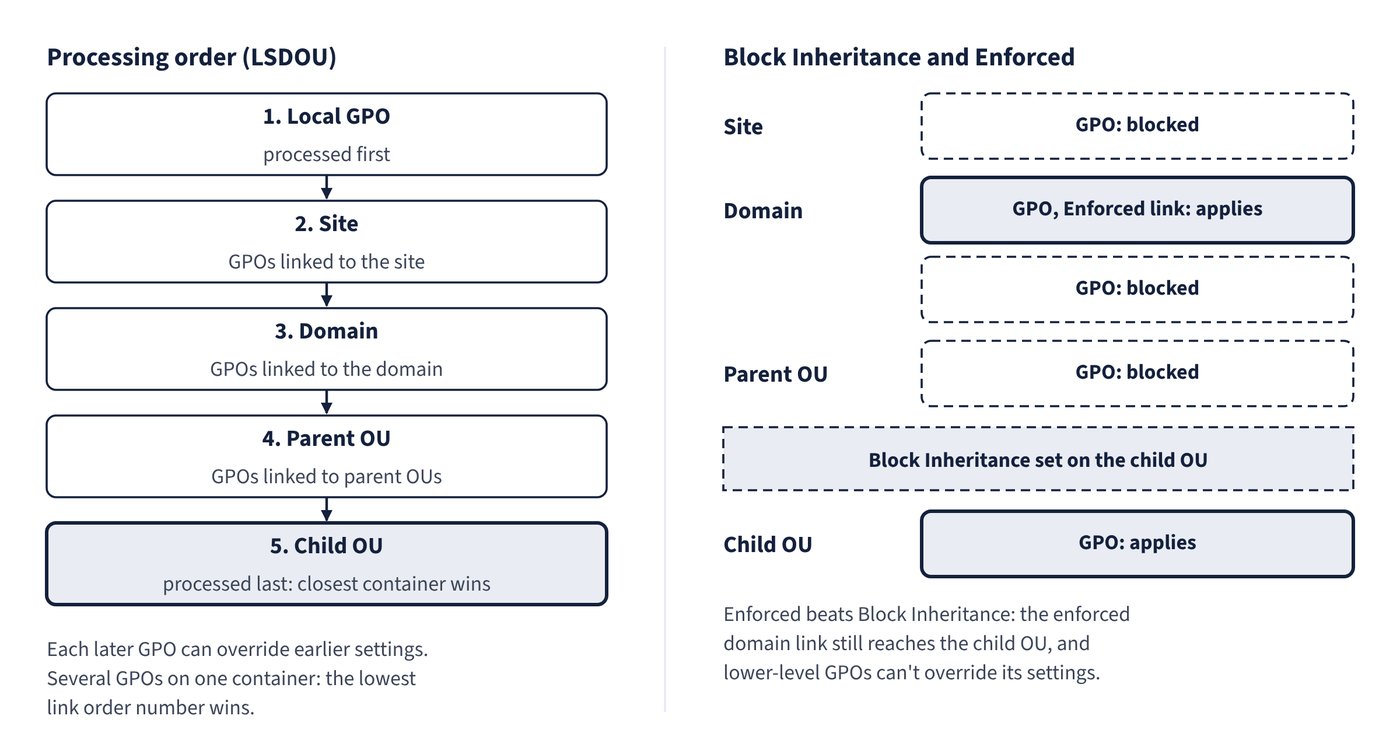
Common trap: Using Block Inheritance on an OU to escape a domain-level security GPO that is enforced - enforced is a link property that takes precedence over block inheritance, a container property, so the enforced settings still apply.
When processing happens
- Computer policy applies at startup and user policy at logon (foreground processing), synchronously or asynchronously.
- Background refresh runs every 90 minutes with a random offset of up to 30 minutes. Domain controllers refresh computer policy every 5 minutes.
- Some extensions don’t run in the background: folder redirection only at logon, software installation only at startup and logon, and scripts only at startup, shutdown, logon and logoff.
- By default a client-side extension reapplies settings during a refresh only if its GPOs changed.
- All policy processing must complete within 60 minutes; this time-out can’t be changed.
A GPO is stored in two places: the Group Policy container in AD DS (replicated by AD replication) and the Group Policy template in SYSVOL (replicated by DFS Replication, every 15 minutes within a site). Changes reach a client only after they replicate to the DC it uses.
To force a refresh, run gpupdate locally (for example gpupdate /force), use Invoke-GPUpdate for local or remote computers, or right-click an OU in the Group Policy Management Console (GPMC) and select Group Policy Update.