When data does have to be copied, Fabric offers several tools that overlap in places. Learn’s data movement decision guide gives a short rule of thumb: Mirroring for gold data that is already processed, Copy job for raw bronze ingestion, Eventstreams for real-time streaming, and pipelines with the Copy activity when complex orchestration or metadata-driven, parameterised ingestion is needed. Figure 7.1 sets the no-ETL options beside the ingestion tools.
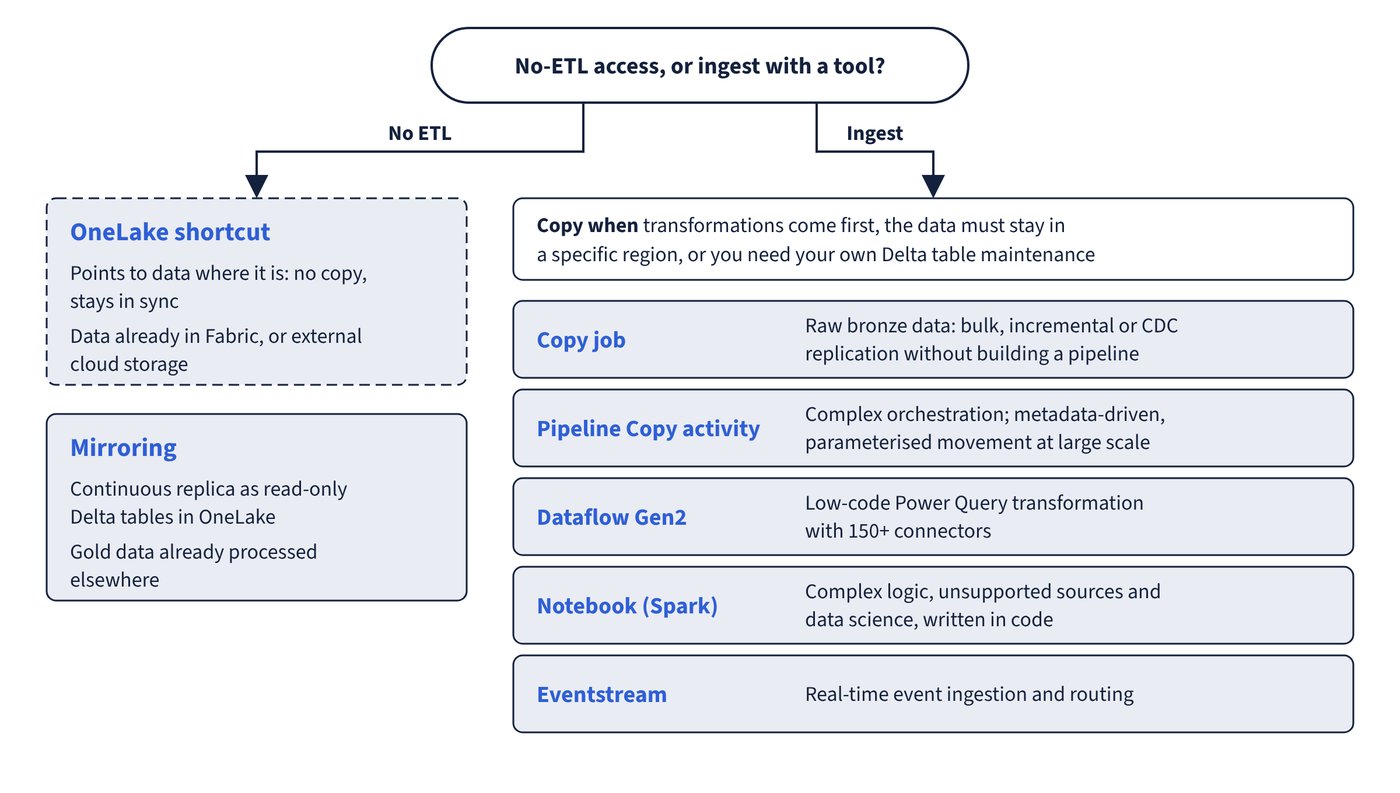
| Tool | Best fit | Skills and interface | Transformation | Incremental loading |
|---|---|---|---|---|
| Copy job | Bulk, incremental or CDC replication without building a pipeline | Wizard; no code or low code | Low (type conversion, column mapping) | Built in: watermark-based or CDC, with state tracked for you |
| Pipeline Copy activity | Large-scale, orchestrated, parameterised movement (petabyte scale) | Wizard and canvas; ETL, SQL, JSON | Low | Manual: watermark logic with expressions and control tables |
| Dataflow Gen2 | Low-code transformation and wrangling with 150+ connectors | Power Query; M | Low to high (300+ transformations) | Append or Replace update methods on each destination |
| Notebook (Spark) | Complex logic, unsupported sources, data science | Code: PySpark, Scala, Spark SQL, R | Low to high | Written in code |
| Eventstream | Real-time event ingestion and routing | No-code canvas | Lightweight stream operations | Continuous |
| Load to Tables | One-off conversion of CSV or Parquet files already in the lakehouse | Lakehouse explorer | None | Append or overwrite only |
| File upload | Small local files, no transformation | Lakehouse explorer | None | Not applicable |
For a warehouse destination, T-SQL ingestion (COPY INTO, CTAS, INSERT...SELECT) is also available; it’s covered in “Data warehouses and T-SQL in Fabric”.
Copy job
- Copy modes: full copy (everything every run) or incremental copy (everything first, then only new or changed rows). Incremental copy is watermark-based (ROWVERSION, datetime, date, integer or string interpreted as datetime columns) or CDC-based when CDC is enabled on the source; only CDC captures deletes.
- Update methods: Append by default; Merge (upsert on a key, defaulting to the primary key), Overwrite or SCD Type 2 where the destination supports them.
- Creates destination tables automatically, can truncate the destination before the full load and can copy subsets with custom queries. A failed run resumes from the end of the last successful run.
- Runs once, on one or more schedules, or from a pipeline (Copy job activity); reaches on-premises and VNet sources through gateways.
Pipeline Copy activity into a lakehouse
| Setting | Options and defaults |
|---|---|
| Root folder | Tables (managed Delta area) or Files (unmanaged area) |
| Table action | Append; Overwrite (replaces both the data and the schema; previous versions remain available for time travel); Upsert (key columns decide whether a row matches) |
| Enable partition | Partition column types: string, integer, boolean or datetime; partition columns can’t overlap with upsert key columns |
| Apply V-Order | Selected by default; clearing it keeps the original Parquet files without V-Order |
| Files destination copy behaviour | Flatten hierarchy, Merge files, Preserve hierarchy or dynamic content |
| Lakehouse table as source | Table (optionally a past Version or Timestamp) or T-SQL Query (preview) through the SQL analytics endpoint |
| Schema-enabled lakehouse | If no schema is given, dbo is used |
Dataflow Gen2 destinations
Dataflow Gen2 itself is covered in “Power Query, Dataflow Gen2 and the visual query editor”; the ingestion-relevant settings are these.
- Destinations include Lakehouse Tables and Files, Warehouse, KQL database, SQL database, Azure SQL and others; each tabular query can have its own.
- Automatic settings (the default for a new table, supported only for Lakehouse and Azure SQL) replace the data on every refresh, manage the column mapping and drop and recreate the table, which removes relationships or measures added to it.
- Manual settings offer Replace or Append (KQL databases and Azure Data Explorer don’t support Replace) and, for Replace, Dynamic schema (drop and recreate on schema change) or Fixed schema (rows replaced, table kept).
- A Warehouse destination requires staging, a fixed schema and the same workspace as the dataflow. For Lakehouse and other non-warehouse destinations, staging is off by default.
- Lakehouse destination connection options Enable use of V-Order compression and Synchronize SQL Analytics Endpoint metadata both default to True.
- Fast copy (turned on under Options > Scale) switches large loads to the Copy activity engine: CSV or Parquet files of at least 100 MB in ADLS Gen2 or Blob storage, or database sources with 5 million rows or more. It writes only to a Lakehouse destination, supports only a few file transformations (combine files, select, rename or remove columns, change types), doesn’t support fixed schema, and needs gateway version 3000.214.2 or later. Require fast copy fails the refresh instead of silently falling back.
Load to Tables, notebooks and eventstreams
- Load to Tables, from the lakehouse explorer, turns a CSV or Parquet file or folder into a new or existing Delta table (Append or Overwrite) with V-Order. You can’t define a custom schema there; use a notebook when explicit column names and types matter.
- A notebook gives full control: read with an explicit schema, transform and write with
saveAsTable, as described in “Lakehouses, Delta tables and Spark transformations”. - An eventstream can send events to an Eventhouse, a Lakehouse (as Delta tables), Fabric Activator, a derived stream, a custom endpoint or a Spark notebook (preview); Eventhouse, Lakehouse and Activator destinations need Contributor or higher on their workspace.
This PySpark reads CSV files from Files with an explicit schema, which Load to Tables can’t do, and appends them to a Delta table.
from pyspark.sql.types import StructType, StructField, IntegerType, StringType, DateType

schema = StructType([
    StructField("order_id", IntegerType(), False),
    StructField("customer_id", StringType(), True),
    StructField("order_date", DateType(), True)
])

df = spark.read.format("csv").option("header", "true").schema(schema).load("Files/raw/orders/")
df.write.format("delta").mode("append").saveAsTable("bronze.orders")
Common trap: Setting a Dataflow Gen2 query to load into a Fabric Warehouse with staging turned off - Warehouse destinations require staging (and a fixed schema); staging is off by default only for Lakehouse and other non-warehouse destinations.
Common trap: Choosing Copy activity table action Overwrite to refresh rows while keeping a hand-tuned table schema - Overwrite replaces both the data and the schema; use Upsert with key columns, or Append, when the table definition must stay.