“Many-to-many” describes three different requirements in Learn’s guidance, and each has a different recommended design. Choosing the wrong one produces either wrong numbers or a model that can only be grouped one way.
| Scenario | Example | Recommended design |
|---|---|---|
| Relate two many-to-many dimensions | Customers and accounts (joint account holders) | Bridging (factless fact) table with two one-to-many relationships, one of them bi-directional |
| Relate two fact tables | Order lines and fulfilments sharing an order ID | Don’t relate facts directly; add shared dimensions with one-to-many relationships to both |
| Relate a fact stored at a higher grain | Targets by category and year; products at product level | Date: store first day of period, one-to-many to the date table. Non-date: many-to-many relationship, single direction from dimension to fact, plus measure logic |
Bridge tables for many-to-many dimensions
The steps Learn gives for the bridge pattern are:
- Load each entity (Account, Customer) as a dimension with an ID column.
- Add a bridging table (AccountCustomer) that stores one row per association.
- Create one-to-many relationships from each dimension to the bridge, and from Account to the Transaction fact.
- Set one relationship (Account to AccountCustomer) to filter in both directions so a filter on Customer reaches the fact. Figure 13.1 shows the resulting filter path.
- Hide the bridge table and ID columns that aren’t useful for reporting; if an ID stays visible, keep it on the “one” side.
- Disable Is Nullable on key columns where missing values aren’t acceptable, so refresh fails rather than loading them.
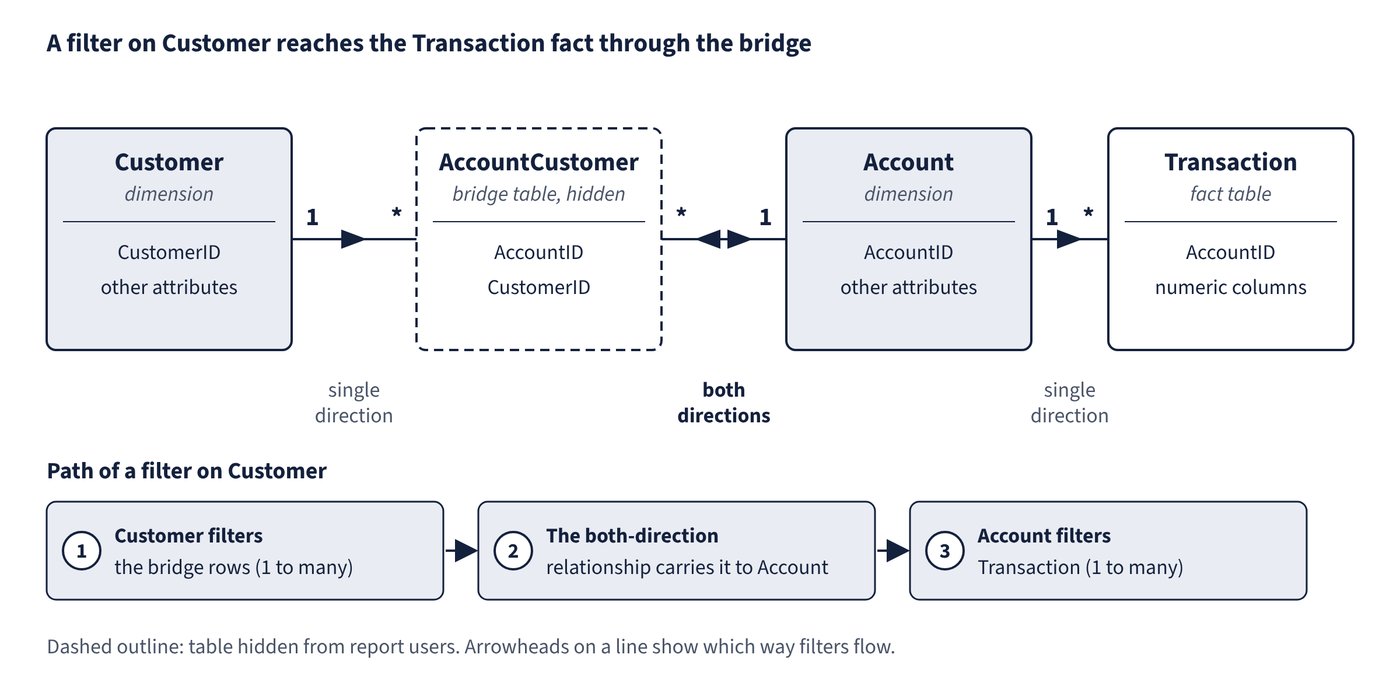
Totals are non-additive: two joint holders of the same account each show its full balance, so the customer subtotals add up to more than the grand total. Learn suggests explaining this to report users with text or visual header tooltips. Relating two dimensions directly with many-to-many cardinality isn’t recommended, because dimension tables should always use their ID column as the “one” side.
Higher-grain facts
When targets are stored by category but products are at product level, a many-to-many relationship on Category (filtering from Product to Target) lets category slicing work, but grouping by a lower-level column such as Color filters targets by every category that colour appears in. Learn’s fix is to hide summarisable fact columns and return BLANK when a lower-level column is filtered:
Target Quantity =
IF (
    NOT ISFILTERED ( 'Product'[ProductID] )
        && NOT ISFILTERED ( 'Product'[Product] )
        && NOT ISFILTERED ( 'Product'[Color] ),
    SUM ( Target[TargetQuantity] )
)
The same idea applies to dates: store the first date of the target period, relate it one-to-many to the date table, and return BLANK when Date or Month is filtered.
Common trap: Relating two fact tables directly with a many-to-many relationship because they share an order number - Learn recommends against it: visuals can then only group by that one column, and the limited relationship can drop rows when integrity is broken; add shared dimension tables instead.