Every write to a Delta (or Iceberg) table creates a new table version. Two table properties decide how long you can see the history and how long you can actually query old versions, and they are the main tools for a retention policy.
DESCRIBE HISTORY returns each operation, user and timestamp in reverse order; Catalog Explorer shows the same on the History tab.
DESCRIBE HISTORY main.sales.orders;
DESCRIBE HISTORY main.sales.orders LIMIT 1;   -- last operation only
Time travel queries an earlier version by number or timestamp:
SELECT * FROM main.sales.orders VERSION AS OF 123;
SELECT * FROM main.sales.orders TIMESTAMP AS OF '2026-09-30';
SELECT * FROM main.sales.orders@v123;
RESTORE TABLE main.sales.orders TO VERSION AS OF 120;
In Python use spark.read.option("versionAsOf", 123).table(...) or timestampAsOf. The version or timestamp can’t be a subquery. RESTORE needs MODIFY. It is itself a data-changing operation, so downstream streaming readers may reprocess the restored files as new data.
To time travel you need both the log entry and the data files for that version:
| Table property | Default | Controls | Removed by |
|---|---|---|---|
delta.logRetentionDuration |
interval 30 days |
How long table history (the transaction log) is kept | Automatic clean-up after checkpoints; not VACUUM |
delta.deletedFileRetentionDuration |
interval 7 days |
How old unreferenced data files must be before VACUUM can delete them |
VACUUM |
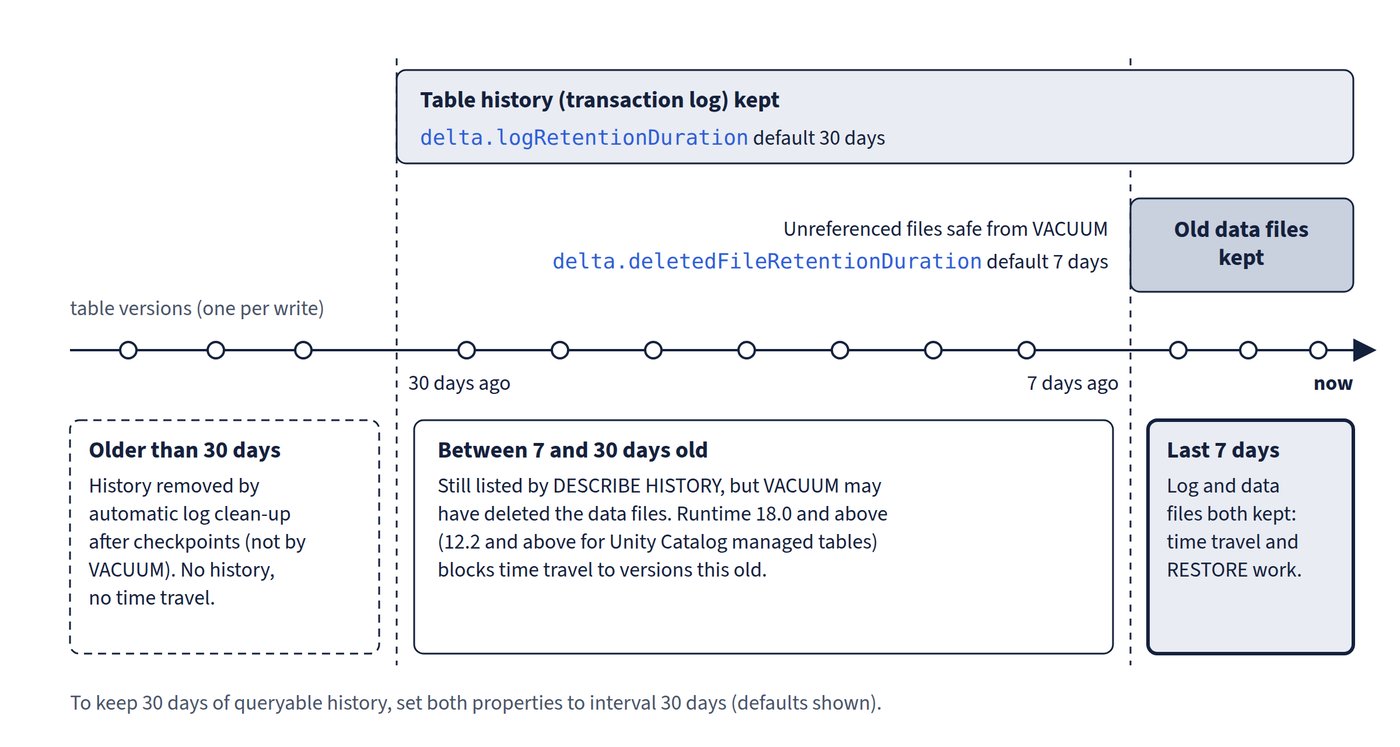
Iceberg tables use the same property names with the iceberg. prefix. Figure 4.1 shows how the two defaults combine.
Rules in current runtimes:
- In Databricks Runtime 18.0 and above, time travel queries are blocked if they request a version older than
deletedFileRetentionDuration. For Unity Catalog managed tables this applies on Runtime 12.2 and above. - In Runtime 18.0 and above,
logRetentionDurationmust be greater than or equal todeletedFileRetentionDuration. For Unity Catalog managed tables this also applies on Runtime 12.2 and above. - To keep 30 days of queryable history, raise the deleted-file retention to match the log default:
ALTER TABLE main.sales.orders SET TBLPROPERTIES (
  'delta.deletedFileRetentionDuration' = 'interval 30 days',
  'delta.logRetentionDuration' = 'interval 30 days');
Longer retention means more data files kept and higher storage costs. Databricks says table history is not a long-term backup or archive: use only the last 7 days for time travel unless both properties are raised. For a long-term copy, Learn’s clone examples create an archive table with CREATE OR REPLACE TABLE ... CLONE and long retention properties. Changing a table property conflicts with concurrent writes, so change it when nothing else is writing.
Common trap: Raising only
delta.logRetentionDurationto keep 90 days of time travel -VACUUMstill deletes data files afterdeletedFileRetentionDuration(7 days by default), and Runtime 18.0+ blocks older time travel; raise both properties.
Common trap: Treating
RESTOREas invisible to downstream jobs - it writes new log entries with data changes, so a streaming reader of the table can process the restored rows again as duplicates.