A system-versioned temporal table keeps the current rows in the table and every previous version in a linked history table, with the period of validity recorded by the engine. It answers “what did this row look like at time T” without application code.
How it works
- Period columns: two
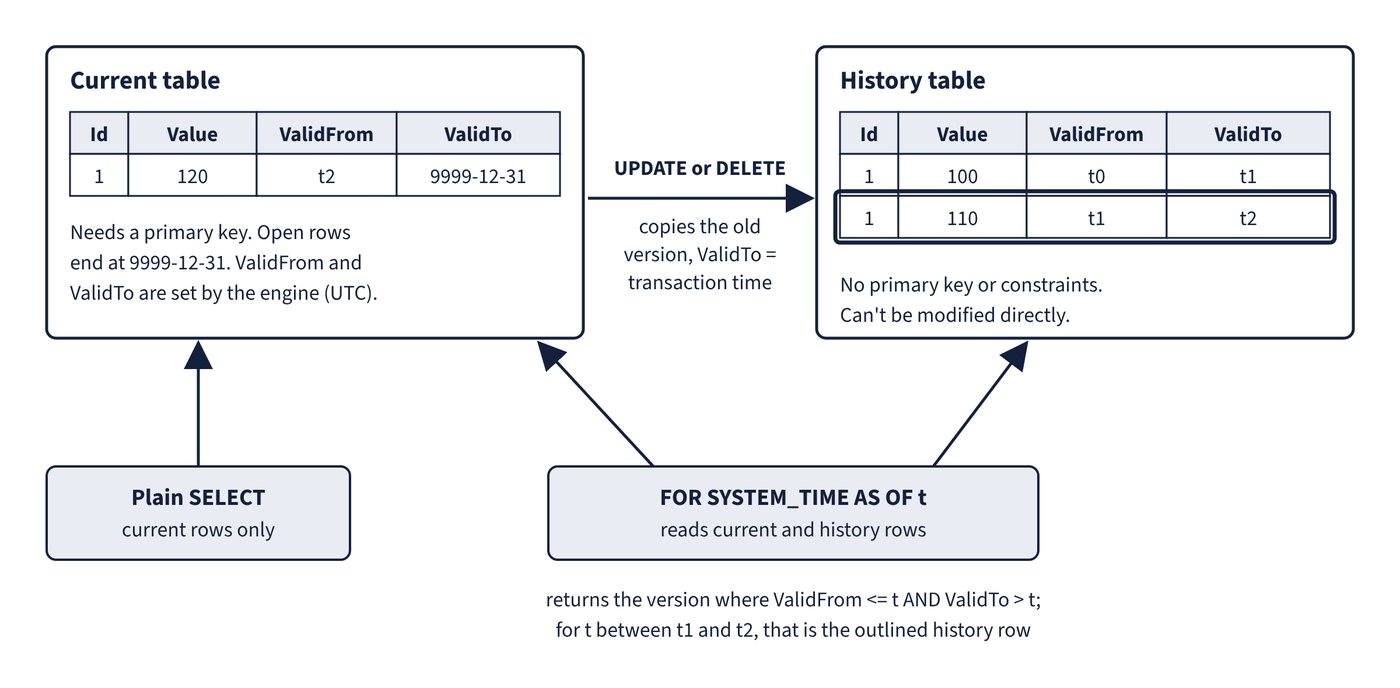
datetime2columns declaredGENERATED ALWAYS AS ROW STARTandROW ENDplusPERIOD FOR SYSTEM_TIME. Values are the UTC begin time of the transaction; open rows end at 9999-12-31. They can beHIDDENfromSELECT *. - Updates and deletes copy the old version to the history table with
ValidToset to the transaction time. A history row is written even if no column value changed. - Requirements: the current table needs a primary key; the history table can’t have one (or any constraint), must be in the same database, and is
PAGEcompressed by default. If you name the history table, give schema and name. Figure 2.1 shows how row versions move to the history table and how AS OF reads them.
CREATE TABLE dbo.Employee
(
    EmployeeId   int NOT NULL PRIMARY KEY CLUSTERED,
    Department   varchar(100) NOT NULL,
    AnnualSalary decimal(10,2) NOT NULL,
    ValidFrom    datetime2 GENERATED ALWAYS AS ROW START HIDDEN,
    ValidTo      datetime2 GENERATED ALWAYS AS ROW END HIDDEN,
    PERIOD FOR SYSTEM_TIME (ValidFrom, ValidTo)
)
WITH (SYSTEM_VERSIONING = ON (
        HISTORY_TABLE = dbo.EmployeeHistory,
        HISTORY_RETENTION_PERIOD = 6 MONTHS));

SELECT EmployeeId, AnnualSalary
FROM dbo.Employee FOR SYSTEM_TIME AS OF '2026-01-01T00:00:00'
WHERE EmployeeId = 1000;
Querying with FOR SYSTEM_TIME
| Subclause | Rows returned |
|---|---|
AS OF t |
ValidFrom <= t AND ValidTo > t (the version current at t) |
FROM s TO e |
ValidFrom < e AND ValidTo > s (excludes both boundaries) |
BETWEEN s AND e |
ValidFrom <= e AND ValidTo > s (includes rows that became active at e) |
CONTAINED IN (s, e) |
ValidFrom >= s AND ValidTo <= e (opened and closed inside the range) |
ALL |
Union of current and history rows |
Rows with zero-length validity (several updates to one key in one transaction) are filtered out of temporal queries; query the history table directly to see them. A plain SELECT without FOR SYSTEM_TIME reads only current rows.
Retention
HISTORY_RETENTION_PERIOD accepts DAYS, WEEKS, MONTHS or YEARS and defaults to INFINITE. A background task deletes aged history rows (in chunks of up to 10,000 for a rowstore history table, or whole rowgroups for a clustered columnstore history table). It needs the database flag TEMPORAL_HISTORY_RETENTION (on by default, but turned off automatically after a point-in-time restore) and, on the history table, either a clustered columnstore index or a rowstore clustered index that starts with the period end column. Setting SYSTEM_VERSIONING = OFF discards the retention setting, and turning it back on without HISTORY_RETENTION_PERIOD means infinite retention. The alternatives are a partition sliding window on the history table (switch out with SYSTEM_VERSIONING still on) or a custom cleanup that sets versioning off, deletes and sets it on again.
Limitations
TRUNCATE TABLEisn’t allowed while versioning is on, and the history table can’t be modified directly.INSTEAD OFtriggers aren’t allowed on either table;AFTERtriggers only on the current table.INSERTandUPDATEcan’t reference the period columns.- Indexes, statistics, check constraints, triggers, partitioning, permissions and row-level security predicates aren’t copied to the history table.
- Change data capture and change tracking work only on the current table; in SQL database in Fabric the history table isn’t mirrored.
Common trap: Running a nightly
DELETEagainst the history table to enforce retention - direct modification of history is blocked while versioning is on; setHISTORY_RETENTION_PERIOD(and keepTEMPORAL_HISTORY_RETENTIONon) or use partition switching.
Common trap: Using
FOR SYSTEM_TIME FROM ... TOwhen rows that started exactly at the end time must be included -FROM ... TOexcludes both boundaries;BETWEEN ... ANDincludes rows that became active at the upper boundary.