Microsoft Learn now describes custom detections as the best way to create new rules across Microsoft Sentinel and Defender XDR, with Sentinel analytics rules still supported. The exam expects you to know both, and which one fits a requirement. Figure 7.1 walks through the choice.
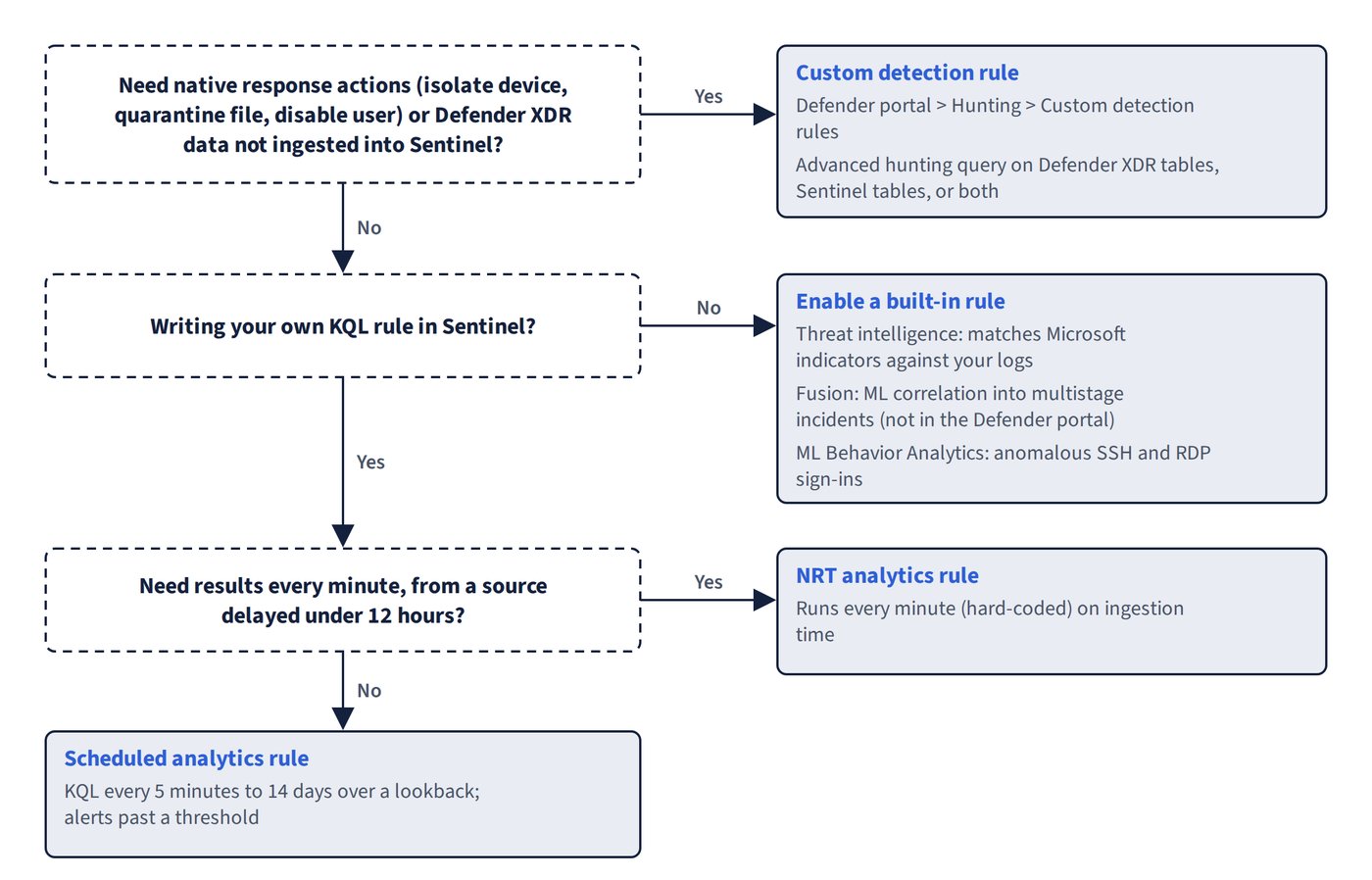
Microsoft Sentinel is moving fully into the Defender portal: after 31 March 2027 Sentinel is no longer supported in the Azure portal, so Defender portal paths are used throughout this chapter.
| Rule type | Where it lives | What it does | Customisable? |
|---|---|---|---|
| Custom detection | Defender portal > Hunting > Custom detection rules | Advanced hunting query on Defender XDR tables, Sentinel tables, or both; can take native response actions | Fully |
| Scheduled analytics rule | Microsoft Sentinel > Configuration > Analytics | KQL query run at an interval over a lookback period; alerts when results pass a threshold | Fully |
| NRT analytics rule | Same page | Scheduled-rule subset, hard-coded to run every minute | Mostly (limited) |
| Microsoft security rule | Same page | Creates Sentinel incidents from alerts raised by other Microsoft security products | Filters only; not available once Sentinel is in the Defender portal |
| Threat intelligence (Microsoft Threat Intelligence Analytics) | Same page, from a template | Matches Microsoft threat intelligence indicators against your logs | No |
| Fusion (Advanced multistage attack detection) | Same page | ML correlation of low-fidelity alerts into multistage incidents | Source signals only; not available in the Defender portal |
| ML Behavior Analytics (preview) | Same page | Detects anomalous SSH and RDP sign-in behaviour | No |
| Anomaly rules | Analytics > Anomalies tab | ML baselining; writes to the Anomalies table, no alerts | Through a duplicate |
Custom detections versus analytics rules
The feature gap between the two is closing, but several differences are still tested.
| Capability | Analytics rules | Custom detections |
|---|---|---|
| Query Defender XDR data without ingesting it into Sentinel | Not supported | Supported |
| Native Defender response actions (isolate device, quarantine file, disable user) | Not supported | Supported |
| Near-real-time detection | NRT rules test events after ingestion | Continuous (NRT) frequency tests events as they stream |
| Run rule on demand | Not supported | Supported |
| Rerun on a previous time window | Supported | Planned |
| Choose one alert per event or all events in one alert | Supported | Not supported |
| Custom alert grouping into incidents | Supported | Not supported (the correlation engine groups alerts) |
| Create alerts without incidents | Supported | Not supported |
| Alert suppression after the rule runs | Supported | Not supported |
| Sentinel automation rules triggered by the rule | Supported | Planned |
| Shown on the MITRE ATT&CK page | Supported | Planned |
| Create rules from content hub | Supported | Planned |
| Rule simulation in the wizard | Supported | Planned |
Cross-workspace queries with workspace() |
Supported | Planned |
Both rule types can only query data ingested to the Analytics tier (not Basic or Auxiliary logs). If a Defender table isn’t streamed to the Sentinel workspace, an analytics rule over it saves successfully but never finds data; use a custom detection instead.
Common trap: Building a Sentinel analytics rule to detect on Defender for Endpoint tables that aren’t streamed to the workspace - the rule saves but returns nothing. A custom detection queries Defender XDR data directly without ingestion.