All three run queries in the background and write results to a table, so the exam tests which one fits a requirement. Microsoft’s comparison: Figure 12.1 sets the three side by side.
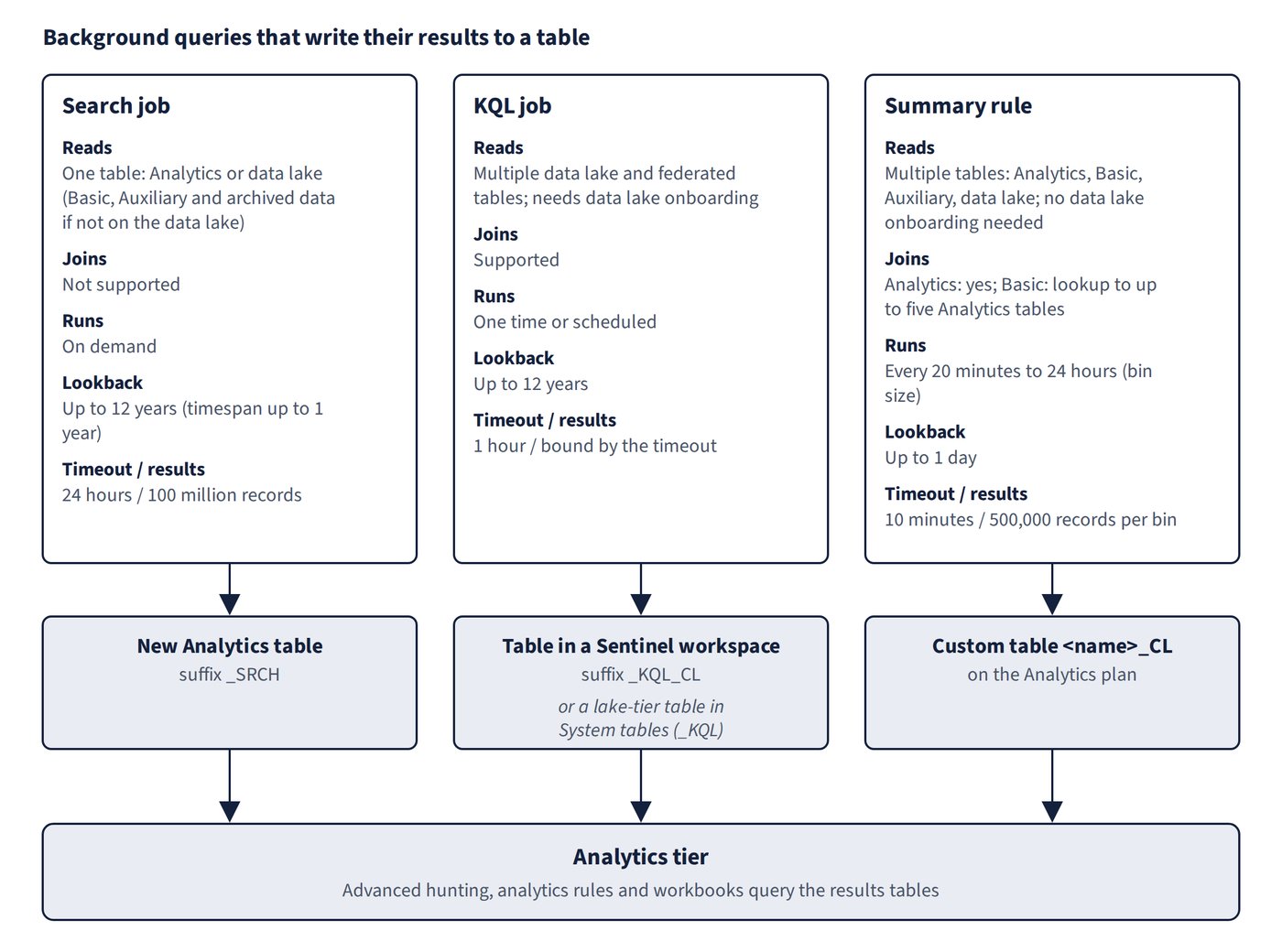
| Feature | KQL jobs | Summary rules | Search jobs |
|---|---|---|---|
| Needs data lake onboarding | Yes | No | No |
| Source data | Data lake tier | Analytics, Auxiliary, Basic, data lake | Analytics, data lake; Auxiliary, Basic and archived for workspaces not on the data lake |
| Tables | Multiple | Multiple | Single |
| Federated tables | Yes | No | No |
| Joins | Supported | Analytics: yes; Basic: lookup to up to five Analytics tables |
Not supported |
| Schedule | On demand or scheduled | 20 minutes to 24 hours | On demand |
| Lookback | Up to 12 years | Up to 1 day | Up to 12 years (timespan up to 1 year) |
| Timeout | 1 hour | 10 minutes | 24 hours |
| Maximum results | Bound by the timeout | 500,000 records | 100 million records |
| Pricing | GB analysed | Free for Analytics sources; data scan for Basic and Auxiliary | GB analysed |
| Templates and health monitoring | No | Templates (Content hub, ARM); LASummaryLogs | No |
Quick decision rules:
| Requirement | Use |
|---|---|
| Query years of history with joins or unions across several tables | KQL job |
| Promote a filtered subset of lake data to the analytics tier on a schedule | KQL job |
| Aggregate verbose logs every 20 minutes into a small Analytics table for rules and workbooks | Summary rule |
| Workspace not onboarded to the data lake, data in Basic or Auxiliary tables, frequent summarisation | Summary rule |
| Pull matching records from one huge table, or from archive-tier data | Search job |
| Data from before your data lake onboarding date | Search job (KQL jobs cover data from the onboarding date onward) |
On KQL jobs, the comparison table lists daily, weekly and monthly schedules and no template support, while the KQL jobs article also offers by-minute and hourly repeat frequencies and built-in job templates.
Common trap: Choosing a search job to correlate two tables - search jobs work on one table and don’t support joins; use a KQL job (data lake) or restore the data and query it.