An independent study guide for Microsoft 365 Certified: Copilot and Agent Administration Fundamentals · by Tony Rough
Know which Microsoft 365 control governs Copilot, and why.
Due on Amazon in January 2027, in Kindle and paperback editions.
This independent study guide for the Microsoft 365 Certified: Copilot and Agent Administration Fundamentals exam distils what AB-900 really expects you to understand into clear explanations, comparisons and the traps that catch beginners. It uses Microsoft's current names, including Microsoft Copilot (formerly Microsoft 365 Copilot), and notes where older material and today's product differ.
Nine chapters, each readable on its own and together covering all three AB-900 skill areas:
Microsoft 365 and Copilot change quickly. This edition reflects Microsoft's documentation as of October 2026, including the Copilot renaming, the new Copilot admin pages and recent retirements.
This book contains no exam questions. It explains the knowledge the exam expects, so you can answer questions you have never seen and administer Copilot and agents with confidence at work.
Written by Tony Rough, a cloud architect with more than twenty years in IT infrastructure who holds the Azure Solutions Architect Expert, Azure Administrator and Azure Security Engineer certifications.
Part of the Ultra Transcenders series from Distilled Press. An independent publication, not affiliated with, sponsored by or endorsed by Microsoft Corporation.
Every skill area in Microsoft's AB-900 outline (as of October 14, 2026), and the chapters that cover it.
| Skill area | Weight | Chapters |
|---|---|---|
| Identify the core features and objects of Microsoft 365 services | 30–35% | 1, 2, 3, 4 |
| Understand data protection and governance tasks for Microsoft 365 and Copilot | 35–40% | 5, 6, 7, 8 |
| Perform basic administrative tasks for Copilot and agents | 25–30% | 9 |
Plus an appendix glossary of 200+ terms, each linked to Microsoft Learn, with the same terms explained free online for print readers.
Short excerpts from the book, exactly as they appear in it, so you can see how it explains things.
The opening of chapter 1 · Chapter 1: Microsoft 365 tenants, licences and the Microsoft 365 admin center
Every Microsoft 365 administration task starts with the same few objects: the tenant that holds the organisation’s identities, the subscriptions it buys, the licences that switch services on for each user, and the Microsoft 365 admin center where most of this is managed. This chapter explains how those objects fit together, how licences reach users directly or through groups, what happens when a licence is removed, and how to configure domains, organisation-wide settings and admin roles. It ends with a map of the specialist admin centers and which job belongs in each.
A comparison table · Chapter 1: Microsoft 365 tenants, licences and the Microsoft 365 admin center · Assigning licences to users and groups
A user can hold the same licence directly and through a group. Learn’s guidance when tidying up is to confirm that the direct assignment doesn’t switch on more services than the group’s assignment before removing it; otherwise the user can lose access to a service.
| Need | Best fit | Why |
|---|---|---|
| License one new starter today | Direct assignment from Active users | Quick, no group needed |
| License a whole department and keep it current | Group-based licensing on a dynamic membership group | Joiners and leavers are handled automatically (P1 per member for the dynamic group) |
| Give a group the licence but withhold one app | Group-based licensing with apps turned off | Service plans are chosen per assignment |
| License users who are in a group nested inside the licensed group | Assign the licence to the inner group too | Nested membership isn’t followed |
| Find out why a member has no licence | Product page > Errors & issues | Shows the reason; Reprocess after fixing |
A common trap · Chapter 1: Microsoft 365 tenants, licences and the Microsoft 365 admin center · Tenants, subscriptions and licences
Common trap: An administrator must hold a licence for the service they manage - wrong. Admin permissions come from roles, not licences; a dedicated admin account can manage a service with no licence assigned.


Some sections of the book, free to read online:
Verify explicitly, use least privilege access and assume breach, and the pillars they apply to.
How Conditional Access turns sign-in signals into block or grant decisions, and what licence it needs.
What the score measures, how often it is recalculated and which recommendations raise it.
What each Exchange Online mailbox permission allows and which recipients and groups can hold it.
Sharing-link, permission and Everyone except external users reports for finding oversharing.
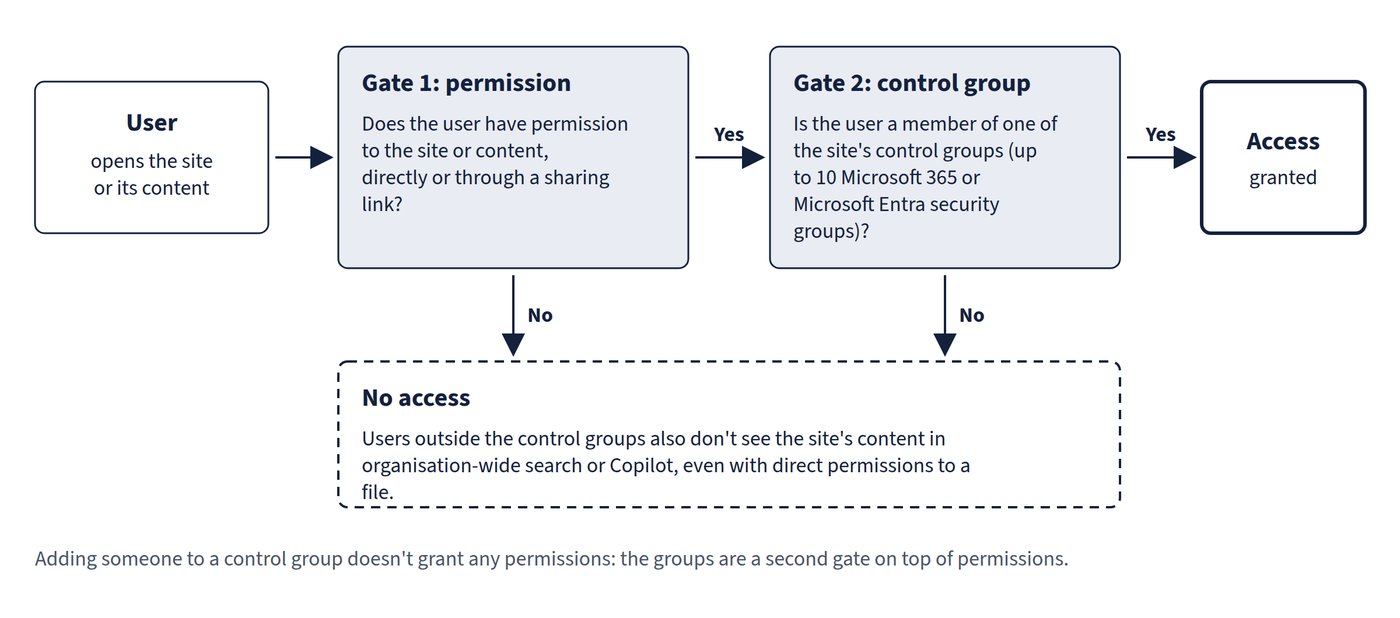
How restricted site access limits a site to members of chosen groups, even for users with permission.
What the two built-in reasoning agents are for, how they are deployed and when a custom agent fits.
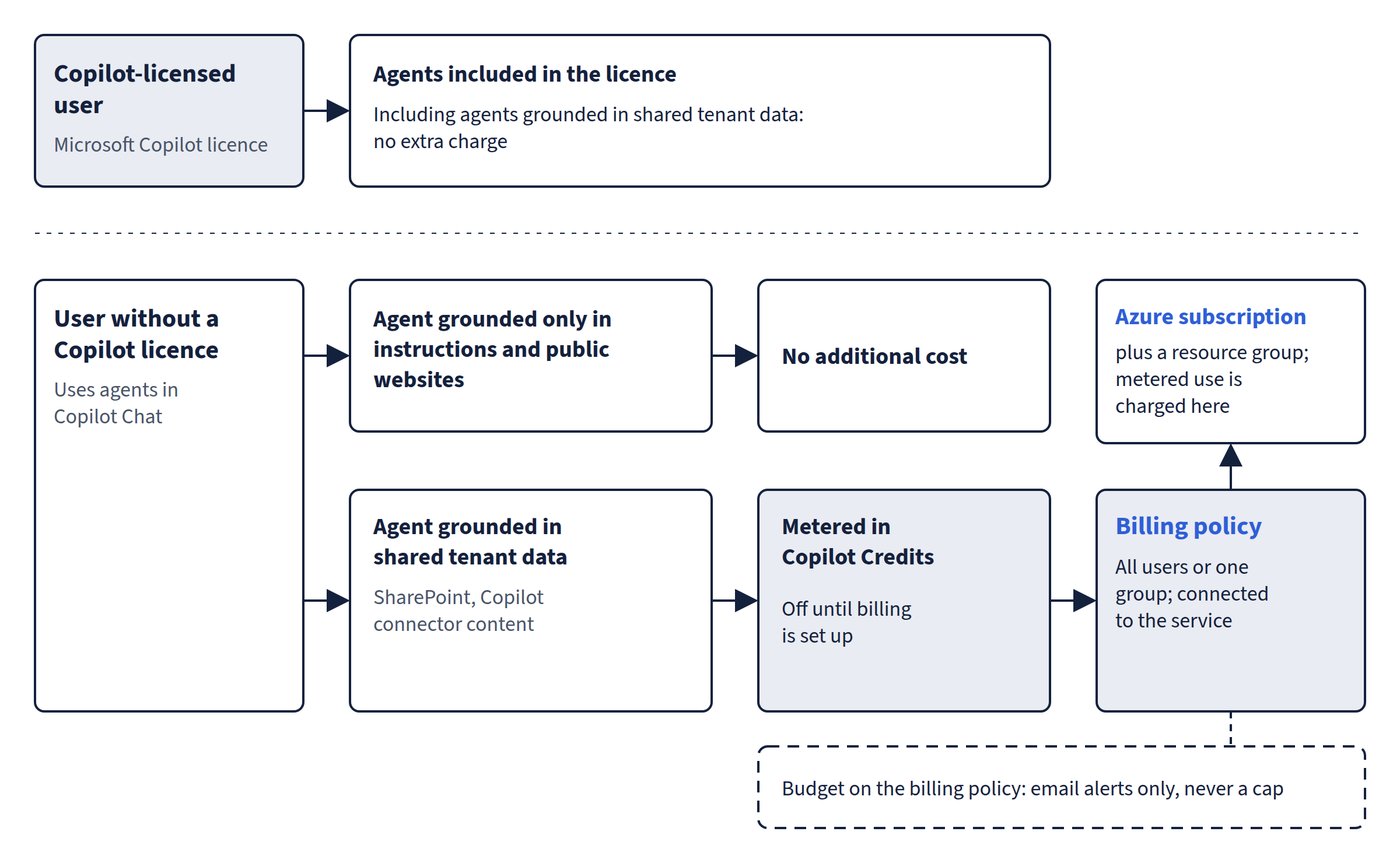
How billing policies connect metered Copilot Chat and SharePoint agent use to an Azure subscription, and what budgets do.
A free week-by-week plan through the book at a 3-week or 6-week pace, with the study notes and exam skill areas for each week.