Sometimes a sensitive site can’t wait for a full permissions clean-up. Restricted site access control (also called restricted access control or site access restriction) limits a site and its content to members of specified groups, even if other users already have permissions or a sharing link.
How it works
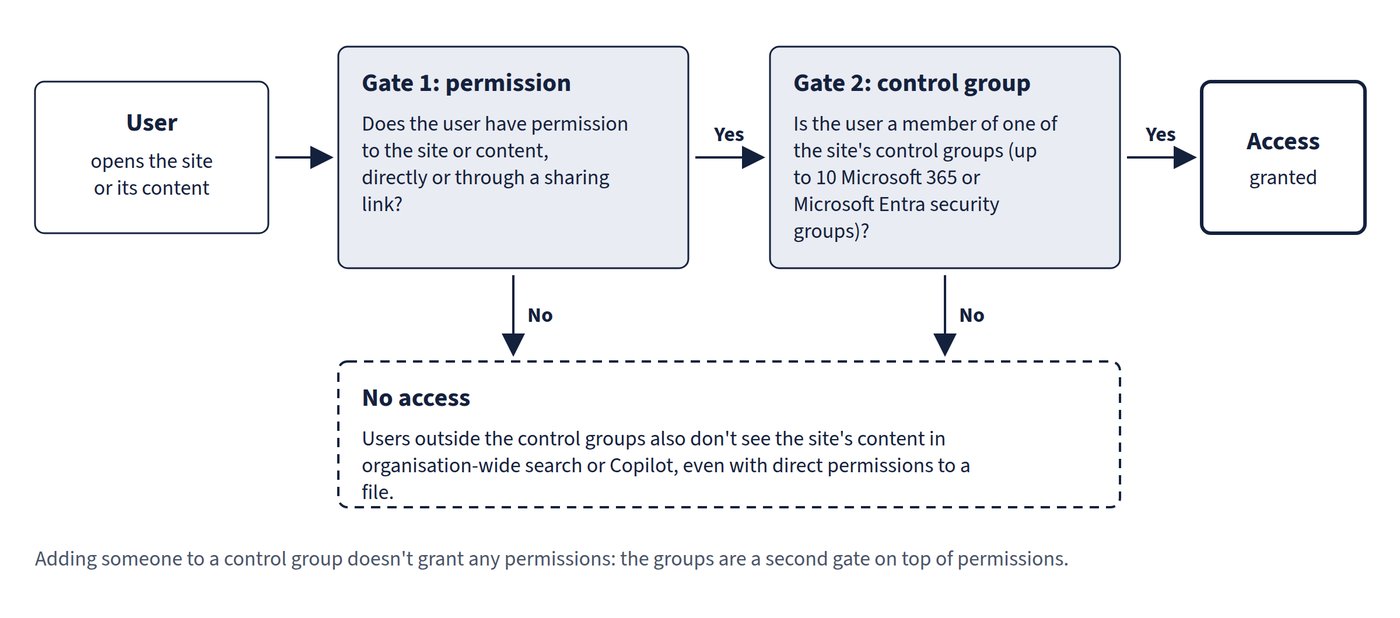
- A user gets in only if they have permission to the site or content and are a member of one of the control groups. Adding someone to a control group doesn’t grant them any permissions. Figure 8.1 shows the two gates.
- Up to 10 Microsoft 365 groups or Microsoft Entra security groups per site; dynamic security groups are supported.
- For a Microsoft 365 group-connected site, the connected group is the default control group.
- Works on group-connected, Teams-connected and non-group sites, and on OneDrive. Shared and private channel sites are separate sites and need their own policy.
- Organisation-wide search and Copilot honour the policy: users outside the control groups don’t see the site’s content there, even with direct permissions to a file. Large sites can take longer for search and Copilot to reflect the change.
- By default, sharing still works with people outside the control groups; administrators can turn on an option to block such sharing.
- Applying, removing or changing the policy, and site admin justifications, are recorded in the Purview audit log.
Setting it up
- Turn it on for the organisation: SharePoint admin center > Policies > Access control > Site-level access restriction > Allow access restriction.
- For each site: Sites > Active sites, select the site, Settings tab, Restricted site access > Edit, select Restrict SharePoint site access to only users in specified groups, add groups and save.
- Optionally, delegate management to site admins with PowerShell (off by default); site admins must then give a justification for each change.
For OneDrive there are two variants: restricting a specific user’s OneDrive to members of up to 10 groups, and a tenant setting (Access control > Restrict OneDrive access) that limits OneDrive use to up to 10 security groups. With the tenant setting, users outside the groups lose access to their own OneDrive but can still see files in search and Copilot if they had existing permissions, though they can’t open them.
Common trap: Adding users to the control group to give them access - membership is a second gate, not a permission; users still need site or content permissions as well.
Common trap: Assuming restricted access control on a team’s site also protects its private and shared channel sites - those are separate site collections and need their own policy.