The right platform is the one that meets the workload’s technical constraints with the least management effort. Start by asking what the code needs from the operating system, how it is triggered and how it must scale; the table below maps common requirements to the best-fit service.
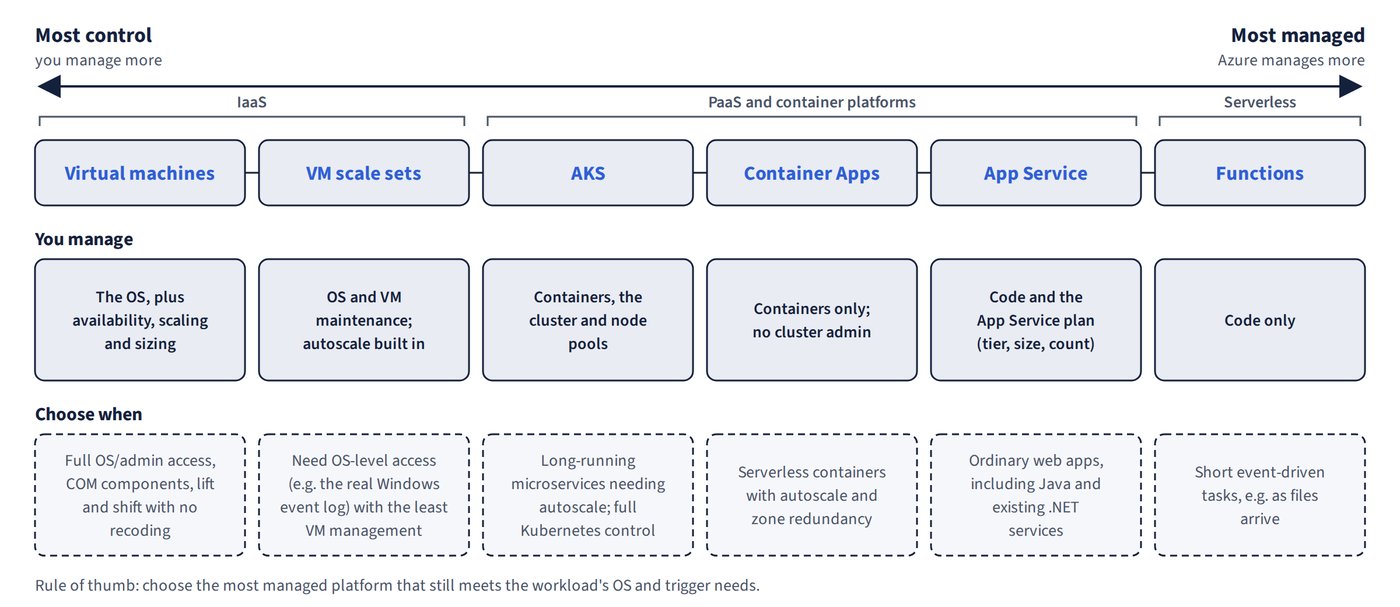
Figure 9.1 places the main options on a spectrum from most control to most managed.
| Requirement | Best choice | Why not the others |
|---|---|---|
| Full .NET Framework plus admin OS access for custom dependencies | Virtual machines (or a VM scale set) | App Service, including an App Service Environment (Isolated v2 plan), runs in a sandbox with no OS access |
| Custom COM component | VMs | App Service can’t register COM components |
| Service that must write to the real Windows Application event log | VM scale set (least management among VM options) | App Service sandbox, Functions and ASE all block it |
| Existing .NET web service that only writes temporary files and Application event log entries | App Service web app | The sandbox allows D:\local\Temp and Application event log writes (captured in LogFiles\eventlog.xml); an ASE is too costly; a VMSS needs VM maintenance |
| Java web app that can’t easily be containerised, needs autoscale and least administration | App Service (Java SE, Tomcat, JBoss EAP) | AKS needs containers plus cluster administration; a VMSS means managing the OS; Batch isn’t for interactive apps |
| Lift and shift with no recoding, no containers and reliance on the local file system | VMs | — |
| Short event-driven tasks as files arrive | Azure Functions (Blob or Event Grid trigger) | App Service is defensible but scales by whole instances, more slowly |
| Long-running microservices needing autoscale | AKS (HPA plus cluster autoscaler) | ACI has no orchestration or autoscale |
| Large parallel/HPC or overnight jobs | Azure Batch | Hand-built VM farms need your own scheduler |
| Containerised web app with autoscale, ACR continuous deployment and built-in user sign-in | App Service (Web App for Containers) | ACI doesn’t autoscale; AKS has no built-in authentication |
| Microservices on-premises and in Azure with per-service upgrades, health-based auto-repair and stateful hyper-scale | Azure Service Fabric | ACI/VMSS have no application lifecycle; Azure Container Service (AKS’s retired predecessor) had no on-premises option |
The two event-log rows are a useful contrast. The App Service sandbox tolerates an ordinary web service that logs to the Application event log, because those entries are redirected to a file. A component that genuinely depends on the Windows event log of the machine (or any other OS-level access) needs a VM, and a scale set is the lowest-management way to run VMs.
Common trap: Hosting a service that must write to the Windows Application event log on an App Service web app — the sandbox (like Functions and an ASE) blocks this, so use a VM scale set.
Common trap: Moving an existing .NET web service to Azure Functions — Functions is for event-driven code, not for hosting a web service; an App Service web app is the right home, and its sandbox permits temp-file and Application event log writes.
Common trap: Putting a Java web app that can’t easily be containerised on AKS — AKS requires containers and cluster administration; App Service runs Java SE, Tomcat and JBoss EAP natively with autoscale.
Common trap: Swapping the platforms for HPC and lift-and-shift — large parallel/HPC jobs belong on Azure Batch, and a no-recode migration that relies on the local file system belongs on VMs.
Containers with built-in sign-in: Web App for Containers
Web App for Containers gives you App Service’s managed features for a container image. Continuous deployment from Azure Container Registry works through a webhook that fires on image push, and App Service Authentication (“Easy Auth”) signs users in with Microsoft Entra ID (Azure AD) without any code.
Common trap: Choosing AKS for a containerised web app that needs autoscale, CD from ACR and built-in user sign-in — AKS has no built-in authentication; App Service (Web App for Containers) with Easy Auth provides all three.
Regional failure
Whatever the platform, a deployment confined to a single region (one scale set, one ASE) never survives a region failure. That needs two regions plus Traffic Manager or Front Door in front of them (see Chapter 12, Networking).