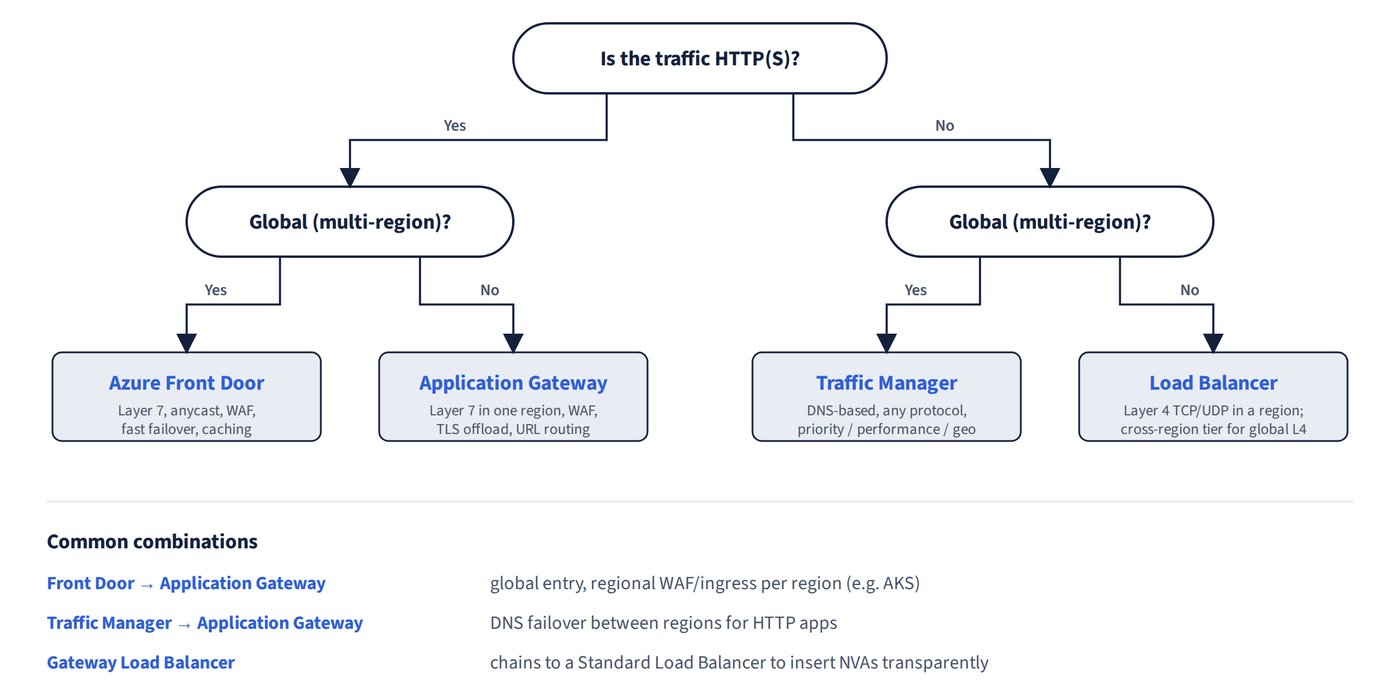
Azure’s load-balancing services differ along two axes: global versus regional scope, and the layer they work at (DNS, layer 4 or layer 7 HTTP). Most designs combine a global service with a regional one, so start with the comparison and then look at common patterns.
Figure 12.3 turns those two axes into a decision tree.
| Service | Scope | Layer | WAF / rate limiting | TLS termination | Session affinity, URL routing |
|---|---|---|---|---|---|
| Azure Front Door | Global (anycast, fast failover) | 7 | Yes / Yes | Yes (managed certificates) | Yes |
| Traffic Manager | Global (DNS, any protocol) | DNS | No / No | No | No |
| Application Gateway | Regional | 7 | Yes (OWASP CRS) / WAF custom rules | Yes (SSL offload) | Yes |
| Azure Load Balancer (Standard) | Regional (zone-redundant); the cross-region tier fronts only regional Standard load balancers | 4 | No / No | No | Source-IP session persistence; no URL routing |
| Gateway Load Balancer | Chained to a Standard Load Balancer frontend | Inline (VXLAN) | — | — | — |
Traffic Manager routing methods
Traffic Manager answers DNS queries with the endpoint chosen by its routing method, and it automatically fails away from unhealthy endpoints.
- Priority: active/passive failover.
- Performance: the lowest-latency endpoint.
- Weighted: split traffic by weight.
- Geographic: route by user location, for example North America to one region.
Placing VMs in two regions behind Traffic Manager with priority routing meets a region-redundancy requirement.
Multi-region patterns
- A multi-region web app that needs rate limiting, balancing across all regions and regional failover: only Front Door (with WAF rate-limit rules) meets all three. Application Gateway and Load Balancer are regional, and Traffic Manager never sees HTTP.
- Front Door also fits multi-region AKS (lowest-latency healthy backend, central TLS), with Application Gateway (AGIC or Application Gateway for Containers) as each cluster’s ingress.
- Non-HTTP traffic (for example a database) across regions and zones: Traffic Manager globally plus a public Standard Load Balancer in each region (Traffic Manager’s health probes come from the internet, so they can’t reach an internal load balancer’s private frontend).
- Counting resources: a Traffic Manager profile is global, so you need one; Application Gateway (WAF SKU) is regional, so you need one per region. Two regions therefore need one Traffic Manager profile and two Application Gateways.
Common trap: Counting two Traffic Manager profiles and one Application Gateway for two regions — Traffic Manager is global (one profile) and Application Gateway is regional (one per region), so the answer is one profile and two gateways.
Common trap: Concluding that no single service meets rate limiting, all-region balancing and regional failover for a multi-region web app — Azure Front Door with WAF rate-limit rules meets all three.
Common trap: Using the cross-region Load Balancer as the global entry point for multi-region AKS — it is layer 4 and can front only regional Standard load balancers, not Application Gateway; use Front Door.
Web application firewall
A WAF inspects HTTP requests for attacks such as SQL injection and XSS, and it runs on Front Door or Application Gateway.
- Layer-7 protection against SQL injection and XSS with no code changes: Application Gateway WAF. SSL offload and URL routing on their own don’t stop injection.
- HTTPS with round-robin balancing and SSL offload: Application Gateway.
- The cheapest WAF when users are in a single region: a regional Application Gateway WAF.
Inserting network virtual appliances
To place a pool of third-party NVAs transparently in the traffic path, use Gateway Load Balancer. It preserves flow symmetry, health-probes the appliances and needs no route tables or VNet changes.
Common trap: Using Front Door to insert NVAs — Front Door is a global entry point for HTTP traffic; transparent NVA insertion is the job of Gateway Load Balancer.