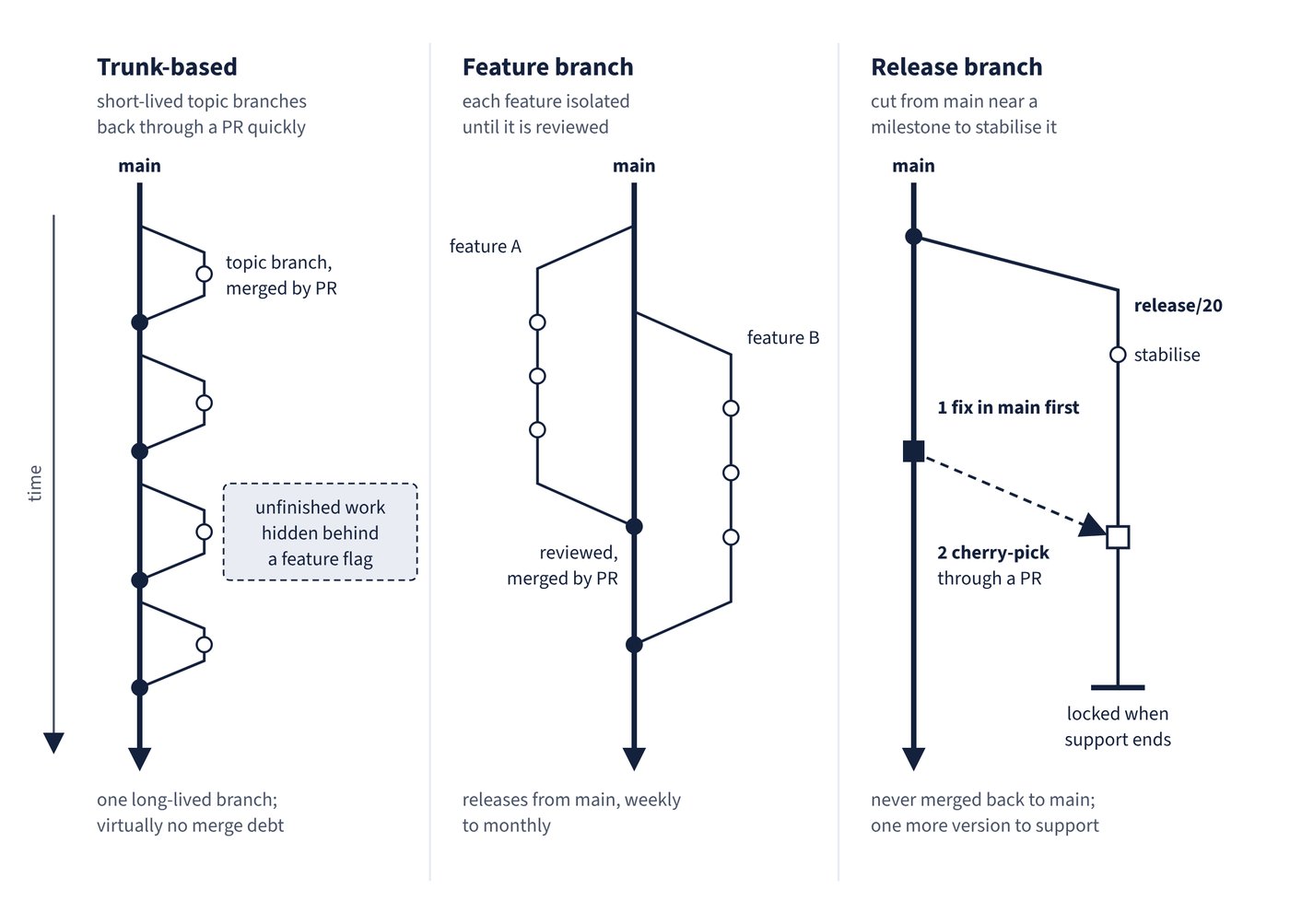
Every model in this section is a variation on the same question: how long does work stay away from the main line, and what happens at release time? Short separation means fewer merge conflicts and faster feedback; longer separation buys stabilisation time at the cost of merge debt. Figure 5.1 sets three of these models side by side on a timeline.
The core Microsoft guidance
Microsoft’s Azure Repos branching guidance builds any strategy from three ideas: put every feature and bug fix on its own feature branch (also called a topic branch), merge those branches into main only through PRs, and keep main high quality and current. Git branches are cheap, so even a one-line fix gets a branch, and the PR that merged it becomes the record of why the change happened.
Microsoft itself uses trunk-based development. Each change starts as a short-lived topic branch off the main integration branch and comes back through a PR as soon as reviewers and policies agree. Unfinished features don’t justify a long-running branch; they ship dark behind feature flags, which decouple deploying code from exposing it (feature flags are covered in Chapter 11, Deployment strategies and infrastructure as code). Learn credits the single-main-branch approach with virtually eliminating merge debt and giving one place to enforce tests and review early.
Suggested branch-naming conventions from the guidance include users/<username>/<description>, feature/<area>/<name>, bugfix/<description> and hotfix/<description>. In Azure Repos, folder-style names can be enforced with the require-branch-folders permission pattern.
Release branches and Microsoft’s release flow
A release branch is cut from main near a milestone (for example release/20) to stabilise and support that version. In the Azure Repos guidance it is long-lived and is not merged back into main through a PR; each active release branch is one more version to support, and you lock it when support ends.
Microsoft’s release flow adds one rule that matters for hotfixes: make the fix in main first, then port it to the release branch by cherry-picking. Azure Repos can cherry-pick from the PR page on the server, which opens a new PR against the release branch so the backport goes through branch policies too. Fixing only the release branch is the classic failure: the bug comes back when the next release branch is cut from main. The guidance also prefers cherry-picking over merging a release branch into main, because a merge can drag release-only changes across.
GitHub flow
GitHub flow is GitHub’s lightweight, branch-based workflow: create a short-lived branch with a descriptive name, commit and push, open a PR (as a draft if you want early feedback), respond to review, merge once approved and checks pass, then delete the branch. Linking the PR to an issue with a closing keyword closes the issue on merge. Learn points out an often overlooked part of GitHub flow: PRs deploy to production for testing before they merge, which puts every PR in a deployment queue. Microsoft’s teams diverged at that point because, with hundreds of developers and 200 or more PRs a day, waiting for a multi-region deployment per PR was too slow, so they batch deployments into sprint releases instead.
Gitflow and the forking workflow
Learn names Gitflow as a topic-branch strategy, describes GitHub flow as its simpler variation, and warns that Git discourages long-lived isolated branches because they delay integration. Learn does not document Gitflow’s internal branch roles, so the exam-safe position is the trade-off: Gitflow keeps more long-lived branches and more ceremony, while GitHub flow and trunk-based development keep one long-lived branch.
The forking workflow gives each contributor a full copy of the repository; maintainers review and merge PRs from forks, so external contributors never need write access to the original. It suits open source and partner contributions.
| Strategy | Long-lived branches | How releases happen | Fits when |
|---|---|---|---|
| Trunk-based (Microsoft release flow) | main, plus release branches that never merge back | Cut a release branch per sprint; hotfix in main first, then cherry-pick | Large teams merging many PRs a day; continuous integration at scale |
| Feature branch | main only; each feature isolated until reviewed | Weekly to monthly from main | Formal review and an audit trail per change |
| Release branch | main plus one branch per supported version | Stabilise on the release branch | Formal release cycles, several supported versions |
| GitHub flow | main only | Merges to main are deployable; delete branch after merge | Continuous deployment, cloud-native services |
| Gitflow | Several long-lived branches (structure not detailed on Learn) | Heavier, milestone-based | Teams that accept more ceremony for scheduled releases |
| Forking | Upstream main; contributors work in forks | Maintainers merge PRs from forks | Open source, external contributors, strict access control |
Common trap: Assuming every Microsoft source agrees that release branches merge back to main - the Azure Repos branching guidance and the release flow article say release branches are not merged back (fixes are cherry-picked), while the Learn training unit on workflow types describes releases merging back to main. For Azure DevOps scenarios, follow the product guidance: cherry-pick, don’t merge the release branch.
Common trap: Applying a hotfix only to the release branch during an incident - release flow makes the change in main first and cherry-picks it into the release branch, otherwise the bug reappears in the next release cut from main.