GitHub Agentic Workflows are repository automations written in natural-language Markdown and executed by a coding agent inside GitHub Actions. GitHub’s documentation describes them as in public preview and subject to change, so treat everything below as preview behaviour.
What they are
A normal workflow scripts every decision as YAML steps. An agentic workflow keeps YAML frontmatter for the parts that must be deterministic (triggers, permissions, tools and allowed outputs) and describes the goal in a Markdown body, letting the agent decide how to reach it. GitHub’s examples include issue triage, investigating CI failures, weekly status reports, documentation upkeep and improving test coverage, and its tutorial builds a pull request reviewer that checks whether changes are adequately tested.
| Element | Agentic workflow | Standard workflow |
|---|---|---|
| Definition | Markdown file in .github/workflows/ with YAML frontmatter and natural-language instructions |
YAML file in .github/workflows/ |
| What runs | A compiled .lock.yml Actions workflow generated by gh aw compile; both files are committed |
The YAML as written |
| Decision logic | Agent reasoning within frontmatter guardrails | Predefined steps and expressions |
| Default permissions | Read-only (read-all) unless more are granted |
Whatever permissions and repository defaults allow |
| Writing to GitHub | Only through declared safe-outputs such as create-issue, add-comment, create-pull-request, validated and scanned before they’re applied |
Any API call the token allows |
| Cost | Actions minutes plus AI inference | Actions minutes |
Guard rails by design
- Engine: the
enginefrontmatter key selects the agent. GitHub Copilot is the default (it needs a Copilot plan); Anthropic Claude, OpenAI Codex and Google Gemini are also supported, each with its own repository secret. - Isolation: agents run in firewalled, isolated Actions environments, and secrets stay in separate downstream jobs rather than being exposed to the agent.
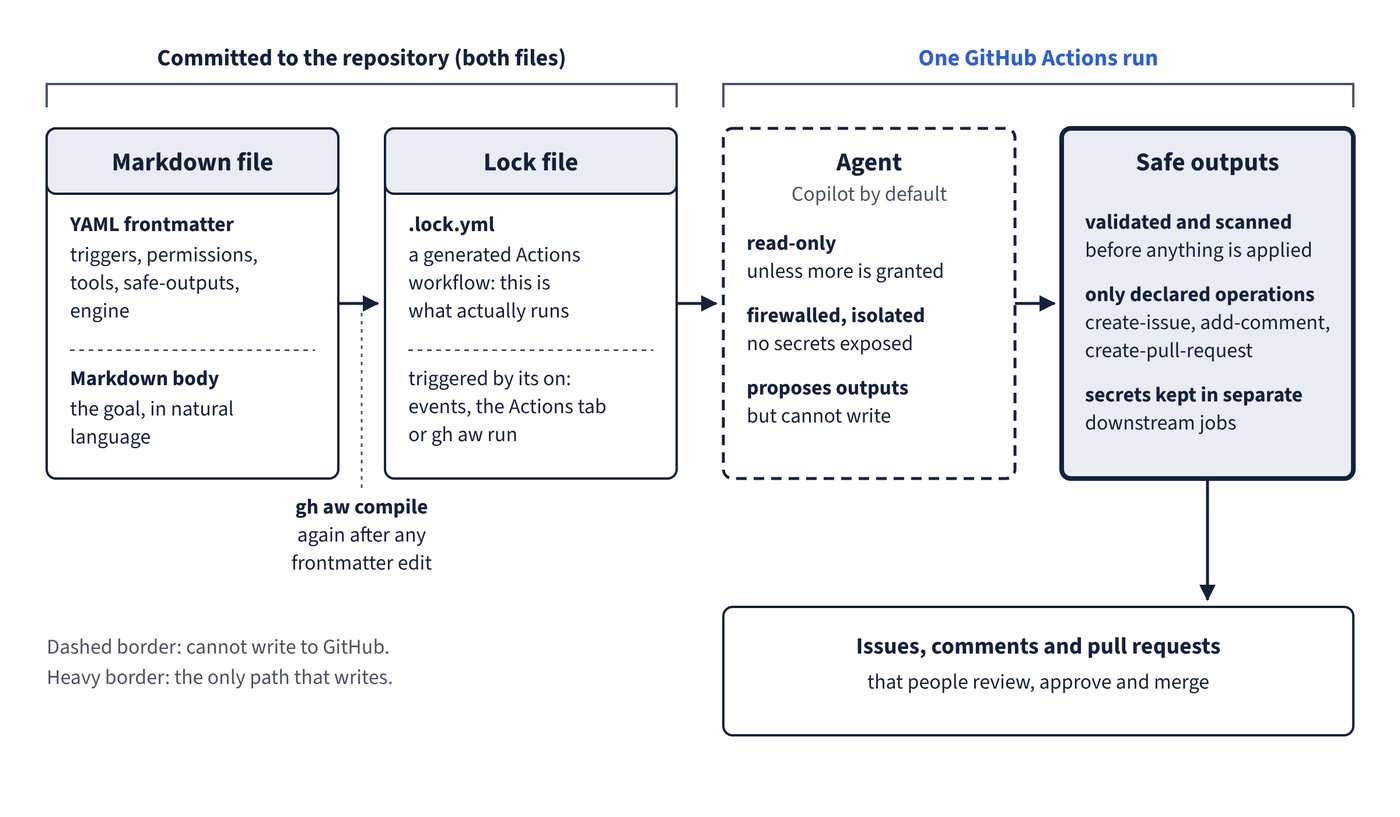
- Writes through safe outputs: the agent proposes outputs; only the operations listed under
safe-outputsare performed, after validation. Figure 10.1 traces a workflow from file to write. - Human control: results arrive as issues, comments and pull requests that people review, approve and merge, and role-based access controls can restrict who triggers or edits workflows.
- Spend cap: inference is measured in AI Credits (1 AIC is $0.01 USD).
max-ai-creditscaps a run, with a default of 1,000 AIC;gh aw logsandgh aw auditshow usage and estimated cost, which GitHub notes are best-effort estimates.
---
on:
  schedule:
    - cron: '0 8 * * 1'
permissions:
  issues: read
  copilot-requests: write
safe-outputs:
  create-issue:
---
Summarise the last seven days of issue activity: counts, recurring
themes, notable open issues and recommended next steps.
Building and running one
- Install the extension with
gh extension install github/gh-aw(GitHub CLI 2.0.0 or later, authenticated withrepoandworkflowscopes; fromgh2.90.0 anygh awcommand offers to install it). - Run
gh aw init, which adds skills, instructions and a custom agent for authoring. - In a coding agent session (Copilot CLI, VS Code agent mode, or another supported CLI agent), invoke the
agentic-workflowsskill and describe the workflow; the agent writes the Markdown file and compiles the lock file. - Review both files, commit them, and open a pull request; after any frontmatter edit, run
gh aw compileagain. - Trigger from the Actions tab, on its
on:events (same syntax as GitHub Actions), or withgh aw run <workflow-name>.
Authentication depends on ownership. In organisation-owned repositories billed to the organisation, an administrator enables the Copilot CLI policies, the frontmatter adds copilot-requests: write, and the built-in GITHUB_TOKEN is used; if that token lacks Copilot access the run fails and a COPILOT_GITHUB_TOKEN (a fine-grained PAT) is needed. Personal repositories and third-party engines always use a stored secret, set in the Actions secrets UI or with gh aw secrets set. Workflows can be imported from other repositories with gh aw add or gh aw add-wizard and refreshed with gh aw update; import only from trusted sources, and note that workflows marked private: true can’t be imported.
Where they fit
Use an agentic workflow where judgement over messy input adds value and the output is reviewable: triage, summaries, investigation and draft fixes. Keep builds, releases and production deployments deterministic: GitHub notes that an agentic workflow can call approved, deterministic reusable workflows rather than duplicating their logic, which keeps the agent’s role advisory while the release path stays scripted and gated by environments.
Common trap: Granting an agentic workflow broad write permissions so the agent can comment or open pull requests - write actions are meant to go through declared
safe-outputs, which are validated before they run, while the workflow itself stays read-only by default.