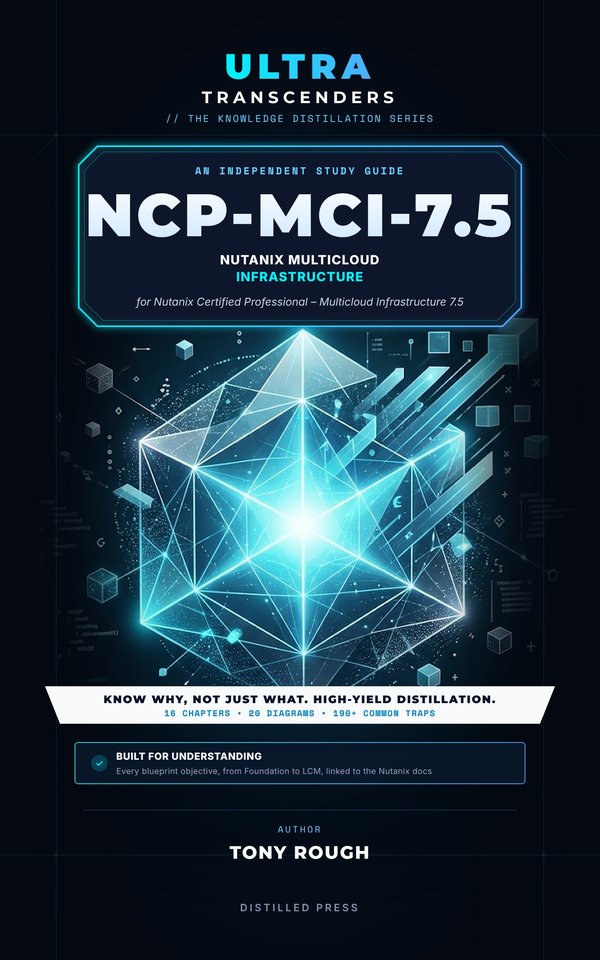
Cover of Ultra Transcenders NCP-MCI 7.5: Nutanix Multicloud Infrastructure
ULTRA TRANSCENDERS · AN INDEPENDENT STUDY GUIDE

NCP-MCI-7.5 Nutanix Multicloud Infrastructure

An independent study guide for the Nutanix Certified Professional – Multicloud Infrastructure 7.5 exam · by Tony Rough

Know which Nutanix option fits the cluster, why, and what breaks.

  • 16 chapters
  • 20 diagrams
  • 100+ common traps
  • 400+ glossary terms
Amazon.co.ukKindle: coming soonPaperback: coming soon
Amazon.comKindle: coming soonPaperback: coming soon

Due on Amazon in November 2026, in Kindle and paperback editions.

Free glossary of the book's terms

What's inside

The NCP-MCI exam isn't about remembering menus. It's about knowing which Nutanix option fits a cluster, why, and what breaks when you pick the tempting alternative.

This independent study guide for the Nutanix Certified Professional – Multicloud Infrastructure 7.5 exam turns the exam blueprint into the decisions, commands and traps that running Nutanix clusters depends on, written from the public Nutanix documentation for AOS 7.5, AHV 11.0 and Prism Central pc.7.5.

Sixteen chapters, every blueprint objective

Each chapter can be read on its own, and together they follow all four sections of the exam:

Inside

Understanding, not memorising

There are no exam questions in this book. It explains the knowledge the exam looks for, so you can reason through scenarios you have never seen and bring the same judgement to a real cluster.

Written by Tony Rough, a cloud architect with more than twenty years in IT infrastructure.

Part of the Ultra Transcenders series from Distilled Press. An independent publication, not affiliated with, sponsored by or endorsed by Nutanix, Inc. Nutanix, AOS, AHV and Prism are trademarks or registered trademarks of Nutanix, Inc.

Is this book for you?

Which certification, which book?

Exam coverage

Every skill area in Nutanix's NCP-MCI-7.5 outline, and the chapters that cover it.

Skill areaWeightChapters
Section 1: Manage Clusters in a Multicloud Environment—1, 2, 3, 4, 5, 7, 12
Section 2: Manage Workloads in a Multicloud Environment—4, 6, 7, 8, 9, 10, 12
Section 3: Perform DR and Data Protection in a Multicloud Environment—6, 11, 12, 13
Section 4: Perform Operations and Monitoring in a Multicloud Environment—4, 14, 15, 16

See every objective and where the book covers it

Chapters

  1. Deploying clusters: Foundation and node imaging
  2. Deploying and scaling Prism Central
  3. Virtual networking: switches, subnets and VPCs
  4. Cluster storage and resiliency
  5. Securing the cluster
  6. Managing virtual machines
  7. Storage containers and storage policies
  8. Workload storage and Volumes
  9. Converting workloads: Nutanix Move
  10. Securing workloads
  11. Protecting Prism Central
  12. Disaster recovery from Prism Central
  13. Disaster recovery from Prism Element
  14. Capacity planning
  15. Performance, alerts and logs
  16. Cluster maintenance: expansion, NCC, LCM and reports

Plus an appendix glossary of 400+ terms, each linked to the Nutanix Support Portal, with the same terms explained free online for print readers.

Look inside

Short excerpts from the book, exactly as they appear in it, so you can see how it explains things.

The opening of chapter 1 · Chapter 1: Deploying clusters: Foundation and node imaging

Every Nutanix cluster starts with nodes that run a supported hypervisor and AOS combination, and Foundation is the official software that gets them there. This chapter covers what to gather first, which deployment tool suits which situation, how to size the Controller VM (CVM), how imaging works and fails, and which services to configure once the cluster exists. Prism Central deployment has its own chapter, “Deploying and scaling Prism Central”.

A comparison table · Chapter 1: Deploying clusters: Foundation and node imaging · Configuration details to gather before imaging

Collect the values below before touching a node. A Foundation configuration file, created on install.nutanix.com, can hold most of these values so that others can review them and repeat runs skip manual entry. It stores configuration only: AOS and hypervisor images are still uploaded in the Foundation GUI.

Item What is needed Rule to remember
Node IP addresses Three per node: IPMI, hypervisor host, CVM All CVMs and hypervisor hosts must share one subnet
CVM addressing Static addresses DHCP is not supported for CVMs
Network values Default gateway, network mask, DNS server, NTP server DNS and NTP are recommended even for isolated or non-production clusters
Proxy IP address and port, if a proxy exists Needed when enabling Nutanix Support on the cluster
Cluster name Letters, numbers, period, hyphen, underscore only Prism shows Unnamed until one is set
Cluster virtual IP One address Essential for Hyper-V, optional for AHV and ESXi
Cluster fault tolerance Redundancy factor choice Set on the Cluster page; see “Cluster storage and resiliency”
AHV hostname Up to 64 characters: a-z, A-Z, 0-9, hyphen, period Must start and end with a letter or number
Reserved ranges 192.168.5.0/24 and 192.168.7.0/27 See below
Images AOS installer, AHV bundle or a vendor ISO AOS has not included AHV since AOS 6.8
IPMI credentials Per node or vendor defaults Standalone Foundation only

A common trap · Chapter 1: Deploying clusters: Foundation and node imaging · Configuration details to gather before imaging

Common trap: Assigning CVMs from a DHCP scope with reservations - DHCP is not supported for CVMs at all, so assign static addresses. Foundation Central nodes use DHCP for discovery, but that is a separate step, covered later in this chapter.

Sample diagrams

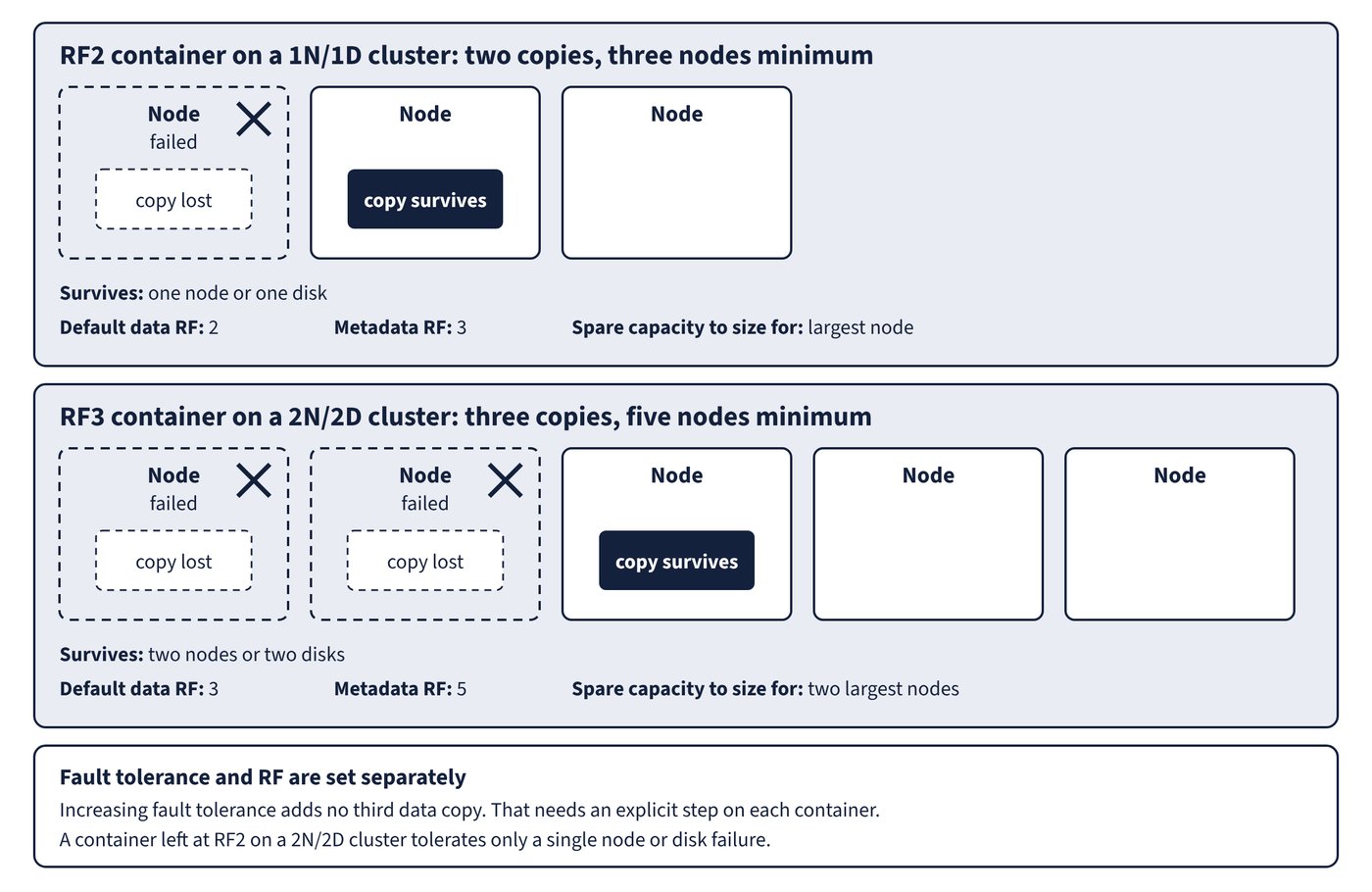
Data copies across nodes: RF2 on 1N/1D survives one failed node and RF3 on 2N/2D survives two, each with one copy left.
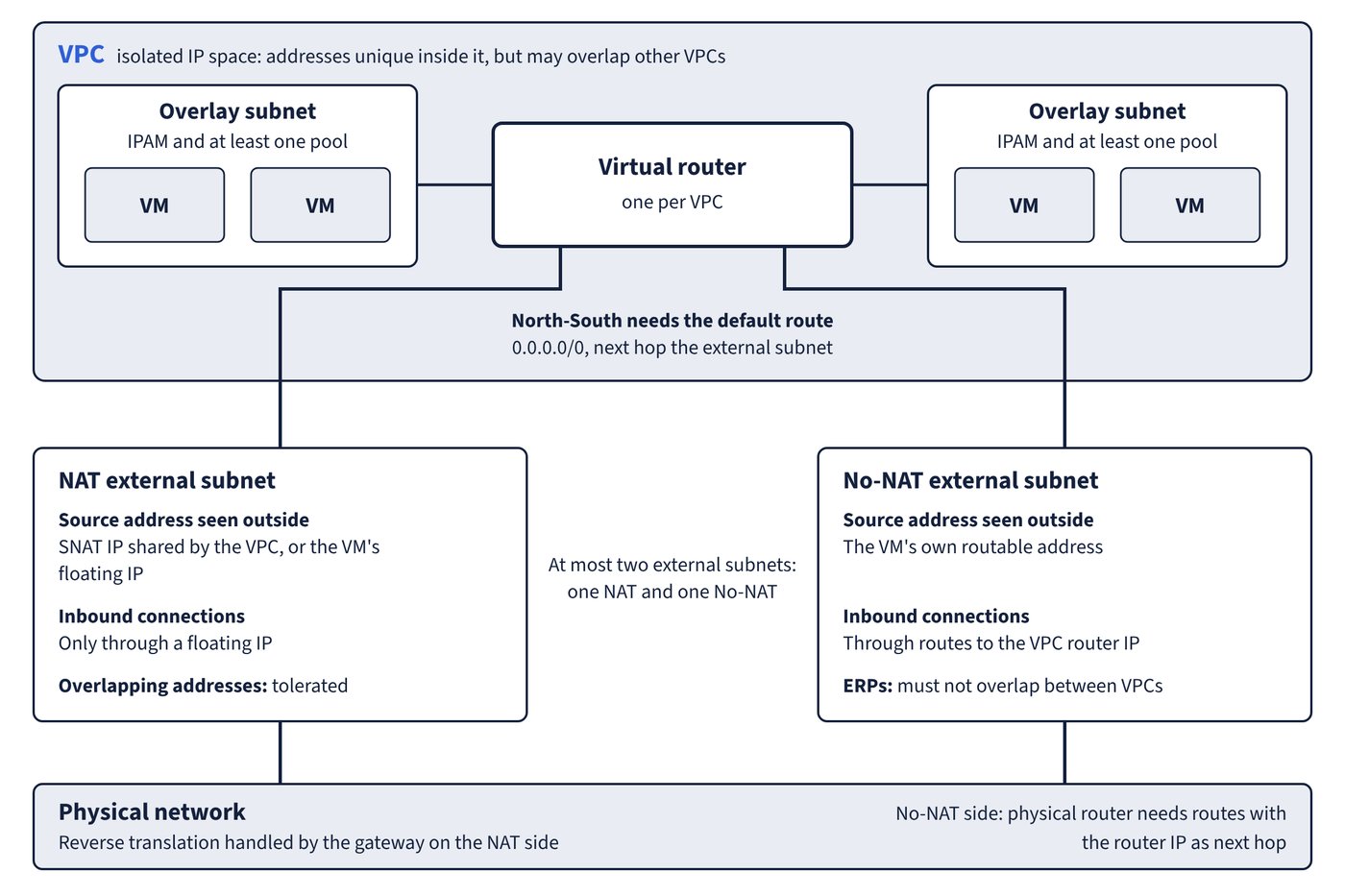
A VPC with overlay subnets on one virtual router, leaving through a NAT or a No-NAT external subnet.
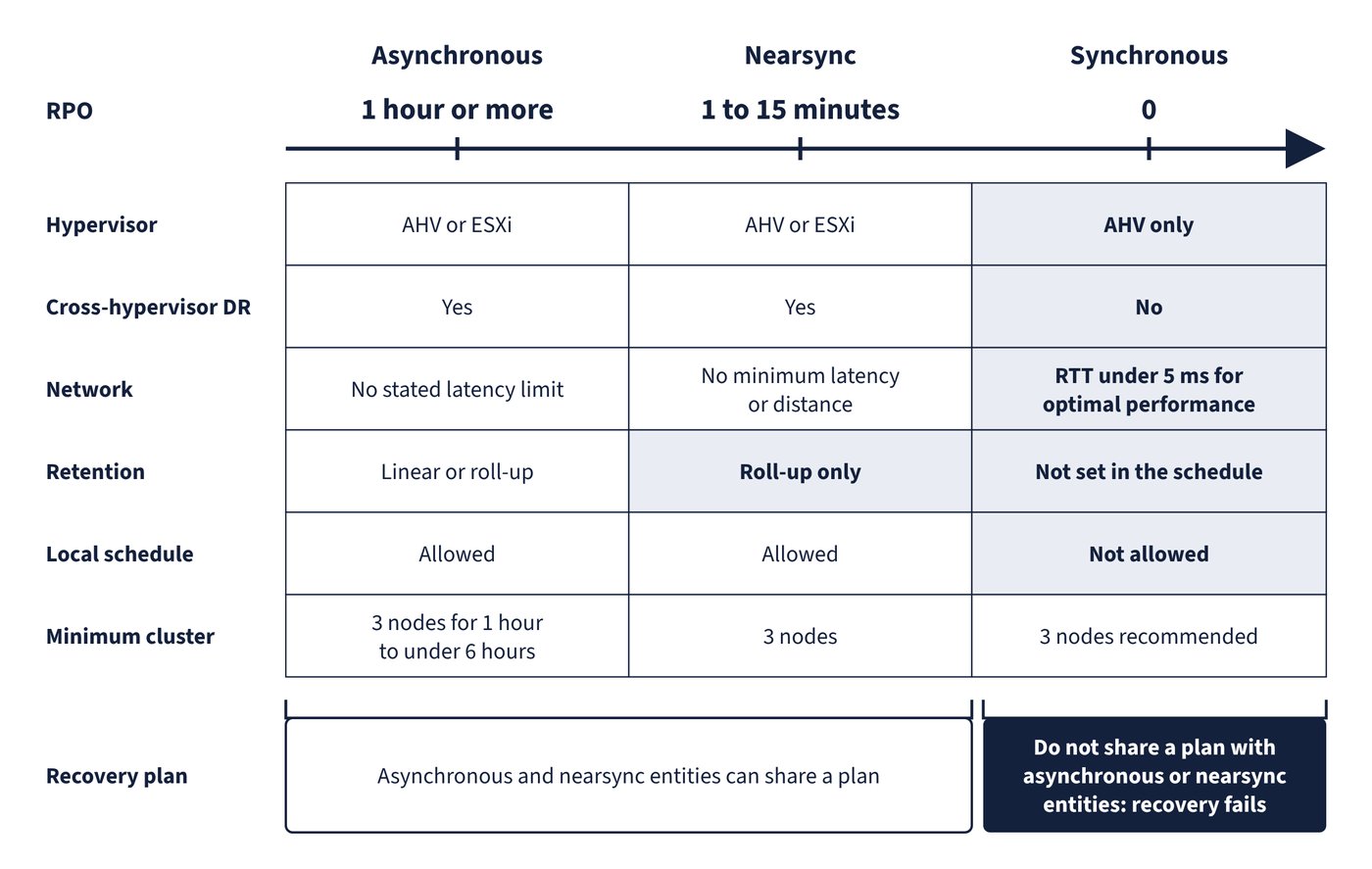
Replication schedules against RPO and requirements. Shaded cells mark where a schedule narrows the choice.

Free study notes

Some sections of the book, free to read online:

Study plan

A free week-by-week plan through the book at a 4-week or 8-week pace, with the study notes and exam skill areas for each week.

Open the NCP-MCI-7.5 study plan

Hear when NCP-MCI-7.5 comes out

An email when an Ultra Transcenders book is free on Kindle, and when a new book for NCP-MCI-7.5 comes out. Sign up and you also get the free exam-day checklist: booking, ID, the online check-in and what to expect on the day.

We'll email you to confirm first. A few emails a month at most, no spam, unsubscribe any time. The list is run by Kit; see the privacy notice.

About the author

Tony Rough is a cloud architect with more than twenty years in IT infrastructure, designing Azure platforms for UK organisations at a Microsoft partner. He holds the Azure Solutions Architect Expert, Azure Administrator and Azure Security Engineer certifications and has passed more than thirty Microsoft exams. Ultra Transcenders is the series he wished he'd had.