Replication factor counts copies of data on a container, while cluster fault tolerance states what failures the whole cluster survives. They are configured separately and do not change each other automatically.
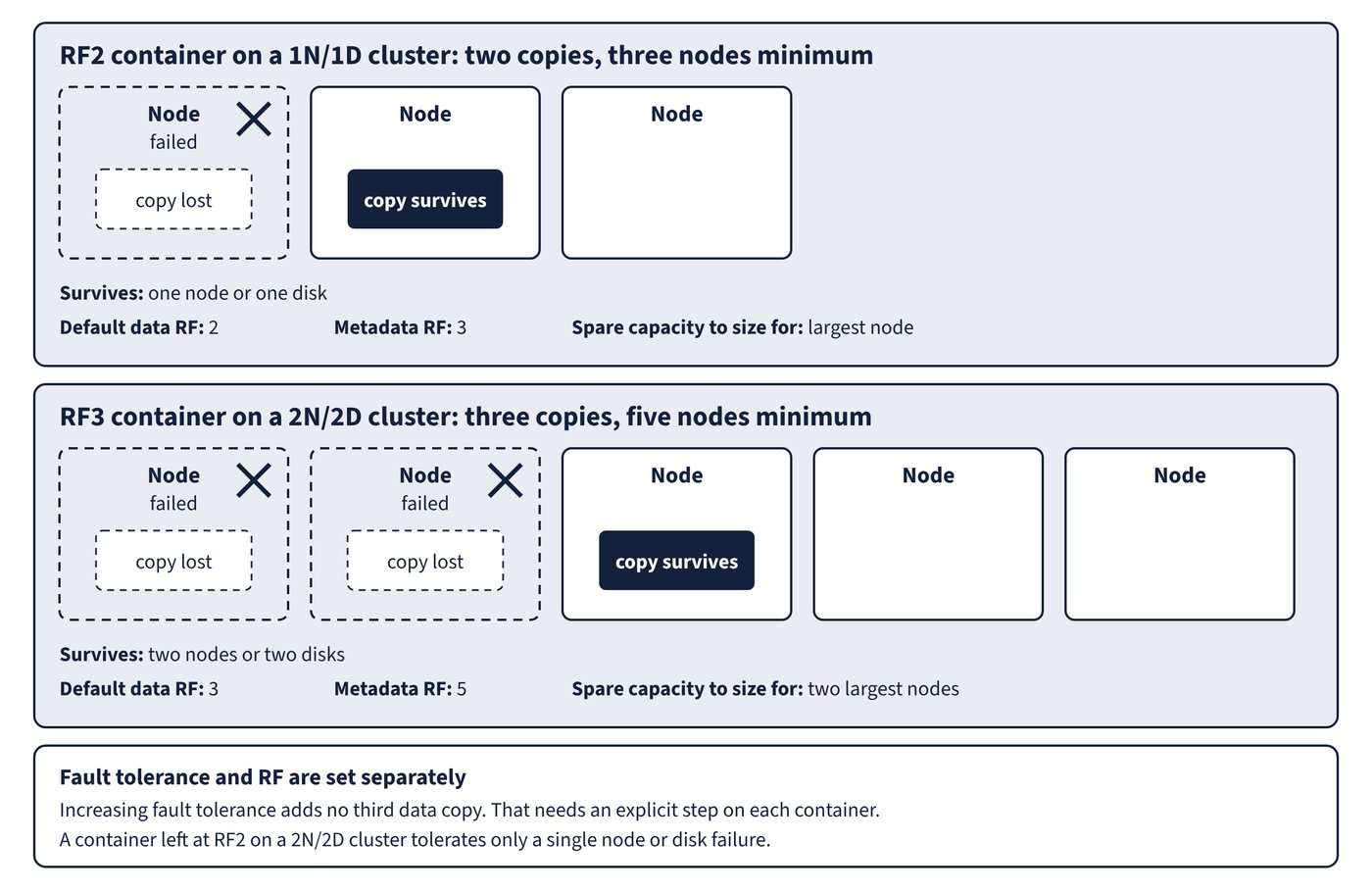
Replication factor (RF) is the number of data copies kept for a storage container. Cluster fault tolerance is the number of simultaneous disk or node failures a cluster withstands in its fault domain. Figure 4.1 shows what each default pairing survives.
| Cluster fault tolerance | Survives | Default data RF | Metadata RF | Minimum nodes | Spare capacity to size for |
|---|---|---|---|---|---|
| 1N/1D | One node or one disk | 2 | 3 | 3 | Largest node |
| 1N&1D | One node and a disk in another node, or two disks across fault domains | 3 | 3 | Exactly 3 | Largest disk on every node |
| 2N/2D | Two nodes or two disks | 3 | 5 | 5 | Two largest nodes |
A cluster’s fault tolerance is set when it is created: in Prism Central, with Foundation or Foundation Central, or with nCLI. Changing it later has narrow limits:
- It can go from 1N/1D to 2N/2D, in Prism Element under Settings > Data Resiliency > Cluster Fault Tolerance, with at least five nodes (and five blocks if block fault tolerance is also enabled).
- It can never be reduced, and a 1N&1D cluster cannot be increased.
- 1N/1D cannot become 1N&1D, because 1N&1D must be chosen at creation.
- The change might need at least 30 percent of disk space and can take a few hours, since metadata must be replicated across the Cassandra ring.
Increasing fault tolerance adds no third data copy. That requires an explicit step on each container, including system containers.
ncli> ctr list
ncli> ctr edit name=storage_container_name rf=3
ncli> ctr edit name=NutanixManagementShare rf=3 force=true
Confirm in the Cluster Resiliency / Fault Tolerance Status widget: Failures Tolerable for Extent Group reaches 2.
Common trap: Assuming 2N/2D means every container now keeps three copies - fault tolerance and RF are separate, so no container has a third copy until its RF is raised to 3. A container left at RF2 tolerates only a single node or disk failure.
An RF cannot be modified on a container in a 1N/1D cluster until fault tolerance is raised. In a 1N&1D or 2N/2D cluster it can be set down to 2, at the cost of tolerating one failure only on that container, which is why Nutanix recommends keeping 3.
Adaptive replication on 1N&1D
1N&1D suits a three-node cluster that needs replication factor 3. While a node is down, for failure or maintenance, containers temporarily drop to RF2 and writes complete with two copies. When the node returns, the third copies are regenerated. A node failure does not start an immediate rebuild, so the cluster can run with no spare capacity for a node; a disk failure does rebuild.
| 1N&1D limitation | Detail |
|---|---|
| Node count | Exactly three |
| Platforms | Not on Hyper-V or Nutanix Cloud Clusters |
| Data reduction | No erasure coding or deduplication |
| Node types | No compute-only or storage-only nodes |
| Storage policies | Not recommended; recovery from RF2 to RF3 takes significantly longer |
Common trap: Planning to grow a 1N&1D cluster to four or five nodes - the setting requires exactly three nodes, and it cannot be increased afterwards. Pick 1N/1D if growth is expected.
RF per entity through storage policies
A storage policy in Prism Central can apply RF 2 or 3 to VMs and volume groups, not RF 1. It is not supported for entities on containers with erasure coding. If the policy’s RF is higher than the cluster’s fault tolerance supports, for example RF3 on a 1N/1D cluster, the RF setting is not applied and the entity shows Realized but Non-compliant. Data shared between an RF2 VM and an RF3 VM keeps three copies, and clones inherit the category and its policy.