Content Libraries hold VM templates, OVF templates and other files such as ISO images and scripts, and share them between vCenter instances. Most decisions concern the library type, the template type and which side drives distribution.
Library types
| Library | Created where | Content | Distribution |
|---|---|---|---|
| Local library | One vCenter instance | Added by import, cloning or upload | Visible only in its own vCenter unless publishing is enabled (optionally with a password) |
| Published local library | Local library with Enable publishing | As above | Others subscribe by URL |
| Publisher library | Published library that has subscriptions | As above | The publisher’s administrator pushes items to chosen subscribers |
| Subscribed library | Same or another vCenter | Read-only copy of a published library | Synchronises automatically at intervals or on demand; nothing can be added locally |
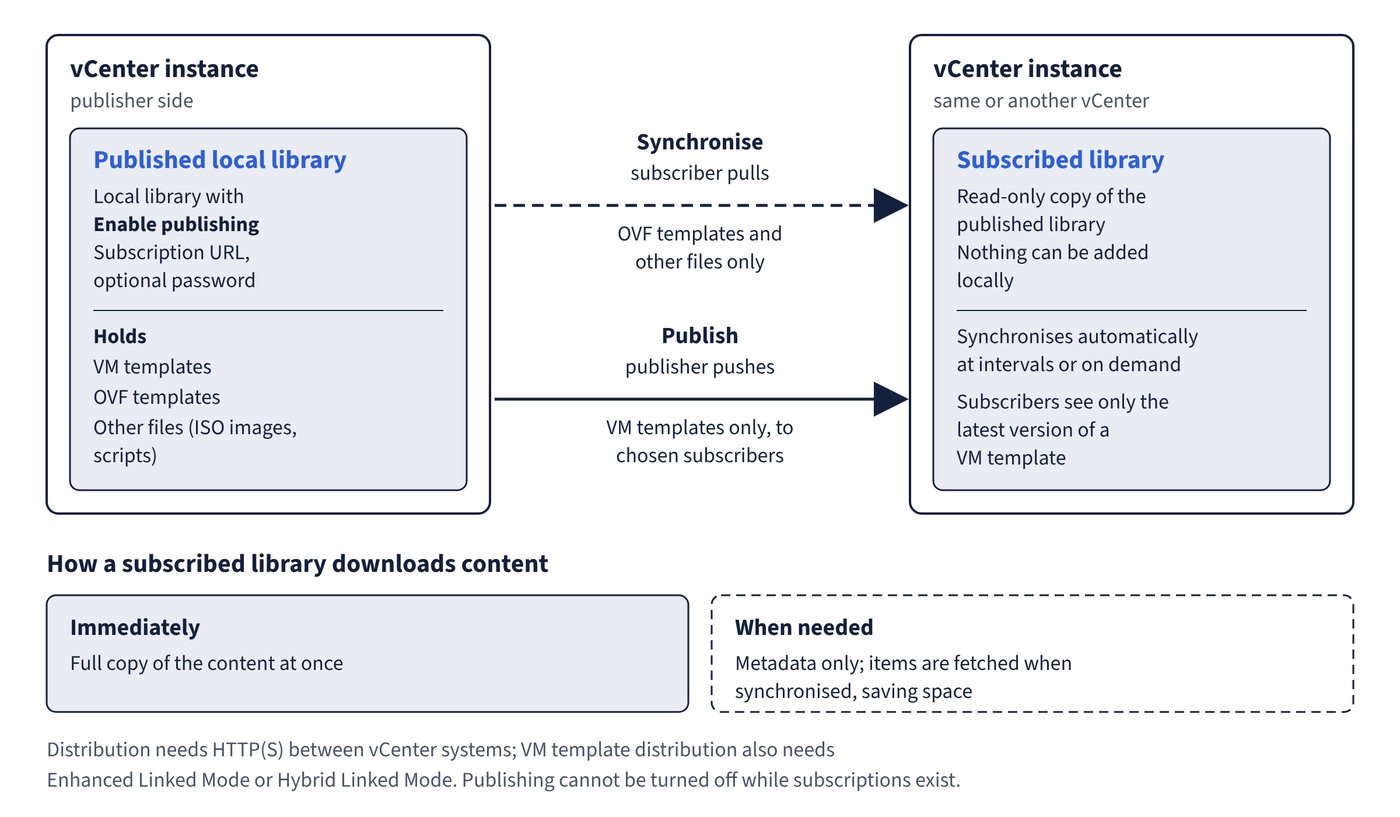
A subscribed library downloads content immediately (full copy at once) or when needed (metadata only; items are fetched when synchronised, saving space). Publishing cannot be turned off while subscriptions exist. Distribution needs HTTP(S) between vCenter systems, and VM template distribution also needs Enhanced Linked Mode or Hybrid Linked Mode. Figure 5.1 shows which side moves which kind of item.
VM templates versus OVF templates
| Property | VM template | OVF template |
|---|---|---|
| Backing | A VM template in the vCenter inventory | Files on the library’s datastore |
| Datastore | Any datastore the user can use, but not a library on NFS or SMB storage | Only the library’s datastore |
| Host association | Yes; moved automatically if the host becomes inaccessible | No; must be moved manually if host or datastore is lost |
| Storage DRS | Supported | Not supported |
| Encryption | Can be an encrypted template | Cannot be encrypted (an encrypted VM can still be deployed from one) |
| Cross-vendor use, software licence agreement | Not supported | Supported |
| Deployment customisation | Hardware and guest OS | Guest OS only |
| Update, export, clone item | Not available | Available |
| vApps | Not applicable | vApps always become OVF templates |
A VM template item and its inventory template are linked: renaming or deleting either affects both.
Distribution rules that catch people out
- Publishing replicates only VM templates. Publishing a whole library that also holds OVF templates and files sends just the VM templates.
- Subscriber synchronisation pulls only OVF templates and other files. VM templates reach a subscriber only when the publisher publishes them.
- A single VM template can be published to selected subscribers instead of the whole library.
Versioning: check out and check in
Check out creates an editable VM from a VM template; others can still deploy the current version meanwhile. Check in needs the VM powered off or suspended and creates a new version on the Versioning tab timeline, from which earlier versions can be reverted to or deleted. Subscribers see only the latest version. vCenter 9.0 can migrate a whole library to another datastore while keeping its identifiers, so subscriptions keep working.
Security and permissions
An OVF default security policy validates OVF/OVA items against signing certificates.
Content libraries are children of the global root, not of the vCenter object. A permission set on vCenter and propagated does not reach them, there is no Permissions tab on a library, and individual libraries or items cannot carry separate permissions. The sample Content Library Administrator role assigned as a global permission is the documented way to delegate library management.
Common trap: Granting a user the Administrator role on the vCenter object and expecting them to see its libraries - that user has enough privileges but sees zero libraries until given at least Read-Only as a global permission, because libraries inherit only from the global root.