The core design choice is whether a host’s networking is configured host by host or once, centrally, in vCenter.
How each switch is built
Every vSphere switch has a data plane (packet switching, filtering, tagging) and a management plane (the configuration). A vSphere Standard Switch holds both planes on the host, so each host’s switches are created and maintained separately and a change on one host does nothing to the others. A vSphere Distributed Switch splits the planes: the management plane sits in vCenter at the data center level, and the data plane runs locally on every associated host as the host proxy switch. Configuration made in vCenter is pushed down to all host proxy switches automatically, which keeps networking identical as VMs move between hosts.
The distributed switch adds two abstractions. The uplink port group is defined when the switch is created and holds one or more uplinks; an uplink is a template to which each host maps a physical NIC, and teaming and failover policy set on the uplinks reaches every host. The distributed port group carries VM and VMkernel traffic, and its network label must be unique within the data center. A standard port group’s label, by contrast, only has to be unique on its host; giving port groups the same label on every host that shares a broadcast domain is what keeps VM network configuration portable. Figure 7.1 shows the two switch types side by side.
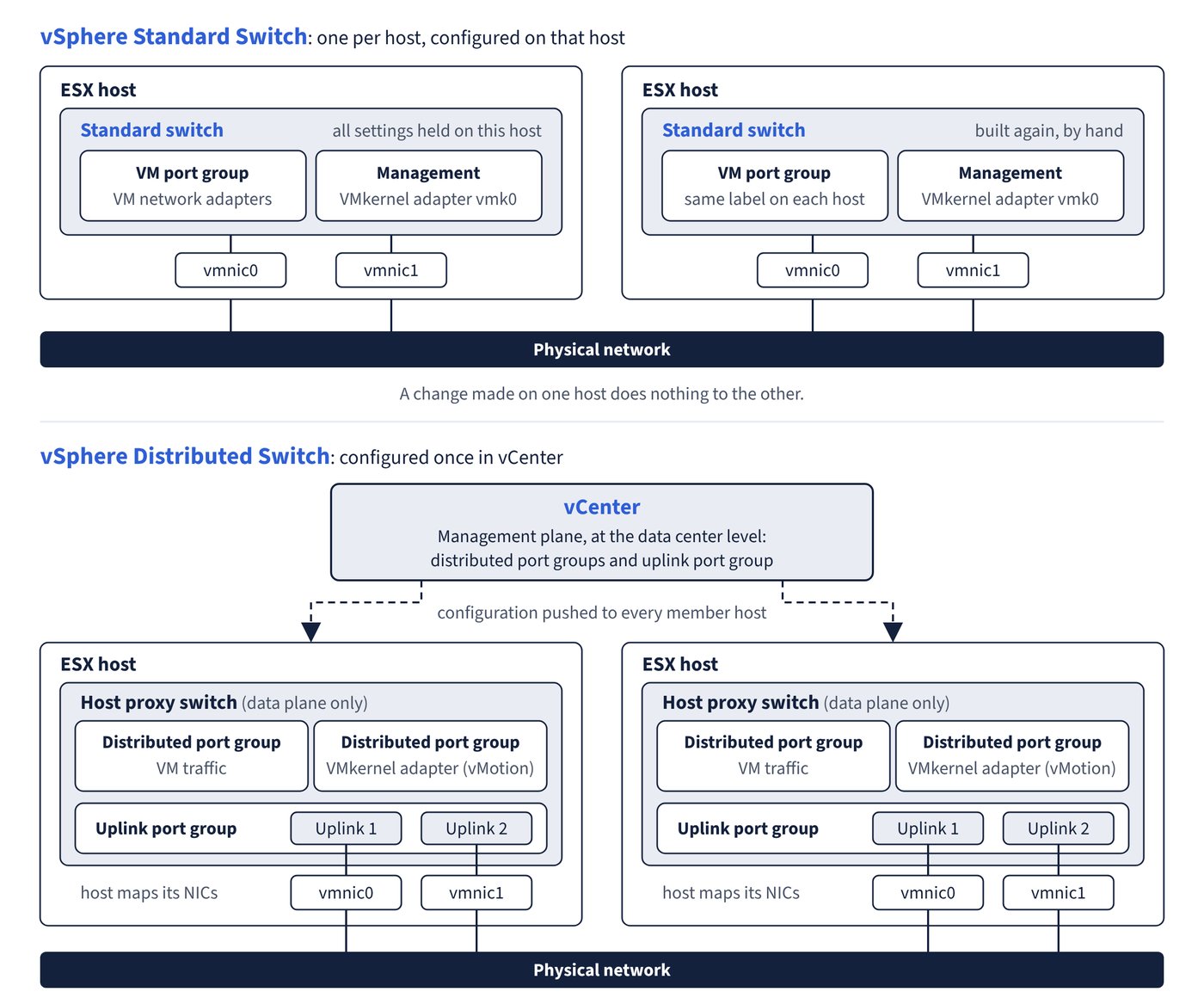
Ports scale automatically in both switch types: a switch (or proxy switch) grows up to the maximum ports the host supports, which is derived from the maximum number of VMs the host can run.
Comparison
| Aspect | vSphere Standard Switch | vSphere Distributed Switch |
|---|---|---|
| Scope | One host | All associated hosts in a data center |
| Where configured | Each host (vSphere Client host view, Host Client) | vCenter, Networking view |
| Created by default | Yes: ESX installation creates a standard switch with the management VMkernel adapter | No |
| Label uniqueness | Per host | Per data center |
| Policy levels | Switch, overridden per port group | Distributed port group or uplink port group, overridden per port |
| Teaming, security, traffic shaping, VLAN policies | Yes | Yes |
| Traffic shaping direction | Outbound (egress) only | Inbound and outbound |
| Route based on physical NIC load | No | Yes |
| NetFlow (monitoring policy), traffic filtering and marking, port blocking, resource allocation | No | Yes |
| Network I/O Control, LACP, private VLANs, port mirroring, health check | No | Yes |
| Discovery protocols | CDP | CDP and LLDP |
| Permissions on the switch object | Cannot be set | Can be set (switch must be in a network folder to propagate to children) |
| Configuration backup and restore | No | Export, import and restore of switch and port group configuration |
Common trap: Planning Network I/O Control, LACP or private VLANs on a standard switch - these are distributed switch features; the fix is to migrate host networking to a vSphere Distributed Switch first.
Distributed switch versions
The switch version chosen at creation (7.0.0 to 9.0.0 in vCenter 9.0) sets the minimum ESX version of member hosts; 9.0.0 adds the Industrial vSwitch and 7.0.2 adds LACP fast mode, for example. Upgrading to 9.0.0 needs vCenter 9.0 and every member host on ESX 9.0, and the documentation advises exporting the switch configuration first. The upgrade is one-way: the switch cannot be reverted, and hosts older than the new version can no longer join.
Two creation-time options restrict the switch later. The Industrial vSwitch (for real-time industrial traffic) can be enabled only on a new switch and disables Network I/O Control, port mirroring, IPFIX and health checks, among others. Choosing a DPU for Network Offloads Compatibility (Pensando or NVIDIA BlueField) disables Network I/O Control and rules out traffic shaping, traffic filtering and network resource pools.