vSAN pools the local devices of the ESX hosts in a cluster into one shared, object-based datastore that supports HA, vMotion and DRS without external shared storage. vSAN 9.0 offers two architectures, and the choice is largely made by the hardware.
vSAN ESA versus vSAN OSA
| vSAN Express Storage Architecture (ESA) | vSAN Original Storage Architecture (OSA) | |
|---|---|---|
| Device grouping | One storage pool per host; every device provides cache and capacity | Disk groups, each pairing one flash cache device with one to seven capacity devices; at most five per host, so 35 capacity devices |
| Supported media | NVMe TLC flash, from the ESA list in the Broadcom Compatibility Guide | SAS/SATA SSD or PCIe flash cache; flash (all-flash) or magnetic (hybrid) capacity |
| Storage controller | Not used (NVMe only) | HBA or RAID controller in passthrough or RAID 0 mode |
| Minimum host memory | 128 GB | 32 GB (for 5 disk groups of 7 devices) |
| Minimum CPU | 16 cores per host | Not specified |
| Network | 10 GbE minimum, 25 GbE or faster recommended | 1 GbE dedicated (hybrid); 10 GbE (all-flash) |
| Effect of a device failure | Only that device; smaller failure domain | A cache device or controller failure takes out the disk group |
| Compression | On by default, per object through policy | Cluster setting, all-flash only, per disk group |
| Deduplication | Not available | With compression, all-flash only, per disk group |
| Checksum | Always on | On by default, can be disabled per policy |
| Snapshots | Disk and snapshots in one object, no delta objects | Snapshots are separate objects |
| vSAN storage cluster (disaggregated) | Supported | Not supported |
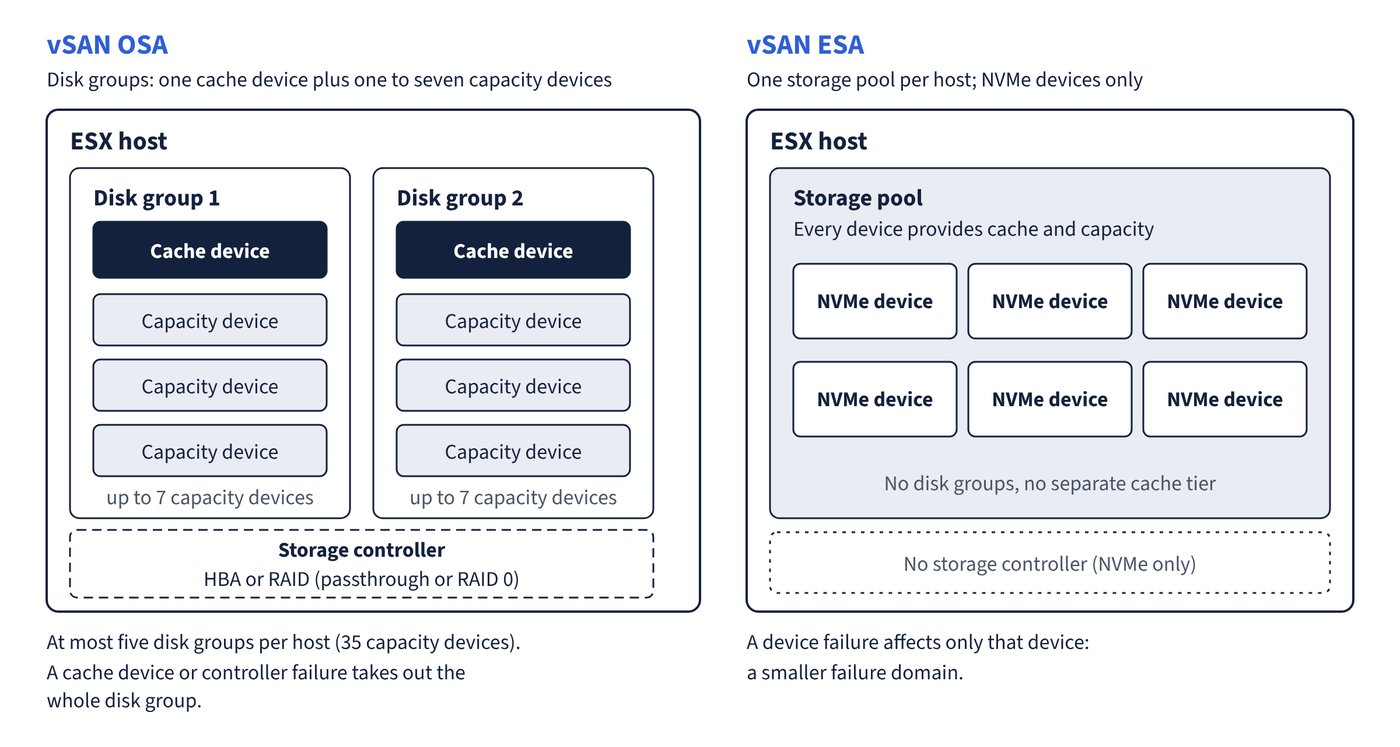
When vSAN is enabled and the hardware is compatible with ESA, ESA is enabled automatically. Datastore sharing never crosses architectures: a client cluster with an OSA datastore mounted cannot add an ESA one. Figure 6.1 compares how each architecture groups a host’s devices.
vSAN in VVF licensing
Starting with version 9.0, vSAN is licensed automatically through the vCenter instance it is connected to; vSAN is no longer licensed manually. A VMware vSphere Foundation licence includes 0.25 TiB of vSAN capacity per licensed physical core in the vSAN hosts (with the usual 16-core-per-CPU minimum), so three single-CPU hosts with 8 cores each count as 48 cores and receive 12 TiB. Extra capacity is bought as vSAN TiB add-on licences that pool with the included amount. vSAN witness appliances need no licence. Licence assignment itself is covered in “Identity, RBAC, licensing and certificates”.
Common trap: Planning a vSAN storage cluster (formerly vSAN Max) with a standard VVF subscription - the documentation states that a vSAN storage cluster is deployed by purchasing VCF or by acquiring the advanced add-on offer for VVF, and that it runs only on ESA. Standard VVF covers vSAN HCI clusters.