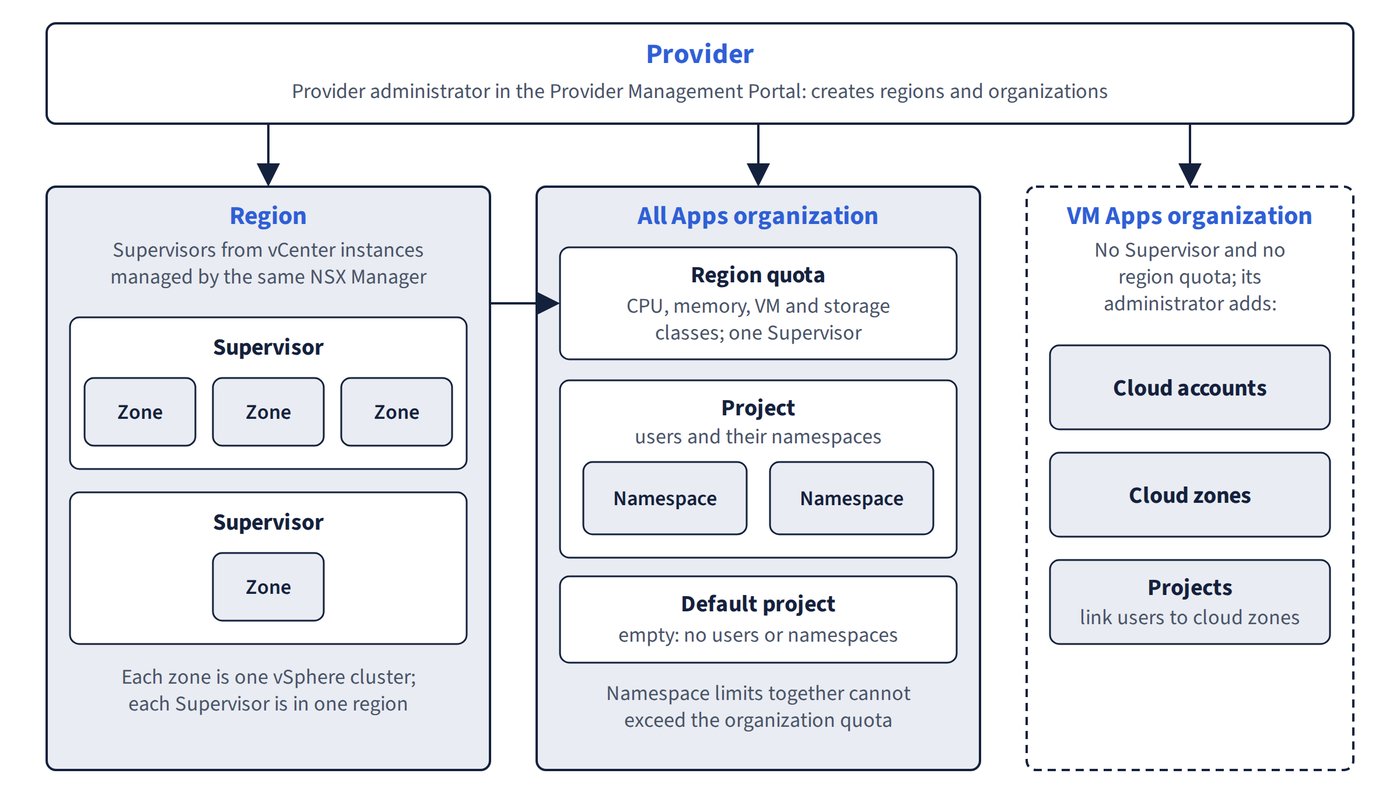
An organization is the top-level tenant boundary: a line of business or customer with its own portal, identity sources, users, resources, policies and catalog. The provider chooses an organization type when creating it. Figure 12.1 shows how regions, quotas and the two organization types fit together.
| Attribute | All Apps organization | VM Apps organization | Provider Consumption Organization (PCO) |
|---|---|---|---|
| Purpose | Primary multi-tenancy model for VMs, Kubernetes and built-in cloud services | Continuity for existing Aria Automation users provisioning VM-based applications | Provider’s own consumption and content sharing |
| Infrastructure | vSphere Supervisor, allocated by the provider through region quotas | vSphere cluster capabilities; no Supervisor, shared infrastructure or tenancy isolation; the organization administrator adds cloud accounts, cloud zones, profiles and mappings | Same as All Apps |
| How many | Many | Only one can be created in the Provider Management Portal; upgraded 8.x tenants appear as multiple VM Apps organizations | One, enabled by the Provider Consumption Org feature flag |
| Prerequisite | Supervisor enabled | Classic Tenant Creation feature flag; no existing VM Apps organization | Feature flag only |
| Extras | Region networking, VPCs, namespaces | Assembler, Service Broker and Orchestrator style roles; cloud templates | Embedded VCF Operations orchestrator; can publish blueprints, workflows and catalog items to other organizations; no access to the Provider Management Portal |
Creating an All Apps organization
- Provider Management Portal > Infrastructure > Organizations > Create Organization, select Organization for All Apps.
- Enter the name, which forms the organization’s URL. After Create and Continue the creation cannot be cancelled; an organization must be deactivated before it can be deleted.
- Select a region and Supervisor, then add zones with CPU and memory limits and reservations.
- Select VM classes and storage classes.
- Add the single first user, usually with the Organization Administrator role. The password needs at least 15 characters with lower case, upper case, number and special character. The first user logs in and connects the organization to its identity provider.
- Configure the organization’s regional networking (next section).
When upgrading from Aria Automation 8.x, existing organizations map automatically to VM Apps organizations, and VMware Identity Manager continues to be managed by VMware Aria Suite Lifecycle for legacy authentication.
Common trap: Expecting the Quick Start to finish onboarding a tenant - it creates the organization, region, quota and networking but no users, and it can be used only once.