An agent (Azure Pipelines) or runner (GitHub Actions) is a machine with agent software that runs one job at a time; the options trade convenience against control, network reach and cost. Figure 7.1 turns these trade-offs into two questions.
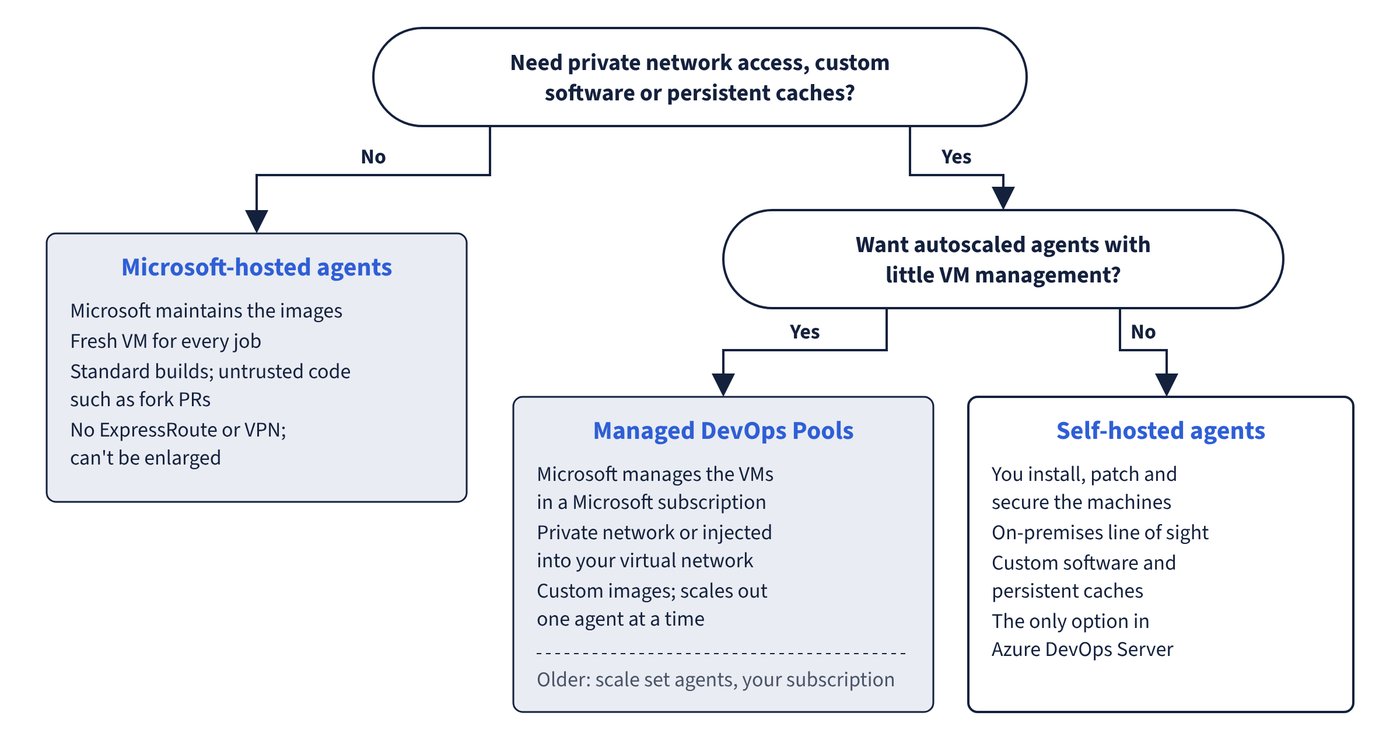
Azure Pipelines agent types
| Agent type | Who manages it | Choose when | Limits and notes |
|---|---|---|---|
| Microsoft-hosted agents | Microsoft | Standard builds, untrusted code such as fork PRs | Fresh VM per job; Standard_DS2_v2 (2 cores, 7 GB RAM, 14 GB SSD, at least 10 GB free for sources and outputs; Linux steps run in a cgroup with 6 GB of physical memory); images updated regularly; no ExpressRoute or VPN; can’t be enlarged |
| GitHub-hosted agents (preview) | Microsoft, on GitHub’s larger-runner infrastructure | Bigger machines (8 or 16 cores, macOS arm64) without managing VMs | Pay-as-you-go per minute, no free tier, separate from parallel jobs; enabled in billing settings, creates a GitHub-hosted agents pool; limited to eight agents per SKU during preview |
| Self-hosted agents | You | Custom software, persistent caches, on-premises line of sight | Windows, Linux, macOS or Docker; one agent per machine recommended; the only option in Azure DevOps Server |
| Azure Virtual Machine Scale Sets agents | You (VMs in your subscription), scaled by Azure Pipelines | Autoscaled self-hosted agents | Microsoft now recommends Managed DevOps Pools instead |
| Managed DevOps Pools | Microsoft (VMs in a Microsoft subscription) | Autoscaled, custom-image or private-network agents with little management | Successor to scale set agents; managed in the Azure portal |
Microsoft-hosted images are chosen with the vmImage label. Current labels:
| Label | Image |
|---|---|
ubuntu-latest / ubuntu-24.04 |
Ubuntu 24.04 (default when no pool is given) |
ubuntu-22.04, ubuntu-26.04 |
Ubuntu 22.04, Ubuntu 26.04 |
windows-latest / windows-2025 |
Windows Server 2025 with Visual Studio 2022 |
windows-2025-vs2026, windows-2022 |
Windows Server 2025 with Visual Studio 2026, Windows Server 2022 |
macOS-latest / macOS-15 |
macOS 15 Sequoia |
macOS-26, macOS-14 |
macOS 26 Tahoe, macOS 14 Sonoma (deprecation schedule started July 2026) |
The Windows Server 2019 image was retired on 31 December 2025, Ubuntu 20.04 and macOS 13 are retired, and the legacy named pools that older examples show (such as Hosted VS2017 or Hosted Ubuntu 1604) aren’t in the current image table: use the Azure Pipelines pool with a vmImage label. macOS agents always run in the US; Windows and Linux agents run in any region of the organisation’s geography. Hosted agents can’t be identified by service tag: firewall rules must allow the published weekly IP ranges for every region in the geography (macOS ranges come from GitHub’s metadata API). Hosted images also don’t meet CIS hardening benchmarks.
Managed DevOps Pools compared with scale set agents
| Feature | Managed DevOps Pools | Scale set agents |
|---|---|---|
| Where VMs run | Microsoft-owned subscription | Your subscription |
| Scale-out granularity | One agent at a time | Percentage of maximum size (can leave billed idle agents) |
| Pool size | Thousands of agents | Hundreds |
| Images | Azure Pipelines images (same as Microsoft-hosted), selected Marketplace images, Azure Compute Gallery images; several images per pool | One Marketplace or custom image |
| Standby agents | Flexible schedules or automatic | Single standby count |
| Quota | Dedicated to the service | Shared Compute quota |
| Organisations | Can serve several organisations, optionally restricted to projects | One organisation |
| Networking | Private network or inject into your virtual network; proxy support | Join or create a virtual network |
| Other | Stateless or stateful agents (state kept up to 7 days), jobs up to two days, Key Vault certificates at provisioning, data disks | VMSS extension scripts |
| Pricing | Self-hosted parallel jobs plus the Azure resources; VM reservations can’t be used | Same model |
GitHub Actions runner types
| Runner | Availability | Notes |
|---|---|---|
| GitHub-hosted standard runners | All plans | Fresh VM per job (except the single-CPU ubuntu-slim container runner, 15-minute job limit); private repos get 2 vCPU/8 GB Linux and Windows runners, public repos 4 vCPU/16 GB; macOS arm64 (macos-latest) has 3 vCPU/7 GB; labels such as ubuntu-latest, windows-latest, macos-latest, ubuntu-24.04-arm, windows-11-arm; passwordless sudo on Linux and macOS |
| Larger runners | GitHub Team and GitHub Enterprise Cloud | More CPU, RAM and disk, GPU options, autoscaling, runner groups; static IP addresses, custom images and Azure private networking on Linux and Windows only; always billed per minute, never from included minutes |
| Self-hosted runners | Repository, organisation or enterprise level | Free of Actions minutes; you patch and secure the machine |
| Actions Runner Controller (ARC) | Kubernetes clusters you run | GitHub-maintained Kubernetes operator installed with Helm charts (gha-runner-scale-set-controller, gha-runner-scale-set); autoscaling runner scale sets of ephemeral container runners targeted by scale set name in runs-on |
GitHub doesn’t recommend allowlisting standard hosted runner IP addresses for internal resources; use larger runners with static IPs, Azure private networking or self-hosted runners.
Common trap: Trying to connect Microsoft-hosted agents to a corporate network over ExpressRoute or VPN - this isn’t possible; traffic goes over the public internet, so private targets need self-hosted agents, scale set agents or Managed DevOps Pools injected into a virtual network.