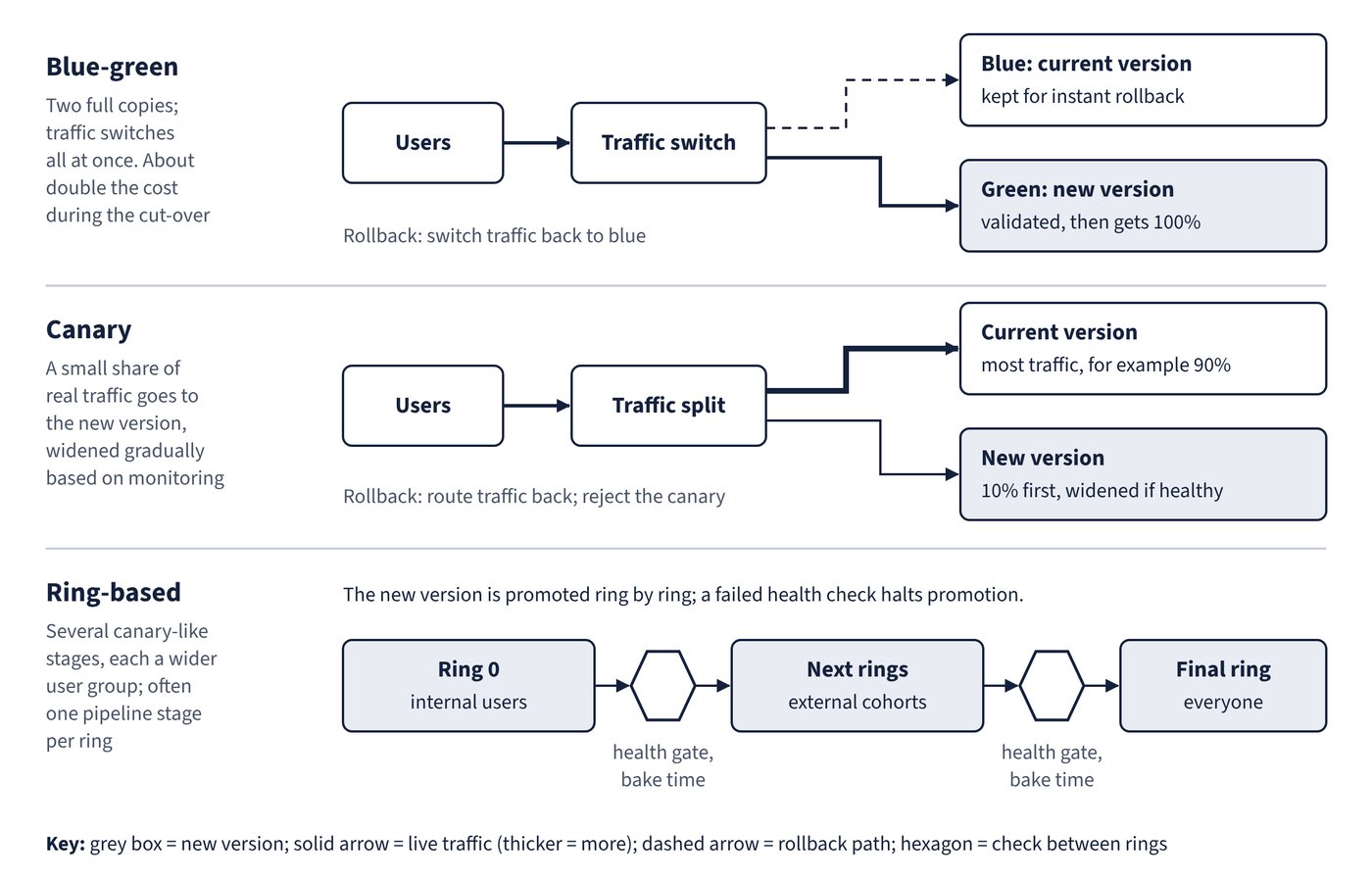
Every release pattern trades cost and complexity for a smaller blast radius. Microsoft calls the family of techniques progressive exposure or “controlling the blast radius”: a release is shown first to the audience with the highest tolerance for risk and widens only as it proves itself. Figure 9.1 contrasts how traffic moves in blue-green, canary and ring-based deployment.
| Strategy | How it works | Exposure control | Rollback | Typical Azure mechanism |
|---|---|---|---|---|
| Rolling update | New instances replace old ones in batches; new instances take traffic as soon as they are ready | By instance, not by user; old and new versions serve traffic together | Redeploy previous version | Kubernetes Deployment default; Azure Pipelines rolling strategy for VMs |
| Blue-green | Full new environment (green) is deployed beside the live one (blue), validated, then traffic switches | All or nothing at the switch (can be stepped with weights) | Switch traffic back to blue | App Service slot swap; Container Apps revisions with labels; Kubernetes service selector |
| Canary | New version goes to a small subset of clients or servers, monitored, then widened | Percentage of traffic or pods | Route traffic back; reject the canary | Container Apps traffic splitting; KubernetesManifest@1 canary; App Service Traffic % |
| Ring-based (progressive exposure) | Several canary-like stages, each a wider user cohort (ring 0 internal users, then external cohorts, then everyone) | Ring membership, often one pipeline stage per ring | Halt promotion; redeploy previous version to affected rings | Multi-stage pipeline with checks between ring stages |
| Feature flags | Code ships dark and is switched on at runtime per user, group or percentage | Runtime configuration, down to an individual user | Turn the flag off; no redeployment | Azure App Configuration feature manager |
| A/B testing | Two or more variants run concurrently with randomised cohorts; results are compared statistically against a goal | Allocation per variant | Allocate all users to the winning variant | App Configuration variant (Experiment) flags; Container Apps traffic splitting |
| Dark launching | New functionality runs in production without users being told, or without being visible, to collect telemetry | Hidden; small cohort or shadow execution | Disable the dormant feature | Feature flags or canary infrastructure |
A few distinctions that matter when picking a pattern:
- Blue-green deployment runs two full copies, so it costs roughly double during the cut-over; the CI/CD for microservices guidance notes that on Kubernetes you temporarily run twice as many pods. Its advantage is an instant, clean rollback.
- Canary release is more complex than blue-green or rolling because requests must be routed dynamically between versions. On plain Kubernetes, traffic follows the replica ratio, so with ten replicas you can only shift in 10% steps; a service mesh or Container Apps traffic splitting gives finer control.
- Ring-based deployment extends canary with multiple graduated stages. In a pipeline, rings are usually separate stages with automated promotion criteria and post-deployment health gates; a failed health check halts promotion before the next ring is touched.
- Feature flags decouple deployment from exposure: code can merge to
mainand deploy while the feature stays off, which is why they pair naturally with trunk-based development (Chapter 3, Branching strategies and pull request workflows). - Dark launching differs from canary in its objective. Canary validates the back end under real load; dark launching focuses on user behaviour or shadow execution without explicit visibility, and is implemented with the same canary and feature-toggle techniques.
Microsoft’s safe deployment guidance adds two operating principles: allow bake time between tiers (a 24-hour day is generally enough to expose latent bugs, and it should include a peak-usage period), and deploy during working hours, early in the day and week, so the people who can fix problems are available.
Common trap: Treating blue-green and canary as the same thing because both run two versions - blue-green validates the new environment and then switches traffic (typically all at once), whereas canary deliberately sends a small share of real traffic to the new version and widens it gradually based on monitoring.