Large files hurt Git whether they’re text or binary, and most of all when they change often: delta compression stops working and Git stores nearly a full copy of every version, which every clone then downloads. The first decision is where each kind of file belongs.
Where each type of file belongs
| Content | Store in | Reason |
|---|---|---|
| Source code, scripts, text, structured data (JSON) | Git | Diffs and compresses well |
| Dependencies, libraries, reusable packages | Azure Artifacts or another package manager | Versioned, installed at build or deploy time |
| Build outputs, logs, traces, diagnostic data | Neither; publish as pipeline artifacts or share elsewhere | Generated content bloats history |
| Small, rarely changed binaries (icons, web images) | Git | Keeps one workflow; little growth |
| Large binaries that change often and don’t diff (video, audio, game maps) | Git LFS | Keeps full contents out of every clone |
Even small binaries cause problems if updated often: 100 changes to a 100 KB file use as much storage as 10 changes to a 1 MB file. Microsoft also advises not committing compressed archives (commit the uncompressed, diffable sources) and not moving many small files into LFS, which doesn’t help performance and can make it worse.
How Git LFS works
Git Large File Storage (LFS) stores a small pointer file in the repository and keeps the binary content in separate remote storage, downloading the right version on clone or checkout. The pointer has three lines: Figure 4.1 shows what a clone fetches with and without the LFS client.
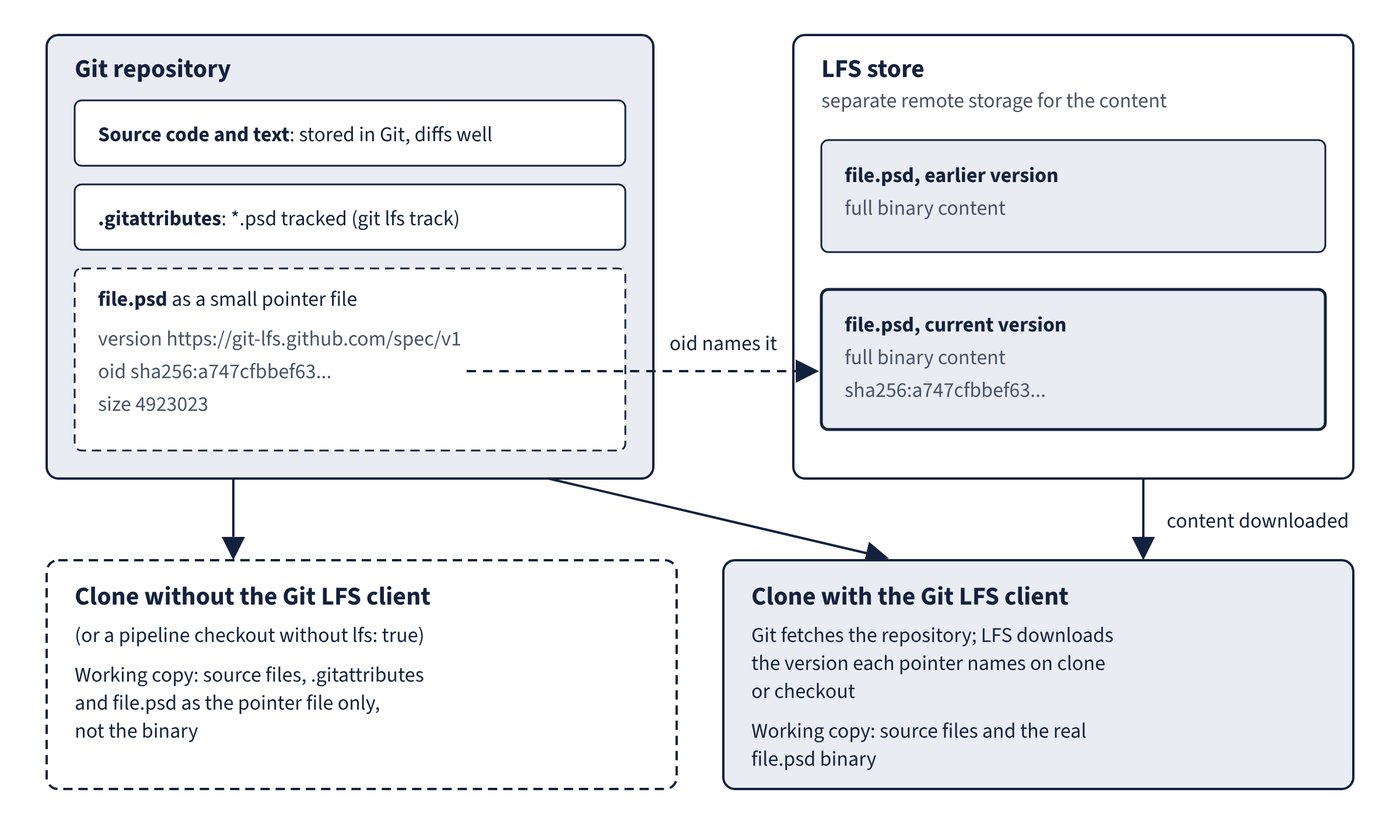
version https://git-lfs.github.com/spec/v1
oid sha256:a747cfbbef63fc0a3f5ffca332ae486ee7bf77c1d1b9b2de02e261ef97d085fe
size 4923023
Tracking is configured per file pattern with git lfs track, which writes the pattern into .gitattributes. Commit .gitattributes to the repository so forks and fresh clones use the same tracking:
git lfs track "*.psd"
git add .gitattributes path/to/file.psd
git commit -m "Track PSD files with Git LFS"
git push
Existing large files already in history must be removed from the repository and re-added through LFS; tracking a pattern doesn’t rewrite past commits.
Limitations and platform differences
- Every client must install the Git LFS client and understand the tracking configuration; without it, clones contain pointer files instead of binaries.
- Git can’t merge different versions of a binary, so teams still coordinate. LFS file locking helps with undiffable assets, but users must still pull the latest copy first.
- Azure Repos supports Git LFS fully and free of charge, but doesn’t support SSH for repositories with LFS-tracked files. Dragging a binary into the web interface commits the binary, not a pointer, and large uploads are subject to a one-hour upload limit.
- Azure DevOps Server with Windows authentication needs Git LFS 2.10.0 or later for Kerberos.
- In Azure Pipelines, the
checkoutstep doesn’t download LFS content unlesslfs: trueis set, and self-hosted agents needgit-lfsinstalled.
| GitHub Git LFS | GitHub Free | GitHub Pro | GitHub Team | GitHub Enterprise Cloud |
|---|---|---|---|---|
| Maximum LFS file size | 2 GB | 2 GB | 4 GB | 5 GB |
| Included storage | 10 GiB | 10 GiB | 250 GiB | 250 GiB |
| Included bandwidth | 10 GiB | 10 GiB | 250 GiB | 250 GiB |
GitHub Free for organizations also includes 10 GiB of each. GitHub LFS is billed on metered usage, always against the repository owner (including downloads by forks and by GitHub Actions); every push of a changed LFS file stores a full new copy. Exceeding the storage quota without a payment method leaves clones with pointer files only and blocks pushing new files; exceeding bandwidth disables LFS on the account until the next month. Git LFS can’t be used with GitHub Pages sites or template repositories.
Common trap: Adding
.gitattributespatterns after the large files were committed and expecting the repository to shrink - tracking affects new commits only; existing blobs stay in history until removed.
Common trap: Moving every asset into LFS to speed things up - Microsoft says LFS is for large files that don’t diff well, and moving many small files into LFS can make performance worse.