Microsoft’s guidance is to keep the strategy simple and build it from three ideas: feature branches for all new work and fixes, PRs to merge them into main, and a main branch that is always high quality and up to date. Everything else, such as release branches or forks, extends that core. Figure 3.1 compares the three shapes.
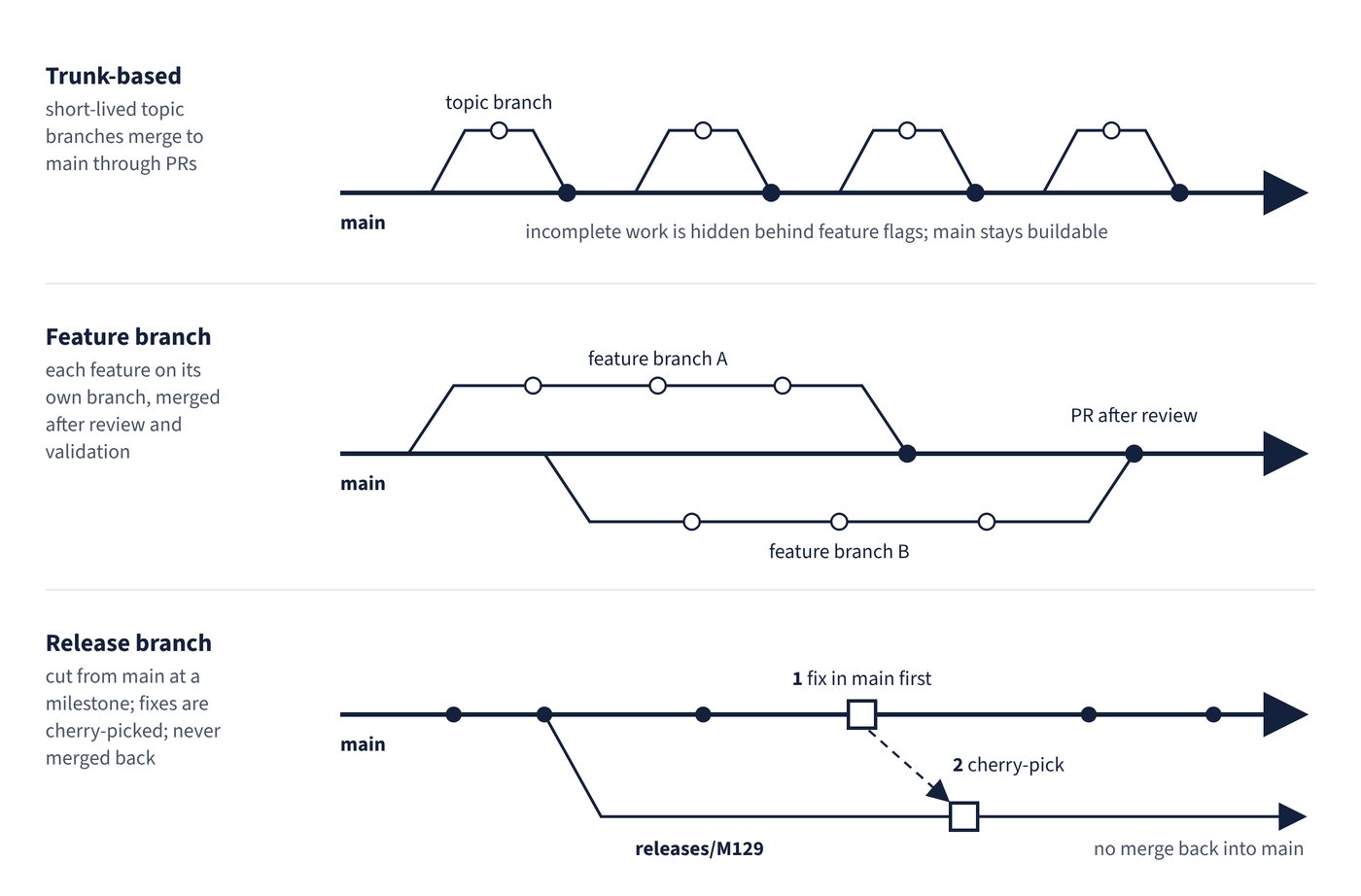
The core: short-lived feature branches and trunk-based development
Feature branches (also called topic branches) isolate work in progress from completed work in main. Git branches are cheap, so even small fixes get their own branch. Microsoft itself uses a trunk-based branching strategy: developers create short-lived topic branches off the main integration branch, push them, open a PR, and merge once policies and reviewers are satisfied. Long-running feature branches are avoided by merging incomplete work behind feature flags, which decouple deployment from exposure (feature flags are covered in Chapter 9, Deployment strategies).
Recommended naming conventions make large repositories navigable:
users/username/descriptionorusers/username/workitemfeature/feature-nameorfeature/feature-area/feature-namebugfix/descriptionandhotfix/description
Azure DevOps and Visual Studio treat / as a folder separator and collapse branch folders by default, and Azure Repos can enforce folder use through permissions (see the branch permissions section).
GitHub Flow and Microsoft’s release flow
GitHub Flow is a popular trunk-based model: a single always-deployable main branch, short-lived feature branches, review through PRs, and continuous deployment when changes merge. Microsoft notes that an often overlooked part of GitHub Flow is that PRs deploy to production for testing before they merge, so every PR waits in a deployment queue.
Microsoft’s release flow diverges here. Teams keep merging into main and batch deployments into timed releases, usually on a three-week sprint cadence. At the end of each sprint a release branch such as releases/M129 is created from main and deployed, while main stays open for the next sprint’s changes.
Release branches and porting changes
Release branches stabilise and support a version of the code. In Microsoft’s guidance they are long-lived and are not merged back into main through a PR; each active release branch is another version to support, and teams lock release branches when they stop supporting a release.
Fixes must land in both main and the release branch. The Azure DevOps team makes the change in main first, then ports it to the release branch with cherry-pick, so the fix cannot be forgotten in main and reappear when the next release branches. Merging the whole release branch into main is discouraged because it can bring release-specific changes across.
| Strategy | How work flows | Release mechanism | Best fit |
|---|---|---|---|
| Trunk-based with short-lived topic branches | Topic branches merge to main through PRs; incomplete work hidden behind feature flags | Main is always buildable; deploy from main or cut release branches | Most teams; continuous integration at scale |
| GitHub Flow | Feature branches from main, reviewed in PRs | Merges to main trigger deployment; PRs deploy for testing before merge | Continuous deployment, cloud-native apps |
| Feature branch workflow | Each feature isolated on its own branch, merged after review and validation | Weekly to monthly releases from main | Formal review and audit trail per change |
| Release branch (release flow) | Work merges to main; release branch cut at a milestone | Release branches never merge back; fixes cherry-picked from main | Timed releases, multiple supported versions |
| Forking workflow | Contributors work in their own fork and open PRs to the upstream repository | Maintainers review and merge contributions | Open source, many casual or external contributors |
Deployment branches, tags and forks
Branches for environments (for example deploy/performance-test) can be treated like release branches. The exception is continuous deployment, where Azure Pipelines should promote builds from main to each target instead. Microsoft’s branching guidance prefers release branches to tags for releases because tags are maintained and pushed separately from commits and are easy to forget.
Forks suit repositories with many casual or infrequent committers; only core contributors should have direct commit rights. For a small team of two to five developers, feature branches plus branch policies are usually enough. Forks for an Azure Repos repository are controlled by the per-repository Forks setting (on by default).
Common trap: Fixing a hotfix only in the release branch - the bug then returns when the next release branch is cut from main. Microsoft’s release flow makes the fix in main first and cherry-picks it into the release branch.