In a hub-and-spoke design, one virtual network gateway in the hub can serve every spoke. Gateway transit is the peering feature that makes this work, and it needs the right setting on each side. Figure 3.1 shows where each setting goes and what each VNet can reach.
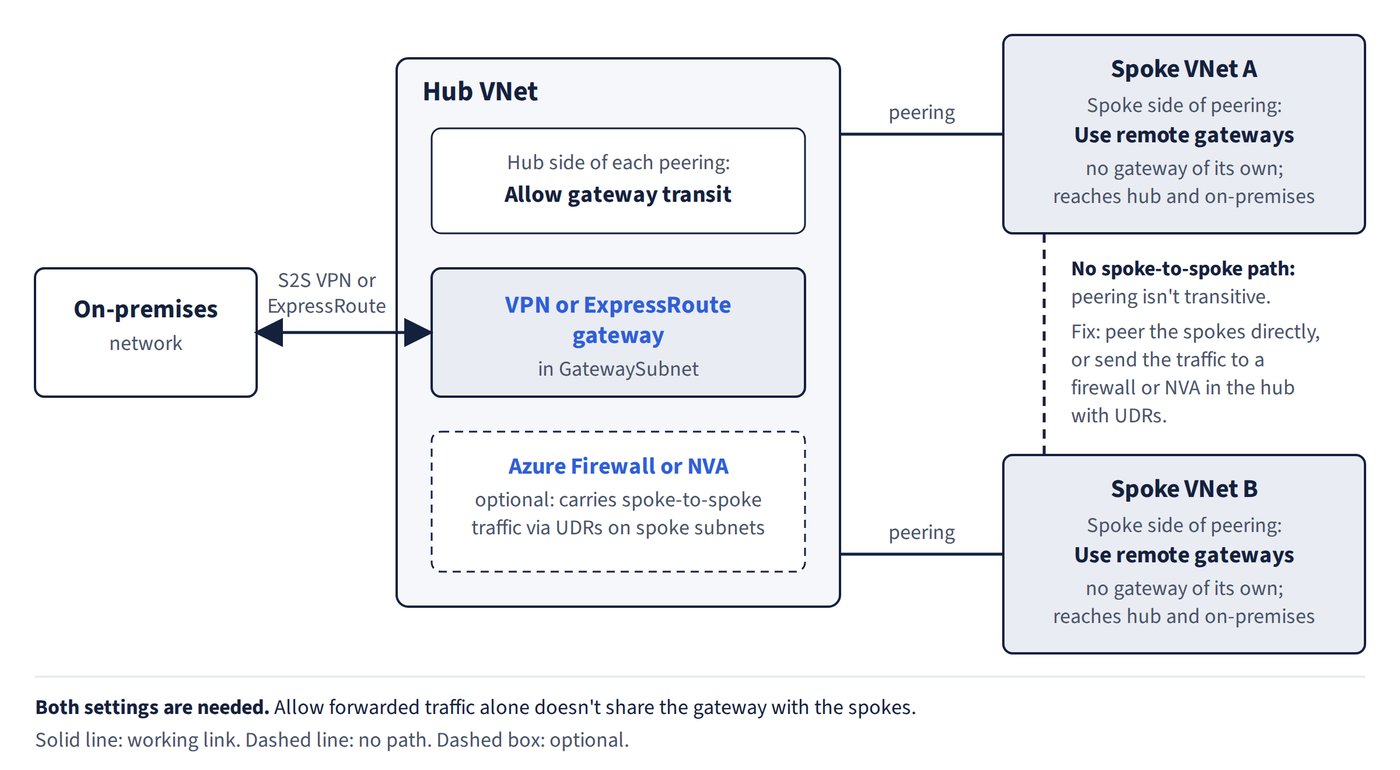
Configuring gateway transit
- Gateway transit needs a setting on each side of the peering. It’s a pick-two:
- On the hub (gateway-owning) side, set Allow gateway transit.
- On each spoke side, set Use remote gateways.
- In Azure PowerShell (
Add-AzVirtualNetworkPeering), use-AllowGatewayTransiton the hub-to-spoke peering and-UseRemoteGatewayson the spoke-to-hub peering. - Use remote gateways can’t be set on the VNet that owns the gateway, and the spoke must not have its own virtual network gateway.
- Allow gateway transit on a VNet that has no gateway does nothing.
Common trap: Enabling only Allow forwarded traffic on the hub peering - that setting doesn’t share the gateway. Spokes reach on-premises through the hub only when the hub peering has Allow gateway transit and each spoke peering has Use remote gateways.
What can reach what
- If the gateway setting is None on both sides of a peering, the spoke has no on-premises access. A VNet peered to the hub without Use remote gateways doesn’t reach on-premises either.
- The gateway VNet reaches on-premises and its directly peered VNets. It doesn’t reach a VNet that is peered only to one of its peers (peering is still not transitive).
- Gateway transit is the cheapest way for spokes to reach on-premises through one S2S VPN, because only the hub pays for a VPN gateway.
Allow forwarded traffic versus gateway transit
- Allow forwarded traffic only admits traffic that an appliance in another VNet forwards into this VNet.
- Traffic that passes through a VPN gateway doesn’t need it, and turning it on doesn’t make spokes use the hub gateway.
Spoke-to-spoke through the hub gateway
- Spokes can reach each other via the hub gateway, but this also needs UDRs on the spoke subnets that point at the gateway.
- It works, but throughput is limited by the gateway SKU. For heavier spoke-to-spoke traffic, a firewall or NVA in the hub (or direct peering) is the better design.
Default routes from on-premises
- On-premises edge routers can advertise 0.0.0.0/0 over ExpressRoute private peering using BGP. The gateway learns the route and propagates it to spokes that use gateway transit, with no route tables to maintain.
- Route filters select which Microsoft service prefixes are advertised over Microsoft peering. They can’t inject a default route into private peering.