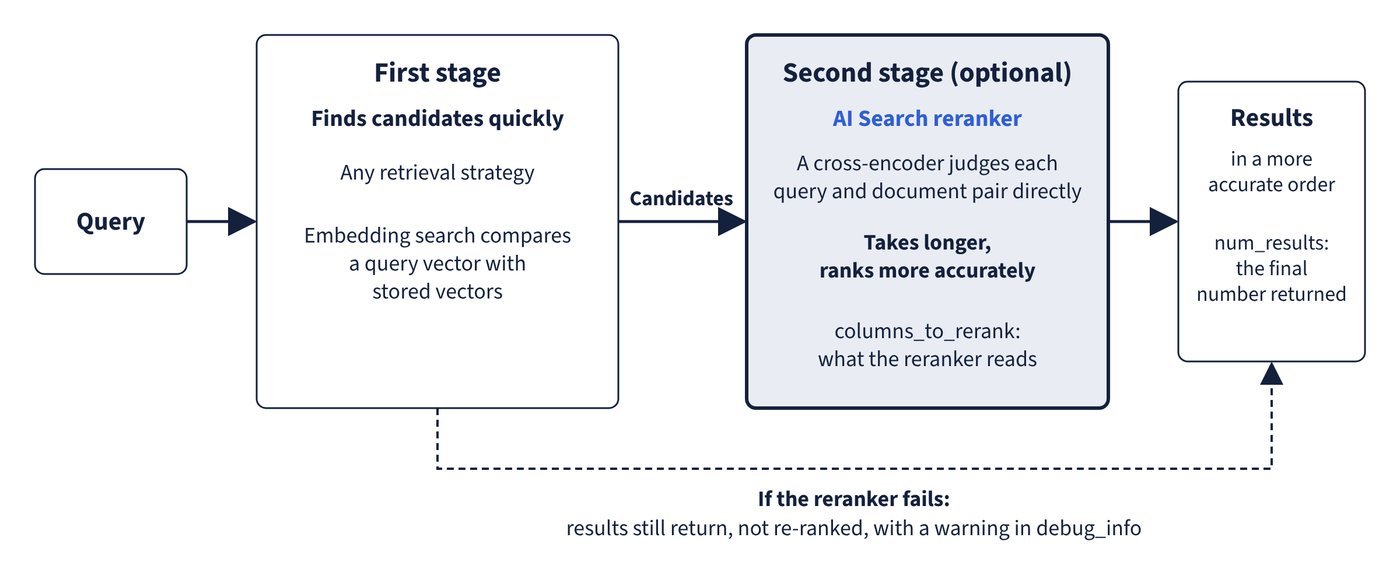
Re-ranking is an optional second pass applied on top of any retrieval strategy. The first stage finds candidates quickly; a cross-encoder then re-evaluates each result in the context of the query and produces a more accurate order.
This two-stage design explains its strengths and costs. Embedding search compares a query vector with stored vectors, while the AI Search reranker judges each query and document pair directly, which takes longer but ranks more accurately. Databricks recommends trying it for any RAG agent use case. The retrieval quality guide names RAG agents as a good fit because LLM generation dominates their latency. Reported gains differ by page: the query page says it typically improves quality by about 10%, and the retrieval quality guide says about 15%. Treat either as a reason to measure on your own data, not as a promise. Figure 7.2 shows the two stages, and what happens if the reranker fails.
from databricks.ai_search.reranker import DatabricksReranker

results = index.similarity_search(
    query_text="How to rotate a storage key",
    columns=["id", "text", "doc_summary", "updated"],
    num_results=10,
    query_type="hybrid",
    reranker=DatabricksReranker(
        columns_to_rerank=["text", "doc_summary"]
    ),
)
Over REST, the same choice is expressed as a reranker block with "model": "databricks_reranker", and debug_level must be at least 1 to see timing.
| Setting or fact | Behaviour |
|---|---|
columns |
What the query returns |
columns_to_rerank |
What the reranker reads; set separately from columns |
| Column order | Columns are read in listed order, and only the first 2,000 characters found are considered |
num_results |
The final number returned; it does not change how many results are used for re-ranking |
| Timing | debug_info reports reranker_time |
| Reranker failure | Results still return, not re-ranked, with a warning such as RERANKER_TEMPORARILY_UNAVAILABLE in debug_info |
| Data residency | A Databricks Designated Service using Geos; outside the US, EU, and Australia and New Zealand, cross-Geo processing might need enabling |
Column order deserves care, because a long body column listed first can use up the 2,000 characters before a short summary is read.
Which reranker fits which constraint
| Option | Status | Latency and scale | Requires | Fits |
|---|---|---|---|---|
| Built-in reranker | Generally available | Reranks 50 results in under 1 s typically, as fast as about 250 ms for shorter chunks; about 5 QPS out of the box | SDK or REST parameter | RAG agents and quality-first applications |
| Lightweight cross-encoder on Model Serving | Your own deployment | Sub-100 ms suggested with a small model | A custom model endpoint | Search bars and high-QPS applications |
| Finetuned reranker | Beta; four US regions | Serving endpoint scales to zero, so the first query after inactivity pays a cold start, unless that is turned off | Delta Sync index with managed embeddings; SELECT, CREATE VOLUME, CREATE TABLE, CREATE MODEL |
Corpus-specific ranking gains |
A finetuned reranker must use exactly the index’s embedding source column in columns_to_rerank; Databricks rejects any other column. Training queries come from a Delta table or are generated from the index, capped by default at 5,000. Through the SDK, the endpoint is resolved automatically; through REST, the finetuned endpoint name must be supplied.
Common trap: Raising
num_resultsto give the reranker more candidates -num_resultsis only the final count returned and does not affect the number of results used for re-ranking. The result is more output and more latency downstream, not a deeper re-rank.
Common trap: Assuming a reranker outage raises an error - the query succeeds and returns results without re-ranking, with only a warning in
debug_info. Setdebug_levelto at least 1 and check for it, or quality can drop silently.