DLP is rolled out along three axes, state, scope and actions, moving from the least to the most disruptive. Simulation mode is what makes this possible. Figure 7.2 shows the states in rollout order.
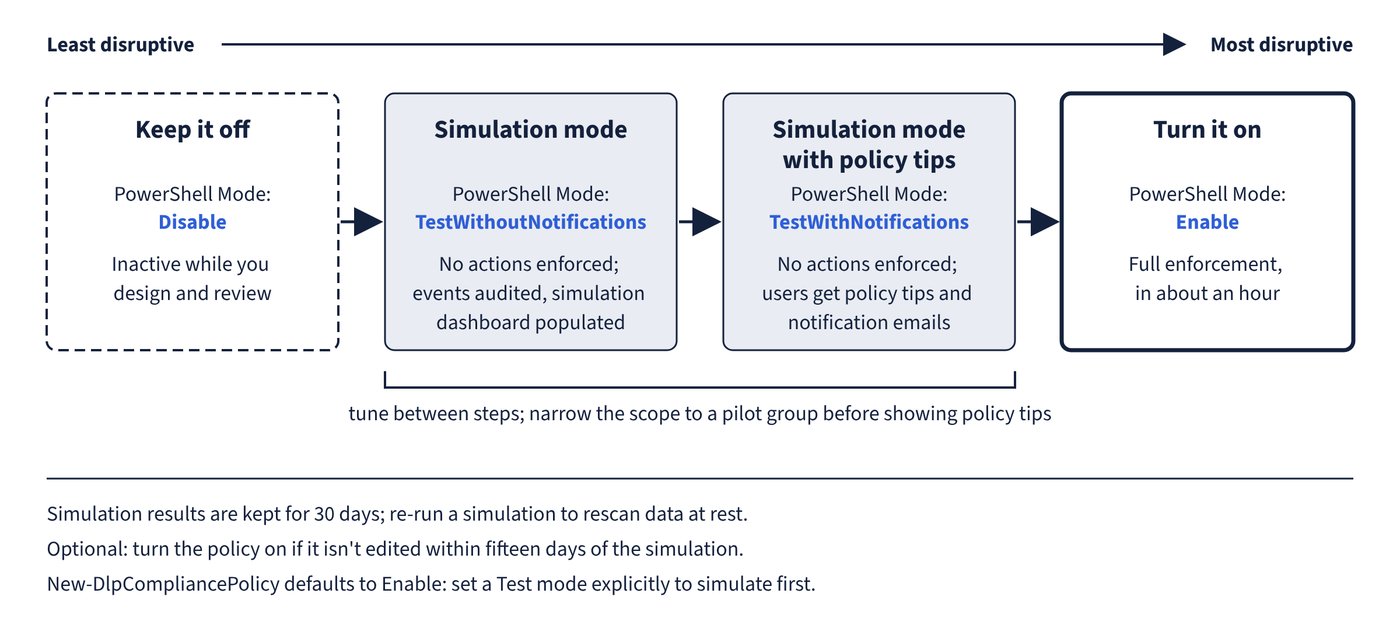
| Policy state (portal) | PowerShell Mode value | Effect |
|---|---|---|
| Keep it off | Disable | Inactive; use while designing and reviewing |
| Run the policy in simulation mode | TestWithoutNotifications | No actions enforced, events audited, simulation dashboard populated |
| Run the policy in simulation mode and show policy tips | TestWithNotifications | No actions enforced, but users get policy tips and notification emails |
| Turn it on right away | Enable | Full enforcement (takes effect in about an hour) |
Simulation mode details
- When you choose simulation, you can also select Turn the policy on if it’s not edited within fifteen days of the simulation.
- Simulation results are kept for 30 days; older results expire, and a SharePoint/OneDrive simulation shows Expired after 30 days. Re-run to rescan data at rest.
- Exchange, Teams, Devices and Fabric/Power BI are scanned in real time; SharePoint and OneDrive also scan existing content and report In progress or Completed (Completed only when they are the only locations).
- Only the first 100 matched SharePoint and OneDrive items are shown for review.
- In Activity explorer, filter simulation events by Policy mode: TestWithNotifyUser, TestWithoutNotifyUser or enforce.
- To see matched items from devices in their native app, configure evidence collection for file activities on devices.
- Turning off simulation can leave insights on the Overview page for up to 24 hours.
Recommended rollout
- Create the policy and set it to Keep it off; review with stakeholders.
- Switch to Run the policy in simulation mode, with broad or narrow scope, and tune.
- Switch to simulation with policy tips, narrowing the scope to a pilot group.
- Gather feedback and alerts, build a group of experienced pilot users, tune again.
- Turn it on right away across the intended scope, and monitor alerts and Activity explorer.
For actions, start with Allow (Devices only) or Audit only, then Block with override, then Block. Overrides during pilots generate justifications that reveal false positives.
Common trap: Assuming a policy created with New-DlpCompliancePolicy starts in test mode like a carefully staged portal policy - the Mode parameter defaults to Enable; set -Mode TestWithoutNotifications or TestWithNotifications explicitly to simulate first.