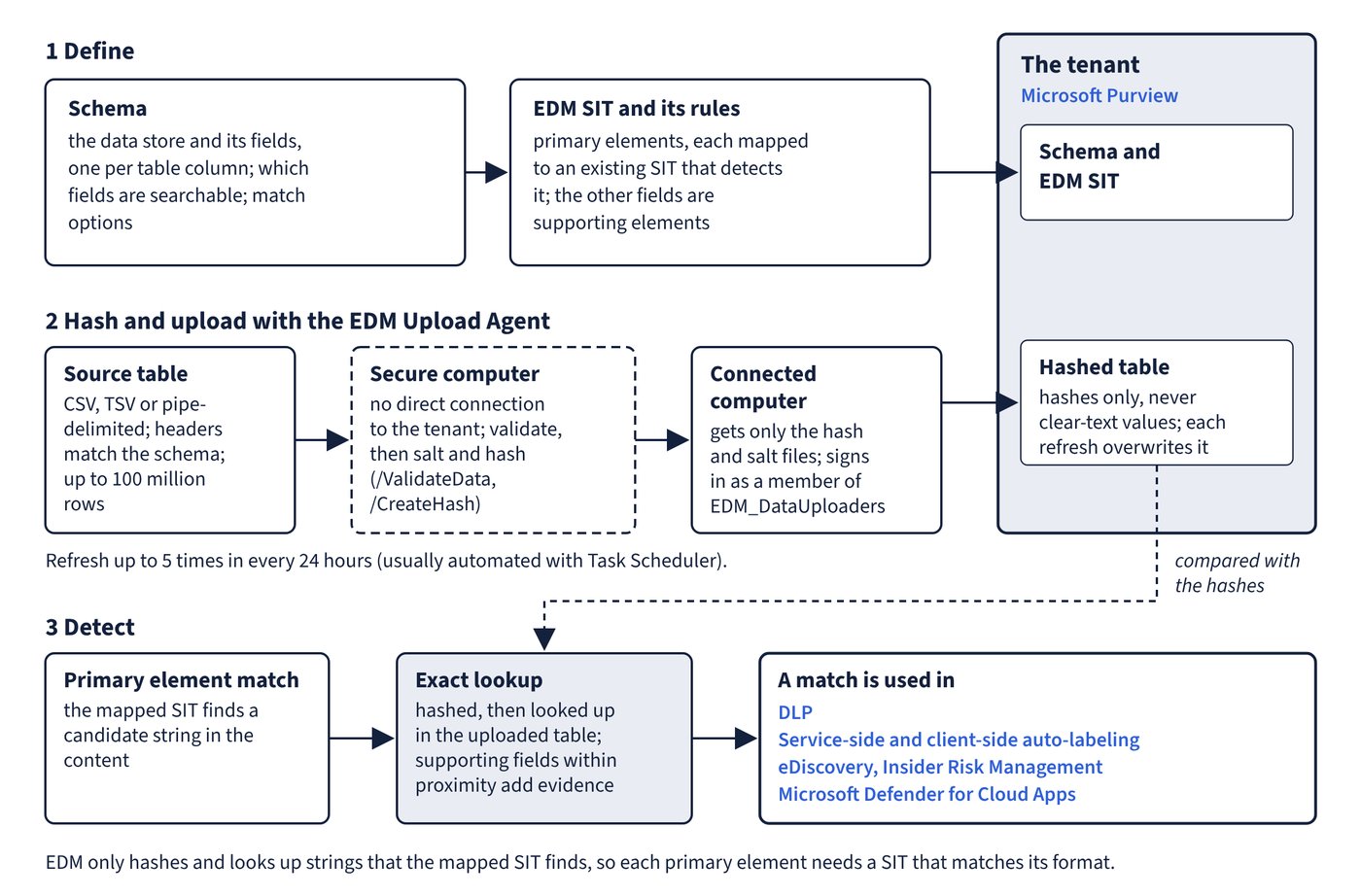
Pattern-based SITs can’t tell a real customer’s account number from any other number of the same shape. Exact data match (EDM) SITs compare content against real values from a table you supply, using one-way hashes so the values never reach the service in clear text. Figure 2.2 follows the data from schema to match.
Concepts
- Schema: an XML definition of the data store (the DataStore), its field names (one per table column), which fields are searchable or multi-token, and match options.
- Sensitive information source table: the real data, exported as CSV, TSV or pipe-delimited text, with column headers that match the schema. It can hold up to 100 million rows and can be refreshed up to 5 times in every 24 hours; each refresh overwrites the previous upload.
- Primary elements: the fields EDM looks up. A primary element must be detectable by an existing SIT that closely matches its format, because EDM only hashes and looks up strings that SIT finds. Choose fields with unique values (account numbers, not first names or dates of birth).
- Supporting elements: the other fields, used as evidence within the proximity window. Multi-token values such as names and addresses use multi-token matching (up to five tokens) or a SIT that detects them.
EDM SITs work in DLP (Exchange, SharePoint, OneDrive, Teams chat and devices), service-side and client-side auto-labeling, Microsoft Defender for Cloud Apps (SharePoint and OneDrive), eDiscovery and Insider Risk Management. Microsoft suggests pairing an EDM SIT at high confidence with the underlying built-in SIT at lower confidence in DLP rules.
New experience versus classic experience
| Aspect | New experience | Classic experience |
|---|---|---|
| Workflow | Schema and SIT created together in one wizard | Schema and SIT created separately (portal tool or XML with PowerShell) |
| Schema source | Sample file of 10-20 representative, non-sensitive rows, or manual definition | Schema XML or schema tool |
| Primary elements | At least 1 and at most 10 per EDM SIT, each mapped to a SIT | Defined per pattern |
| Schemas per SIT | One schema per SIT (1:1) | Several SITs can share a schema |
| Number of EDM SITs | Limited to 10 (10 schemas maximum) | More than 10, by sharing schemas |
| Schema name | Generated: SIT name plus “schema” | You choose it |
| Rules | One rule per primary element; high and medium confidence generated, low added manually | Built manually |
The new experience is reached at Information Protection > Classifiers > EDM classifiers with the New EDM experience toggle on. Its detection settings include:
- Case-insensitive matching (on by default) and optionally ignore delimiters and punctuation; if you ignore delimiters on a primary field, its mapped SIT must match values both with and without them.
- A proximity limit, 300 characters by default.
- Proximity detection mode: Wide matches a primary element against supporting elements from all primary matches in range; Narrow matches only its own supporting elements, reducing false positives.
- Unique counting mode: Primary match-level counting counts every matching combination; Row-level counting counts each row once.
The portal warns when a primary field is mapped to a loosely defined SIT or when its values repeat across many rows, both of which hurt performance and cause missed detections. Schemas created in the classic experience or uploaded with PowerShell aren’t visible in the new experience.
Hashing and uploading the data
The EDM Upload Agent salts and hashes the source table and uploads only the hashes. Requirements:
- The uploading account must be a member of a security group named EDM_DataUploaders (Groups Administrator is the least-privileged role that can create it).
- The agent runs on Windows 10 or later, Windows Server 2019 or later, or Windows Server 2016 with .NET 4.6.2.
- Download the schema with the agent (/SaveSchema) at least an hour after creating or editing it, and validate the data against it first. Don’t edit and re-upload a schema downloaded by the agent.
- Custom hashing isn’t supported; you can supply your own salt with /Salt, but then can’t return to the standard agent for that use case.
The two-computer method is the best practice: hash on a secure computer with no direct connection to the tenant, then copy only the hash and salt files to a connected computer for upload. Both computers need the same agent version. The single-computer method hashes and uploads in one step, so the clear-text table must sit on an internet-connected computer.
EdmUploadAgent.exe /ValidateData /DataFile C:\Edm\Data\PatientRecords.csv /Schema C:\Edm\edm.xml
EdmUploadAgent.exe /CreateHash /DataFile C:\Edm\Data\PatientRecords.csv /HashLocation C:\Edm\Hash /Schema C:\Edm\edm.xml /AllowedBadLinesPercentage 5
EdmUploadAgent.exe /Authorize
EdmUploadAgent.exe /UploadHash /DataStoreName PatientRecords /HashFile C:\Edm\Hash\PatientRecords.EdmHash
EdmUploadAgent.exe /GetSession /DataStoreName PatientRecords
The first two commands validate the file and, on the secure computer, write the .EdmHash and .EdmSalt files, tolerating up to 5% malformed rows. The rest run on the connected computer: sign in as a member of EDM_DataUploaders, upload the hashes and list the upload sessions. Refreshes are usually automated with Task Scheduler.
Creating and managing EDM SITs needs the Compliance Administrator or Global Administrator role (the overview article also lists Exchange Administrator). After creating or editing an EDM SIT, test it with Test-DataClassification and wait 24 hours before testing it in a DLP policy.
Common trap: Believing an EDM SIT can have only one or two primary elements - in the new EDM experience each EDM SIT needs at least one and can have up to 10 primary elements, each mapped to a SIT that detects it.
Common trap: Giving the person who uploads EDM data the Compliance Administrator role and nothing else - the upload account must be a member of the EDM_DataUploaders security group, which is what authorises the EDM Upload Agent.