An organization is a top-level entity that groups resources, users, policies, IaaS services and catalog entities behind a secure boundary. It also gives a single place for billing, access control and resource sharing. The provider organization is named System; every other organization has its own Organization Portal and its own identity source.
All Apps versus VM Apps
| Aspect | Organization for All Apps | Organization for VM Apps |
|---|---|---|
| Positioning | The primary multi-tenancy model in VCF Automation | For VMware Aria Automation customers who want to keep provisioning VM-based applications without disruption |
| Underlying platform | vSphere Supervisor and vSphere Namespaces; workloads include VMs, Kubernetes and data services | vSphere cluster capabilities; no Supervisor, no shared infrastructure, no tenancy isolation |
| Prerequisite | A vCenter with a Supervisor enabled; VCF Automation supports only Supervisors deployed with NSX VPC networking | The Classic Tenant Creation feature flag, and no existing VM Apps organization |
| How many from the UI | As many as needed | One. More VM Apps organizations can be created only through the API |
| Region quota | Required before namespaces and content libraries can be created | Cannot be set |
| Infrastructure | Allocated by the provider through region quotas and regional networking | The organization administrator adds cloud accounts, cloud zones and projects; the system administrator does not allocate infrastructure |
| Label in the organization list | No label | VM Apps label |
If you upgrade from VMware Aria Automation 8.18 with several tenants, those tenants appear as several VM Apps organizations. You still cannot create more from the UI. Once one VM Apps organization exists, the Create Organization wizard skips the type step and goes straight to an All Apps organization.
How the All Apps hierarchy fits together
The documented hierarchy is:
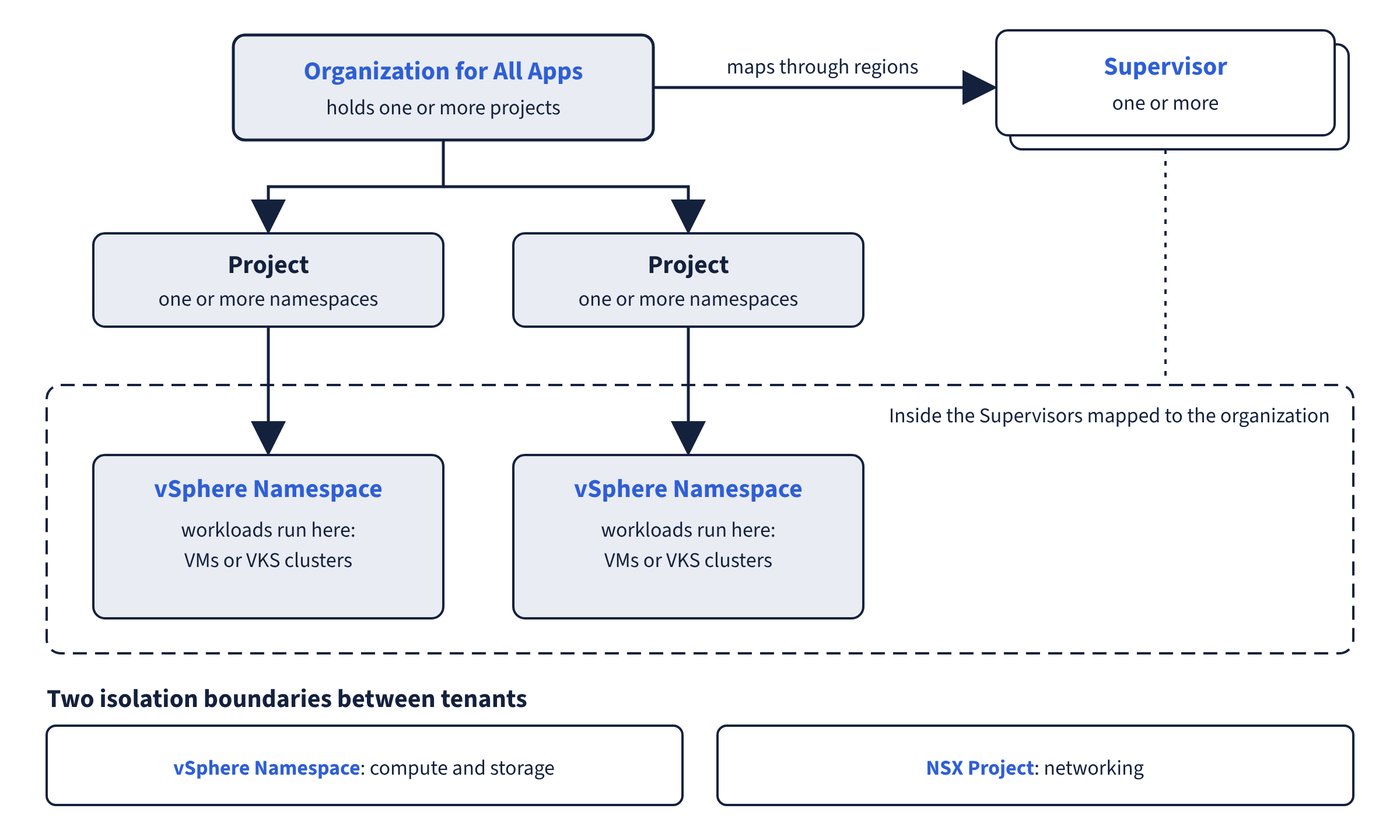
- An organization maps to one or more Supervisors through regions.
- Each organization holds one or more projects.
- Each project holds one or more vSphere Namespaces.
- Namespaces are created inside the Supervisors mapped to the organization, and workloads (VMs or VKS clusters) run in them.
Isolation between tenants comes from two boundaries working together: the vSphere Namespace boundary for compute and storage, and the NSX Project boundary for networking. Tenants never need direct infrastructure access. Figure 12.1 shows the hierarchy and the two boundaries.
Common trap: Creating a second VM Apps organization from the Provider Management Portal for another business unit - the UI allows only one VM Apps organization. Further ones need the VCF Automation API, and the documented primary multi-tenancy model is the All Apps organization.
Common trap: Planning an All Apps organization on a Supervisor deployed with VDS networking or NSX segments - VCF Automation supports only Supervisors deployed with NSX VPC networking. The Supervisor networking choice is made when the Supervisor is enabled (see “Supervisor clusters: networking options and Supervisor upgrades”).