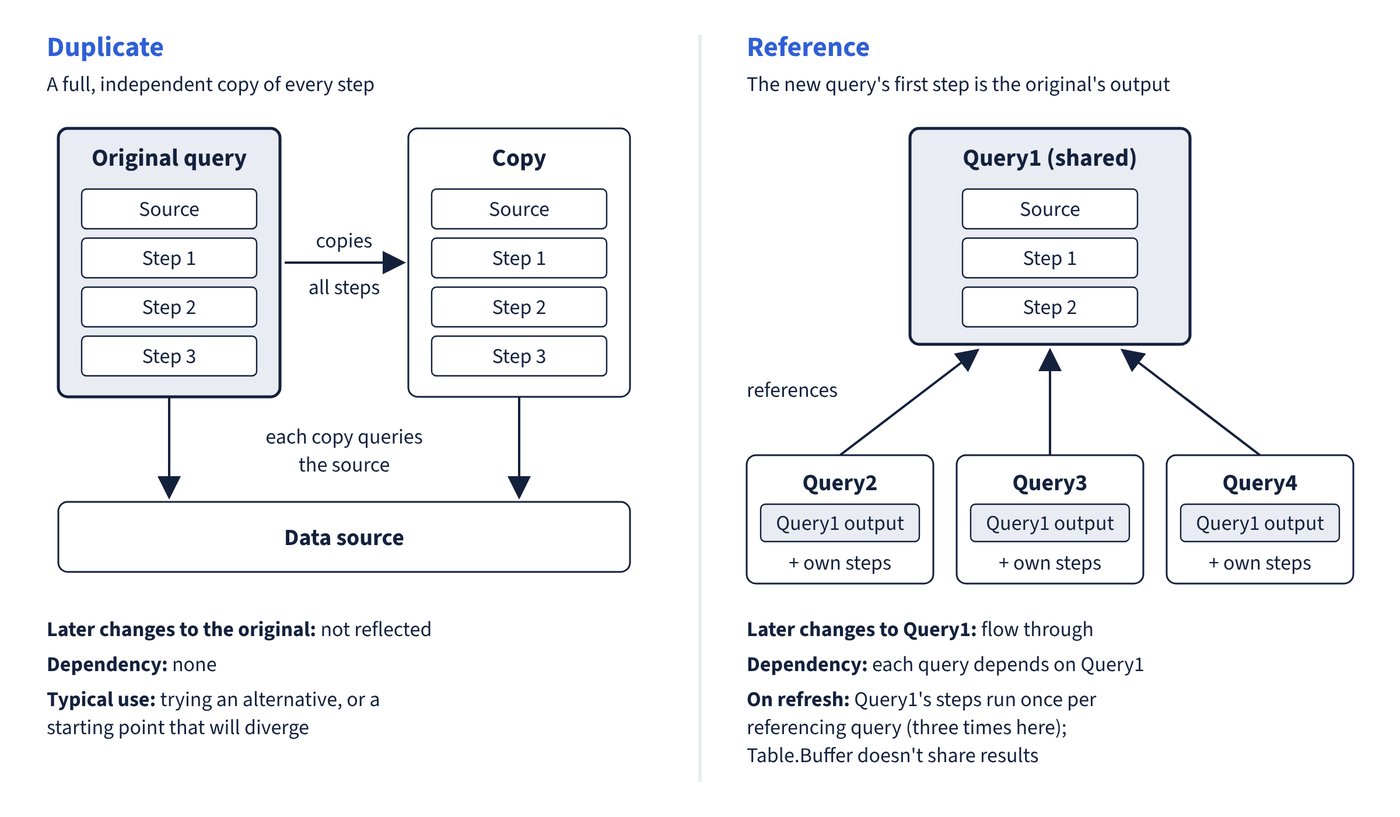
Both commands appear when a query is right-clicked in the Queries pane, and both create a new query from an existing one. The difference is whether the new query depends on the original.
| Duplicate | Reference | |
|---|---|---|
| What it creates | A full, independent copy of all the original’s steps | A new query whose first step is the original query’s output |
| Later changes to the original | Not reflected | Flow through to the referencing query |
| Dependency | None | The referencing query depends on the original |
| Typical use | Trying an alternative, or a starting point that will diverge | Several outputs from one shared preparation (for example a staging query feeding fact and dimension queries) |
| Source access on refresh | Each copy queries the source | Each referencing query still runs the referenced query’s steps itself |
The last row surprises many analysts. Microsoft’s guidance is explicit: when a query references another, it’s as though the referenced query’s steps are combined with, and run before, its own steps. If Query2, Query3 and Query4 all reference Query1, then Query1 is executed three times on refresh. Table.Buffer in Query1 doesn’t help, because a buffer lives only within one query’s evaluation; buffering can even make things worse, as each referencing query buffers its own copy. Microsoft still recommends referencing to avoid duplicated logic, but where the shared query is expensive it recommends moving the shared logic into a Dataflow Gen2 in Fabric (or a dataflow (legacy) for Pro or PPU users without Fabric access): the dataflow stores its result, so the source is queried once and the semantic model’s queries read the stored output. Figure 4.2 compares the two.
Extract Previous on a step is a quick way to create a reference: it moves all earlier steps into a new query and makes the current query reference it. Dependencies can be inspected in the legacy editor’s Query dependencies view (View tab), which shows data-source nodes and the query chain; the new Power Query experience (preview) replaces it with a diagram view that shows steps.
Common trap: Referencing an expensive query several times to “get the data once and reuse it” - Power Query runs the referenced steps separately for each referencing query, and Table.Buffer doesn’t share results between queries; a dataflow (Dataflow Gen2 is the current recommendation) is the documented way to retrieve shared data once.