The Power BI service runs in the cloud, so it needs a route to every source it refreshes or queries. A gateway provides that route when the service can’t reach the source directly over the internet.
An on-premises data gateway is Windows software installed on a computer inside the organisation’s network. It makes outbound connections only, so no inbound firewall ports need to be opened. Use a gateway when the service must query or refresh data it can’t access directly, such as a SQL Server database in a private data centre, a file on a network share, or a file on the local drive of the author’s computer.
Cloud sources that the service can reach directly, such as Azure SQL Database, don’t need a gateway. Their credentials are managed in the Data source credentials section of the semantic model settings instead. Fabric items are also reachable without a gateway: connecting to a Fabric lakehouse needs no gateway. Figure 13.1 shows which route each kind of source needs.
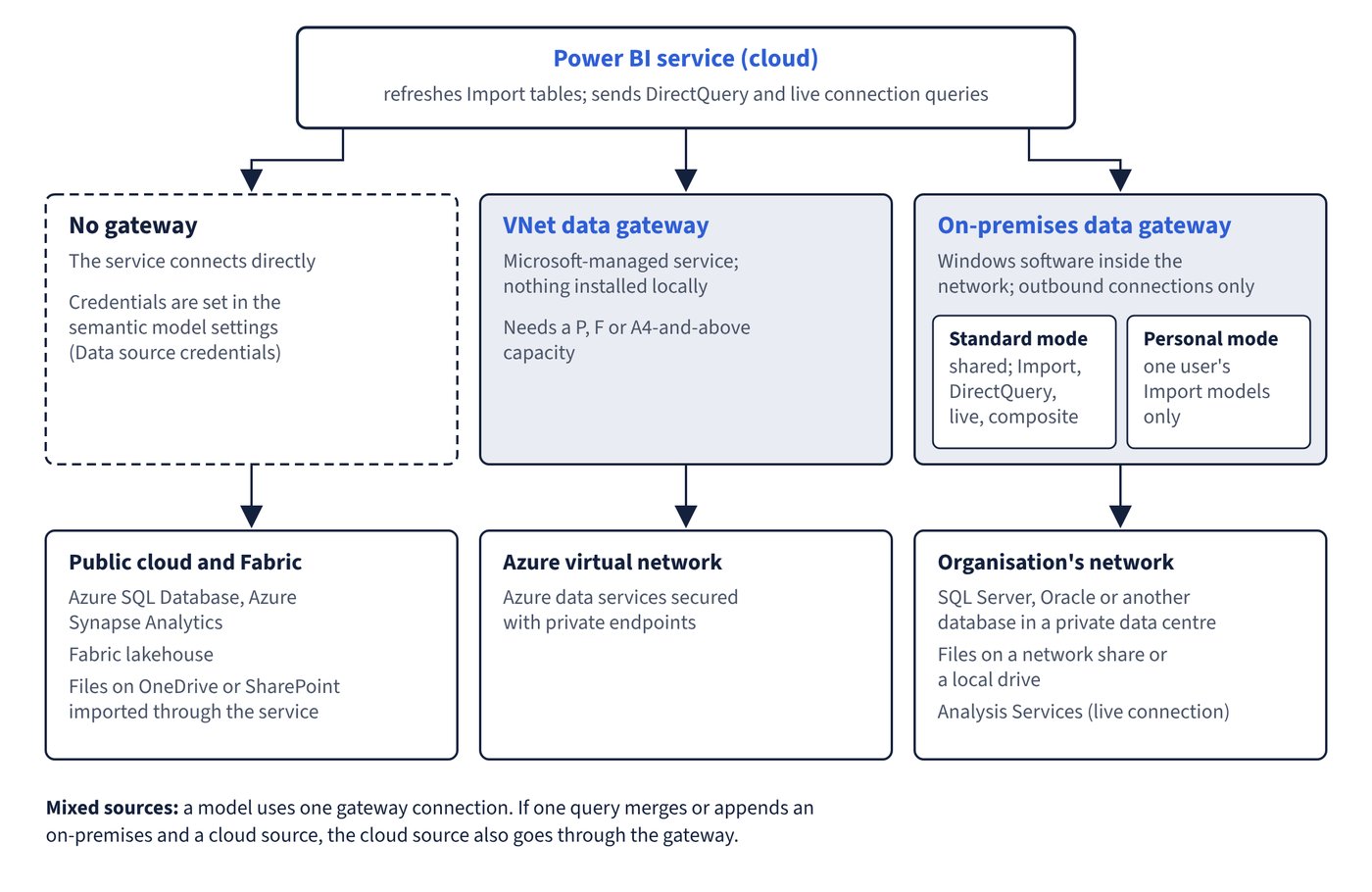
The following table summarises common situations.
| Source or situation | Gateway needed? | Notes |
|---|---|---|
| SQL Server, Oracle or another database on the corporate network | Yes | Standard mode gateway with a matching data source definition |
| File or folder on a local drive or network share | Yes | The computer that stores the file must be running during refresh |
| Excel, CSV or .pbix file on OneDrive for work or school or a SharePoint team site, imported through the service | No | Power BI checks the file about every hour (OneDrive refresh) |
| A file on OneDrive reached through a file connector such as Text/CSV in Desktop | Yes | The connector uses a local reference to the synced file; use the Web connector against the online file to avoid a gateway |
| Azure SQL Database, Azure Synapse Analytics and other public cloud services | No | Credentials set in the semantic model settings |
| SQL Server Analysis Services (live connection) | Yes | The model is on a server inside the organisation |
| Fabric lakehouse | No | Files synchronised to a lakehouse can be reached without a gateway |
| Azure data services secured with private endpoints in a virtual network | Virtual network data gateway | Microsoft-managed; no local installation |
| A query that merges or appends an on-premises source with a cloud source | Yes, for both sources | The gateway connection is used for the cloud source too |
| Web connector script that uses the Web.Page function | Yes | Required for semantic models updated after November 2016 |
Mixing on-premises and cloud sources
A semantic model can use only one gateway connection. All on-premises sources in the model must therefore be defined on the same gateway cluster. When separate queries reach on-premises and cloud sources, Power BI uses the gateway for the on-premises queries and a direct connection for the cloud ones. When a single Power Query query merges or appends data from both, Power BI switches to the gateway connection for the cloud source as well.
A gateway administrator supports that combined query in one of two ways:
- Add an explicit data source definition for the cloud source to the gateway.
- Select Allow user’s cloud data sources to refresh through this gateway cluster, which lets the gateway use the cloud credentials the model owner entered in the semantic model settings.
Common trap: Assuming a cloud source never involves a gateway - if one Power Query query combines an on-premises table with a cloud table, the whole mashup runs through the gateway connection, so the cloud source must be defined on the gateway or the “allow cloud data sources” option must be enabled.