A role-playing dimension is one dimension that filters the same fact table in different ways: a Date table that can mean order date, ship date or due date, or an Airport table that can mean departure or arrival airport. Because only one relationship between two tables can be active, Power BI offers two designs.
Option 1: inactive relationships with USERELATIONSHIP
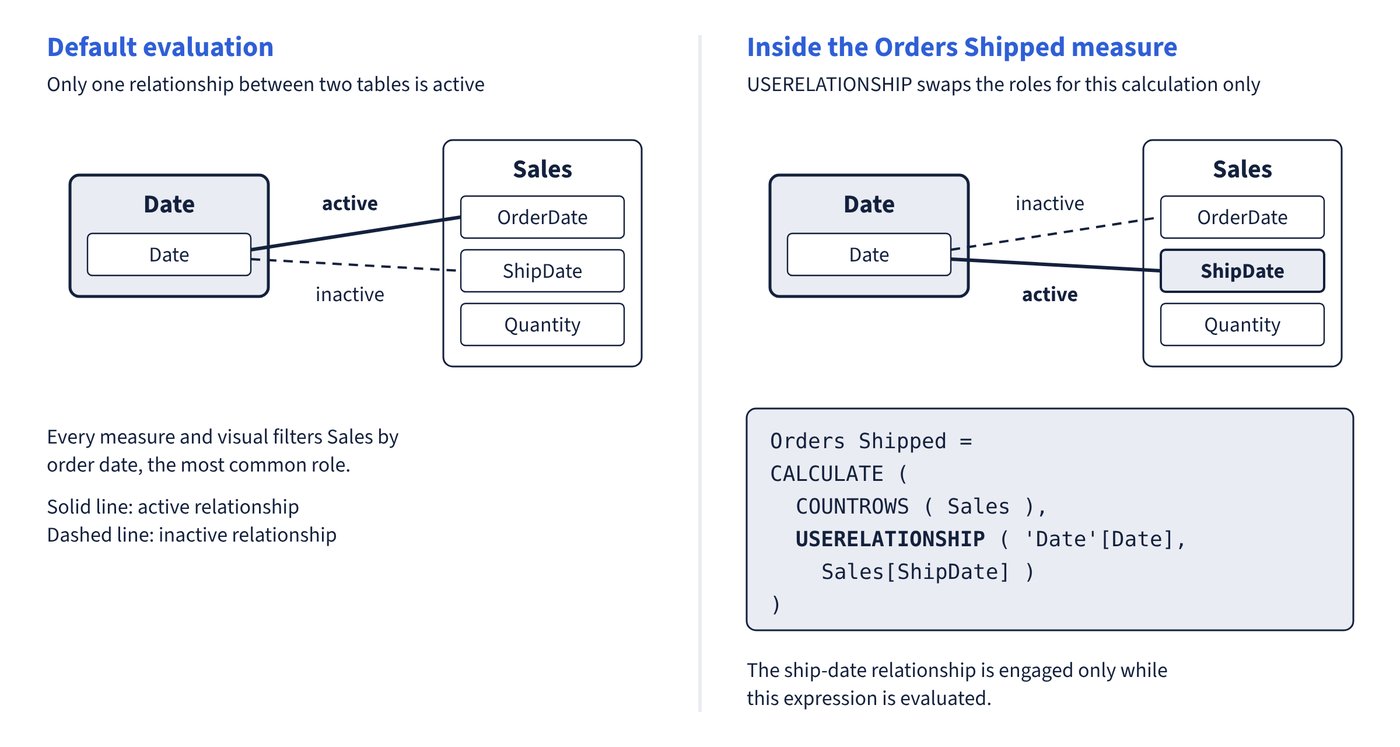
Create all the relationships; one is active (usually the most common role, such as order date) and the rest are inactive (dashed lines). Measures that need another role activate it:
Orders Shipped =
CALCULATE (
    COUNTROWS ( Sales ),
    USERELATIONSHIP ( 'Date'[Date], Sales[ShipDate] )
)
USERELATIONSHIP takes the two related columns and engages the inactive relationship only while this expression is evaluated; the active relationship becomes inactive for that calculation. Figure 5.1 shows the swap.
Option 2: one table per role
Duplicate the dimension so each role has its own table with an active relationship. For an Import table, create a calculated table that references the original; for a DirectQuery table, duplicate the Power Query query (Power Query reference queries also work). Rename columns so visuals are self-describing (Ship Year, Departure City).
Ship Date = 'Date'A calculated-table clone copies columns only. Formats, descriptions and hierarchies aren’t copied, so set them again.
Choosing between them
| Requirement | Inactive relationships + USERELATIONSHIP | Duplicate table per role |
|---|---|---|
| Filter or group by two roles in the same visual (order date against ship date) | Not possible | Supported |
| Report authors use columns directly without writing measures | Only the active role works | Every role works |
| Number of measures | One extra measure per role per calculation | No extra measures |
| Model size | Smallest | Slightly larger (dimensions are usually small) |
| Row-level security | RLS doesn’t propagate through inactive relationships, even when USERELATIONSHIP is used | RLS propagates through each active relationship |
| Q&A and natural-language tools | Only the active relationship is usable | All roles usable |
Microsoft recommends active relationships wherever possible, especially when RLS roles exist, which means duplicating role-playing dimensions. Inactive relationships suit cases where reports never filter by two roles at once and only a few measures need the alternative role. Blank ship dates on unshipped orders also explain a (Blank) item in a Date slicer: table expansion includes inactive relationships.
Common trap: Securing a model with RLS on a Date or Airport table and relying on USERELATIONSHIP measures to apply it to the other roles - RLS filters propagate only through active relationships, never through inactive ones, even inside USERELATIONSHIP.