JIT narrows the window in which management ports are open: they stay closed until someone requests access, and close again automatically. It controls how long a port is open, which a static rule or Bastion can’t do.
- JIT VM access is part of Defender for Servers Plan 2 in Microsoft Defender for Cloud. It uses Defender for Cloud and Azure RBAC, not a Microsoft Entra ID (Azure AD) P1 licence.
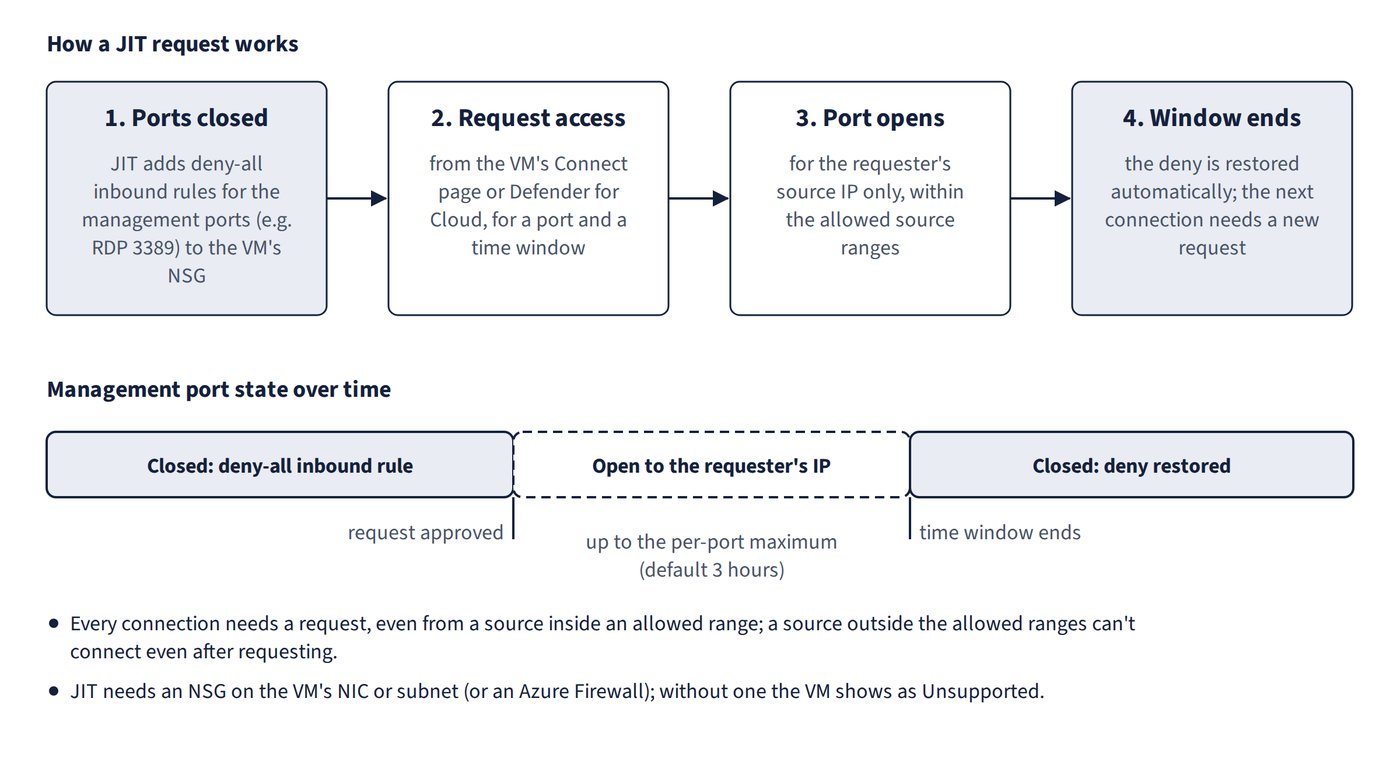
- How it works: JIT adds deny-all inbound rules for the configured management ports (e.g. RDP 3389) to the VM’s NSG (or Azure Firewall). An approved request opens the port for the requester’s source IP, and the deny is restored when the time window ends. Figure 10.1 shows the request cycle and how the port state changes over time.
- Eligibility: the VM must have an NSG on its NIC or subnet, or be behind an Azure Firewall. With neither, it shows as Unsupported; associate an NSG to fix it. Windows and Linux are both supported. Membership of a Basic Load Balancer backend pool doesn’t block JIT, and adding a public IP doesn’t help.
Request rules
- Every connection needs a request, even from a source inside an allowed range.
- A request opens the port only to the allowed source ranges configured for that port; a source outside them can’t connect even after requesting.
- The maximum request time is set per port (default 3 hours, configurable, e.g. to 4 hours) and applies only to the VM where JIT is configured.
- To connect, request access from the VM’s Connect page (or from Defender for Cloud), which temporarily opens 3389 for your IP. Activating a PIM role such as Owner or Security Administrator doesn’t open the port.
- Least privilege to request access: read on the VM and its network resources (
Microsoft.Compute/virtualMachines/read, NIC and public IP reads) plus the JIT initiate action. Write rights are needed only to configure the JIT policy.
| Port | Use |
|---|---|
| 3389 | RDP |
| 22 | SSH |
| 5986 / 5985 | PowerShell remoting (WinRM) HTTPS / HTTP |
| 25 | SMTP |
- Alternatives don’t meet a time-limited requirement: a static NSG rule can’t expire; Bastion changes how you connect, not for how long; Conditional Access applies to Entra sign-ins, not NSG ports.
Common trap: Treating a VM with no NSG as supported, or Linux VMs as unsupported - JIT needs an NSG (or Azure Firewall) and supports Linux.
Common trap: Believing RDP works from a source outside the allowed range after requesting, or from any source without requesting - JIT always requires a request and only opens the port to the allowed source ranges.