PIM replaces standing administrator access with eligible assignments that users activate when needed. Every Microsoft Entra role has its own settings that decide how activation and assignment behave.
Microsoft Entra Privileged Identity Management (Azure AD PIM) role settings split into two groups: activation settings, which apply when an eligible user activates the role, and assignment settings, which apply to the assignment itself or to the admin making it.
| Setting | What it controls | What it does not do |
|---|---|---|
| Activation maximum duration (hours) | Length of each activation of an eligible assignment (e.g. 1 day, 5 h, 2 h); PIM then removes the role automatically | Doesn’t limit direct active assignments or delay activation |
| Require approval to activate | Request waits for a designated approver; off = no approver at all | — |
| Require justification on activation | User types a reason | Nobody reviews it |
| Require MFA on activation | MFA at activation, enforced regardless of the user’s per-user MFA status | — |
| Expire eligible assignments after | Lifetime of eligible assignments (e.g. 3 months) | Not activation length |
| Expire active assignments after | Maximum length of a direct active assignment (e.g. 15 days allows a 2-day active assignment) | Not activation length |
| Allow permanent eligible/active assignment | Can be disallowed so every assignment expires | — |
| Require MFA / justification on active assignment | Applies to the admin creating the active assignment | Not to the assigned end user |
Common trap: Editing the role’s assignment settings to cap how long an activation lasts - assignment settings govern the assignments themselves; the cap on each activation is Activation maximum duration on the Activation tab.
Approvers
- Default approvers: when approval is required and no approvers are named, only active Privileged Role Administrators and Global Administrators can approve. Holding the requested role (e.g. AI Administrator) gives no approval rights.
- Self-approval is never allowed: a requester who is also in the approver group still needs another approver.
- A Privileged Role Administrator can manage PIM assignments, including creating active assignments.
Active versus eligible assignments
- An active (or permanent active) assignment is already in effect at sign-in, so there is nothing to activate. An eligible user activates while the eligible assignment is valid; if no approval, MFA, justification or ticket is required, the role becomes active immediately. Figure 1.1 shows both paths side by side.
- A user who already holds the role permanently active through another group has nothing to activate.
- Assignment end dates set when eligibility (or a direct active assignment) expires, not how long an activation lasts; access reviews check continued need, not duration.
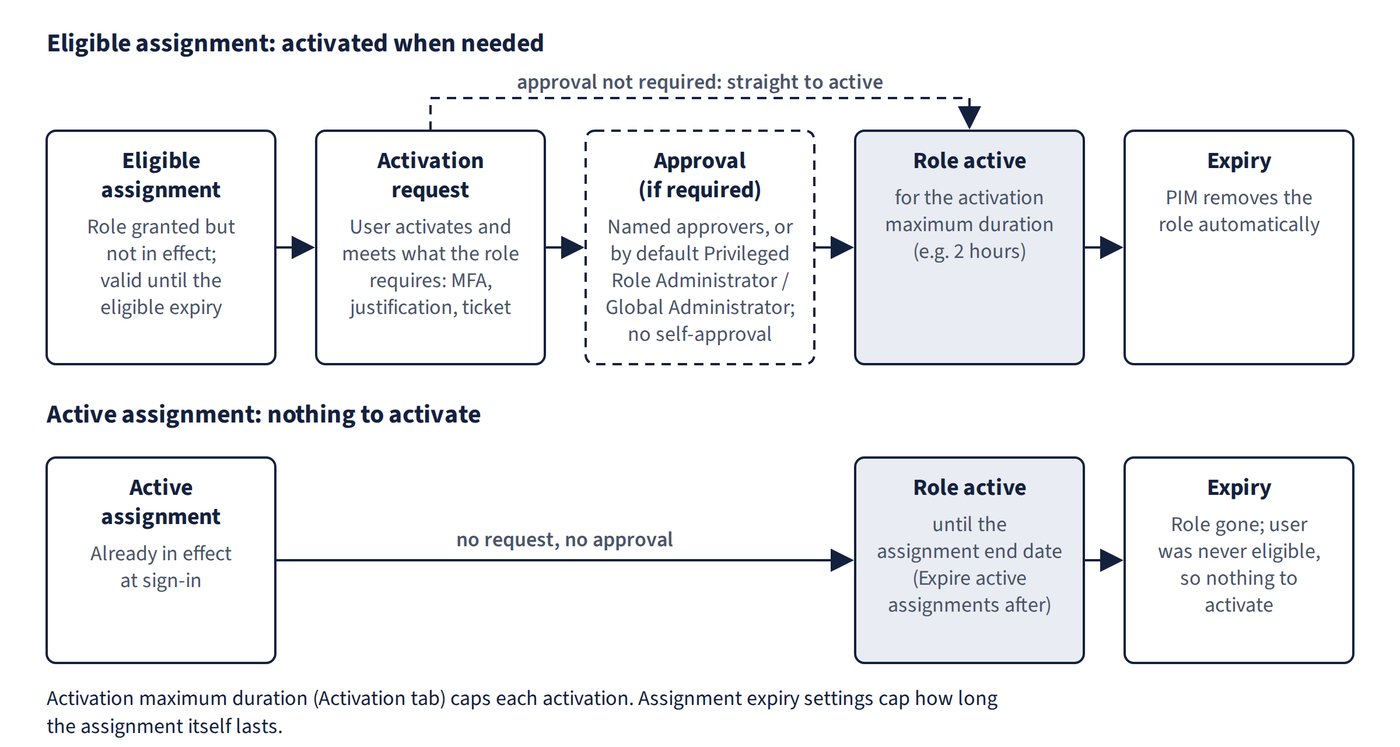
Common trap: Assuming a time-bound active assignment still grants the role after its end date - a one-month active assignment starting on 1 May expires on 1 June, so the user has no role on 15 June; and because it was an active assignment, the user was never eligible and has nothing to activate either.