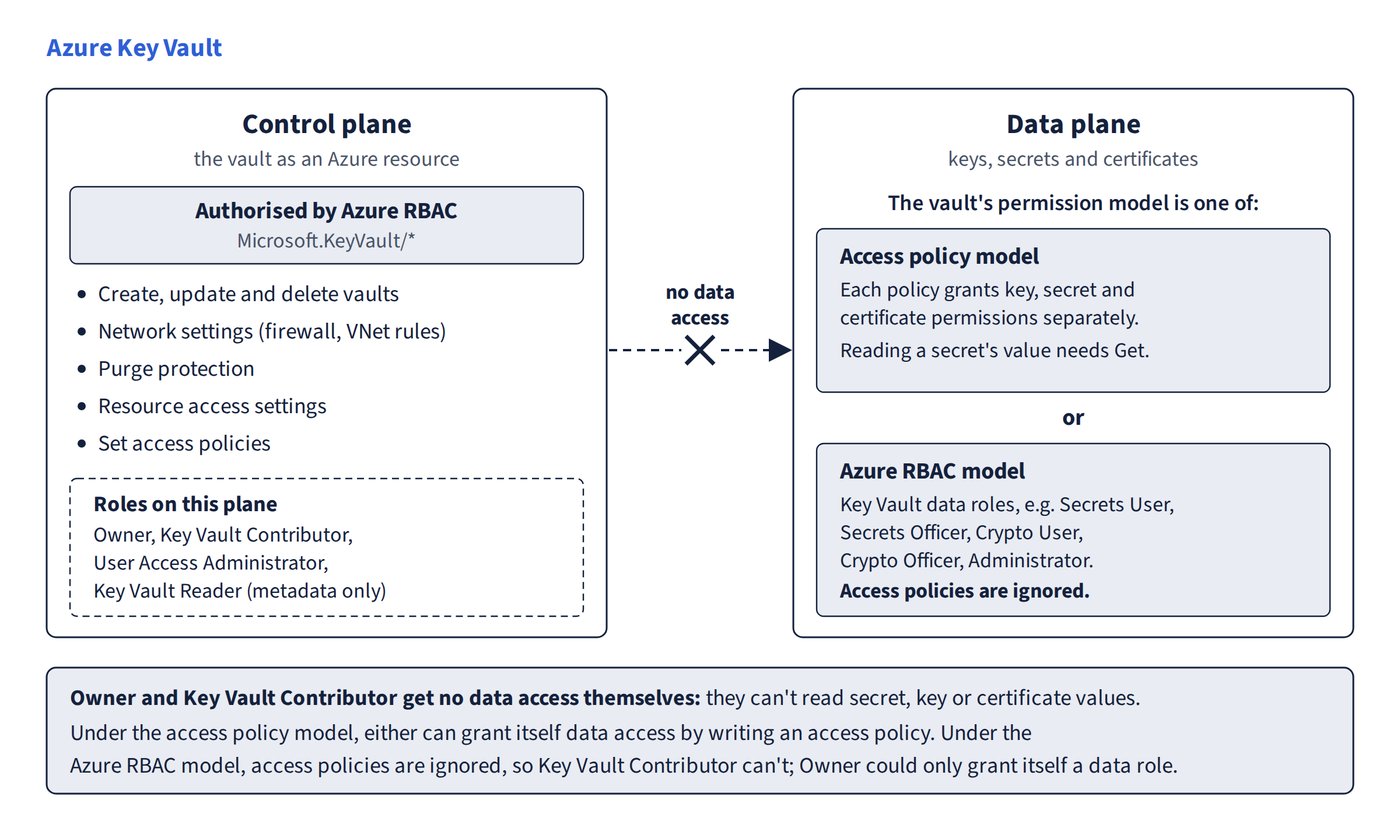
Every Key Vault operation belongs either to the control plane (the vault as an Azure resource) or to the data plane (the keys, secrets and certificates inside it). The two planes are authorised separately, and a role that is powerful on one can be powerless on the other. Figure 3.1 shows what each plane covers and why a control-plane role can’t read secrets.
- Control plane (Azure RBAC,
Microsoft.KeyVault/*) covers creating, updating and deleting vaults, network settings, purge protection, resource access settings and setting access policies. - Data plane covers keys, secrets and certificates. Access comes from access policies or from Key Vault RBAC data roles, depending on the vault’s permission model.
The two data-plane permission models
- Access policy model: each policy grants key, secret and certificate permissions separately, so you can grant certificate management alone for least privilege.
- Reading a secret’s value needs Get. List, Backup and Recover aren’t enough.
- A registered app, through its service principal, still needs a policy granting Get (plus List if needed) on secrets.
- Azure RBAC model: access policies are ignored. Key Vault Contributor can’t grant itself data access through access policies.
- Microsoft Entra ID (Azure AD) directory roles (for example Security Administrator), Azure Policy, Azure Information Protection and Application Proxy don’t grant data access to a vault. A managed identity is only the identity that access gets granted to.
Built-in roles by plane
| Role | Plane | Can do | Can’t do |
|---|---|---|---|
| Owner | Control | Everything on the control plane, including creating role assignments and changing network settings | No data actions, so it can’t create keys or secrets (it could only grant itself a data role) |
| User Access Administrator | Control | Create role assignments (delegate access) | Write vault properties such as network rules |
| Key Vault Contributor | Control | Create, update and delete vaults, change the firewall and VNet rules, set access policies | Read secret, key or certificate values; create role assignments |
| Network Contributor | Control | Manage network resources | Change a key vault’s own network settings |
| Key Vault Reader | Control/metadata | Read vault and object metadata | Read secret values, wrap/unwrap, make changes |
| Key Vault Administrator | Data | All data-plane operations | — |
| Key Vault Secrets Officer | Data | Create, update and delete secrets | — |
| Key Vault Secrets User | Data | Read secret contents only (least privilege for an app) | Create or change secrets |
| Key Vault Crypto Officer | Data | keys/*: full key management, including create and delete |
— |
| Key Vault Crypto User | Data | Key get/list plus encrypt, decrypt, sign, verify, wrap, unwrap | Create or delete keys |
| Key Vault Crypto Service Encryption User | Data | Key metadata read (get, list) plus wrap/unwrap only | Encrypt/decrypt, sign |
Choosing a role: scope and least privilege
- Scope matters. Crypto Officer or Secrets Officer assigned at vault scope can create keys or secrets. A role scoped to a single key (for example Key Vault Administrator on one key) can’t create new keys or secrets in the vault.
- An access policy of Get, List, Wrap and Unwrap on keys maps to Key Vault Crypto Service Encryption User as the least-privilege role.
Common trap: Key Vault Crypto Officer for an identity that only needs get, list, wrap and unwrap - Crypto Officer can create and delete keys, which breaks least privilege; Key Vault Crypto Service Encryption User is the right role.
Common trap: only Owner can configure a vault’s network access - Key Vault Contributor’s control-plane rights include the firewall and virtual network settings.
Common trap: Key Vault Contributor can’t add access policies - it can set them; it simply gets no data access itself.
Common trap: a subscription Owner, or an administrator whose role is scoped to one key, can create keys, and Owner can create secrets - Owner has no data-plane access, and a key-scoped assignment covers that one key only.