An independent study guide for VMware Certified Professional – VMware Cloud Foundation Support · by Tony Rough
Know where a VCF fault lives, which log or tool shows it, and the fix.
Free to read with Kindle Unlimited. Opens Amazon in a new tab.
Free glossary of the book's terms
First edition · published November 2026
This independent study guide for the VMware Certified Professional – VMware Cloud Foundation Support (VCP-VCF Support) exam turns what 2V0-15.25 expects you to understand into the symptoms, causes, fixes and traps that real VCF support work depends on. The exam is based on VMware Cloud Foundation 9.0, and the book is too, written from Broadcom's own 9.0 documentation and the Knowledge Base articles it cites.
Seventeen chapters, each one readable on its own, that together cover every exam objective:
There are no exam questions in this book. It explains the knowledge the exam looks for, so you can reason through scenarios you have never seen and bring the same method to a real VMware Cloud Foundation fault.
Written by Tony Rough, a cloud architect with over twenty years in IT infrastructure, whose VMware certifications include the VCAP-DCA in data centre administration: keeping a vSphere platform running and putting it right when it goes wrong.
Part of the Ultra Transcenders series from Distilled Press. An independent publication, not affiliated with, sponsored by or endorsed by Broadcom Inc. VMware, VMware Cloud Foundation, vSphere, vSAN, NSX and HCX are trademarks of Broadcom Inc. and/or its subsidiaries.
Every skill area in Broadcom's 2V0-15.25 outline (as of November 2026), and the chapters that cover it.
| Skill area | Weight | Chapters |
|---|---|---|
| Objective 5.1 Troubleshooting the Deployment of VMware Cloud Foundation (VCF) - VCF Fleet | — | 1, 2 |
| Objective 5.2 Troubleshooting the Deployment of VMware Cloud Foundation (VCF) - VCF Upgrade & VCF Conversion | — | 3, 4 |
| Objective 5.3 Troubleshooting a VMware Cloud Foundation Fleet - VCF Workload Domains | — | 4, 5 |
| Objective 5.4 Troubleshooting a VMware Cloud Foundation Fleet - VCF Operations Fleet Management | — | 6, 7, 8 |
| Objective 5.5 Troubleshooting a VMware Cloud Foundation Fleet - License Management | — | 7 |
| Objective 5.6 Troubleshooting a VMware Cloud Foundation Fleet - VCF Compute | — | 9, 10 |
| Objective 5.7 Troubleshooting a VMware Cloud Foundation Fleet - VCF Storage | — | 11 |
| Objective 5.8 Troubleshooting a VMware Cloud Foundation Fleet - Networking | — | 12, 13 |
| Objective 5.9 Troubleshooting a VMware Cloud Foundation Fleet - VCF Operations | — | 1, 14, 15 |
| Objective 5.10 Troubleshooting VMware Cloud Foundation - VCF Automation | — | 8, 16 |
Plus an appendix glossary of 400+ terms, each linked to Broadcom TechDocs, with the same terms explained free online for print readers.
Short excerpts from the book, exactly as they appear in it, so you can see how it explains things.
The opening of chapter 1 · Chapter 1: Troubleshooting a VCF 9.0 fleet: method, components and tools
Every fault in a VMware Cloud Foundation (VCF) 9.0 fleet is found the same way: work out exactly what is failing, narrow it to one component, find the evidence that component left behind, and fix the cause rather than the symptom. This chapter sets out that method, gives a one-picture refresher of the fleet and its components (including the components renamed in 9.0), lists where each component keeps its logs, and covers the tools that collect evidence: the Supportability and Serviceability (SoS) utility, component support bundles and the route to Broadcom support. It closes with the handful of root causes (DNS, NTP, certificates, passwords and service accounts) that sit behind a large share of failures across every later chapter.
A comparison table · Chapter 1: Troubleshooting a VCF 9.0 fleet: method, components and tools · A troubleshooting method for VCF
| Step | What to do | VCF-specific questions |
|---|---|---|
| 1. Define the symptom | State precisely what is not happening, and whether it ends in an error message, a timeout or a slow completion | Which workflow failed (deployment, host commissioning, upgrade, password rotation)? Which subtask in the Tasks panel failed, and with what message? |
| 2. Scope it | Decide whether the failure is consistent or sporadic, and how widely it reaches | One host or every host? One workload domain or the whole VCF Instance? One instance or the whole fleet? |
| 3. Isolate the component | Separate the components that could be involved from those that cannot | Is the failing call between SDDC Manager and vCenter, SDDC Manager and ESX, VCF Operations and a collector, or NSX and a host? |
| 4. Check what changed | Look for recent changes; problems that started together usually share a cause | Was a password, certificate, DNS record, NTP source, VLAN or MTU changed, possibly outside SDDC Manager or VCF Operations? |
| 5. Find the evidence | Read the log of the service that ran the failed step, run health checks, collect a bundle | Domain manager log for deployments, lifecycle log for upgrades, SoS health check for the instance |
| 6. Fix | Test likely causes first, one change at a time; revert a change that does not help | Prefer the documented workaround or remediation workflow over a manual change inside a component |
| 7. Verify | Confirm the original workflow now completes and nothing else broke | Retry the failed task, rerun the SoS health check, check VCF Operations alerts |
A common trap · Chapter 1: Troubleshooting a VCF 9.0 fleet: method, components and tools · A troubleshooting method for VCF
Common trap: Treating the component that displays the error as the component at fault - a VCF workflow error is usually raised by SDDC Manager or the VCF Installer while it calls another component, so the cause is often in vCenter, an ESX host, NSX or an external service such as DNS.
Want more? Amazon offers a longer free sample of the Kindle edition on its Kindle page.


Some sections of the book, free to read online:
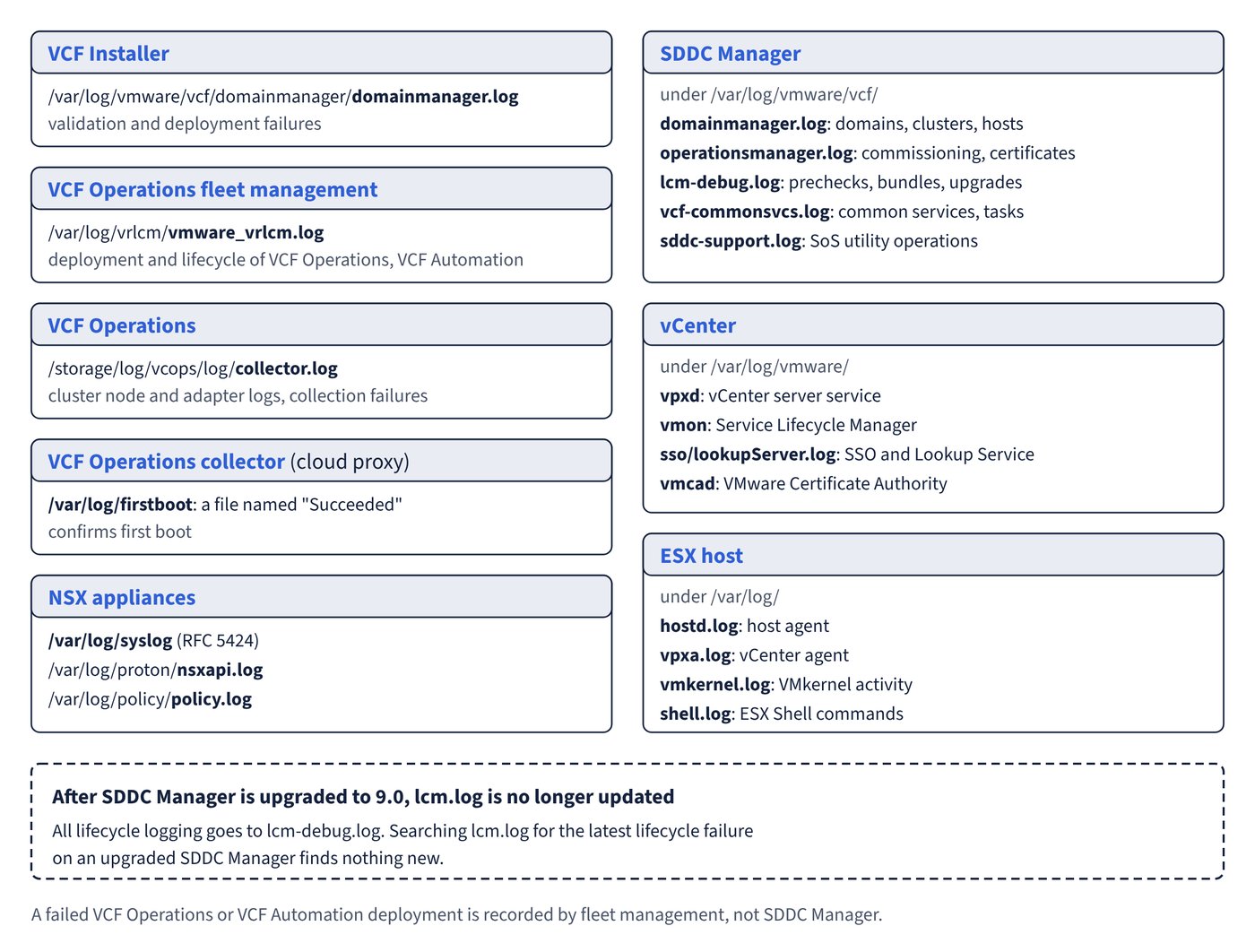
Which log on which appliance records the failed step, from domainmanager.log and lcm-debug.log to hostd, vpxa and the NSX logs.
The four starting points, the path and tool each one leads to, and which existing components converge into VCF 9.0.
The two replacement paths side by side, the import rules for external certificates and the documented replacement failures.
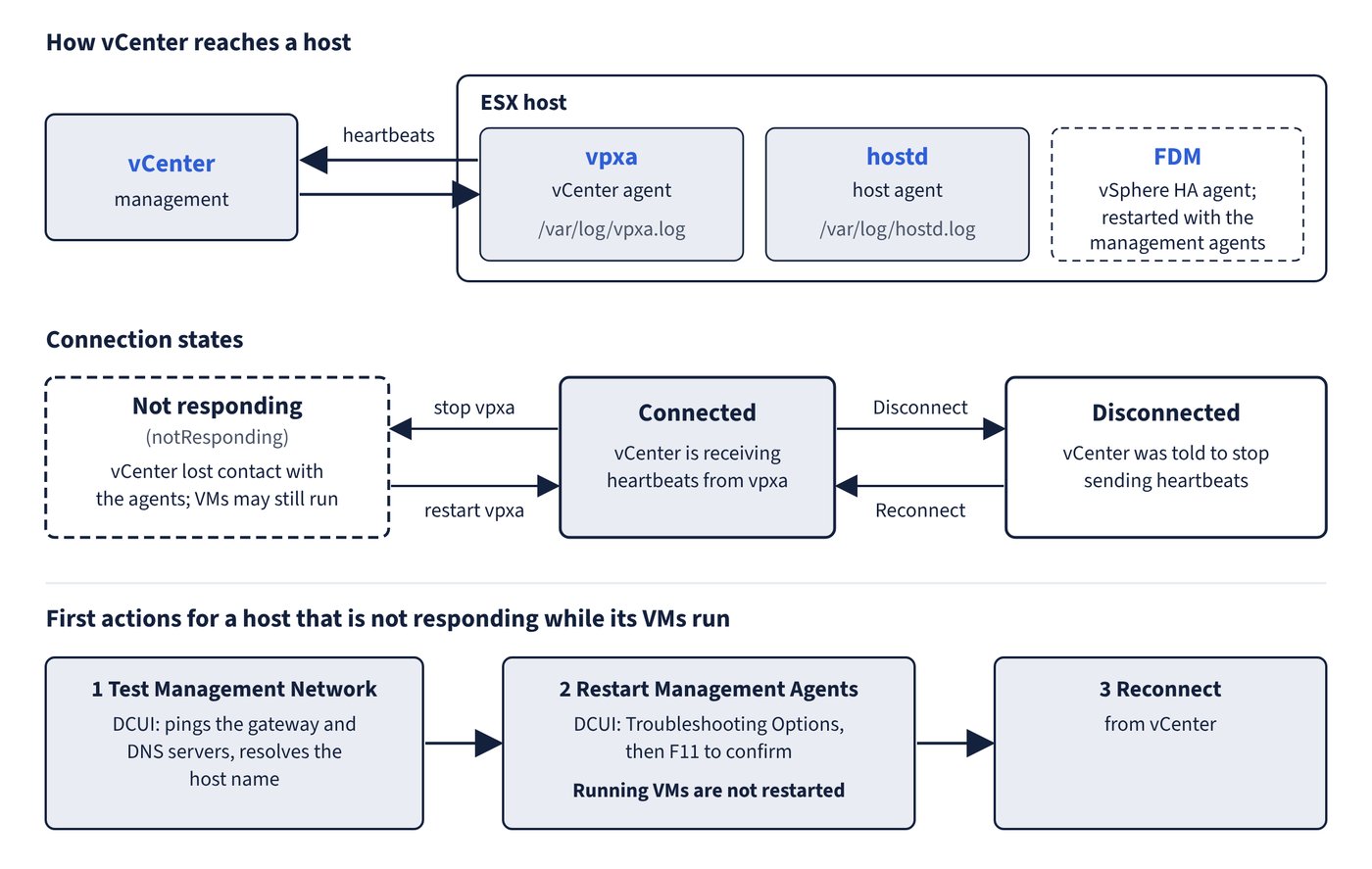
What each state means, how hostd, vpxa and FDM fit in, and the first action for a host that is not responding.
What Agent Unreachable, Uninitialized, Host Failed, Network Partitioned and Network Isolated mean, and the documented fix for each.
Absent and degraded compared, object accessibility rules and how vSAN behaves when a device, controller or host fails.
The channels between NSX Manager and a host, and the symptom, cause and fix for preparation and connection faults.
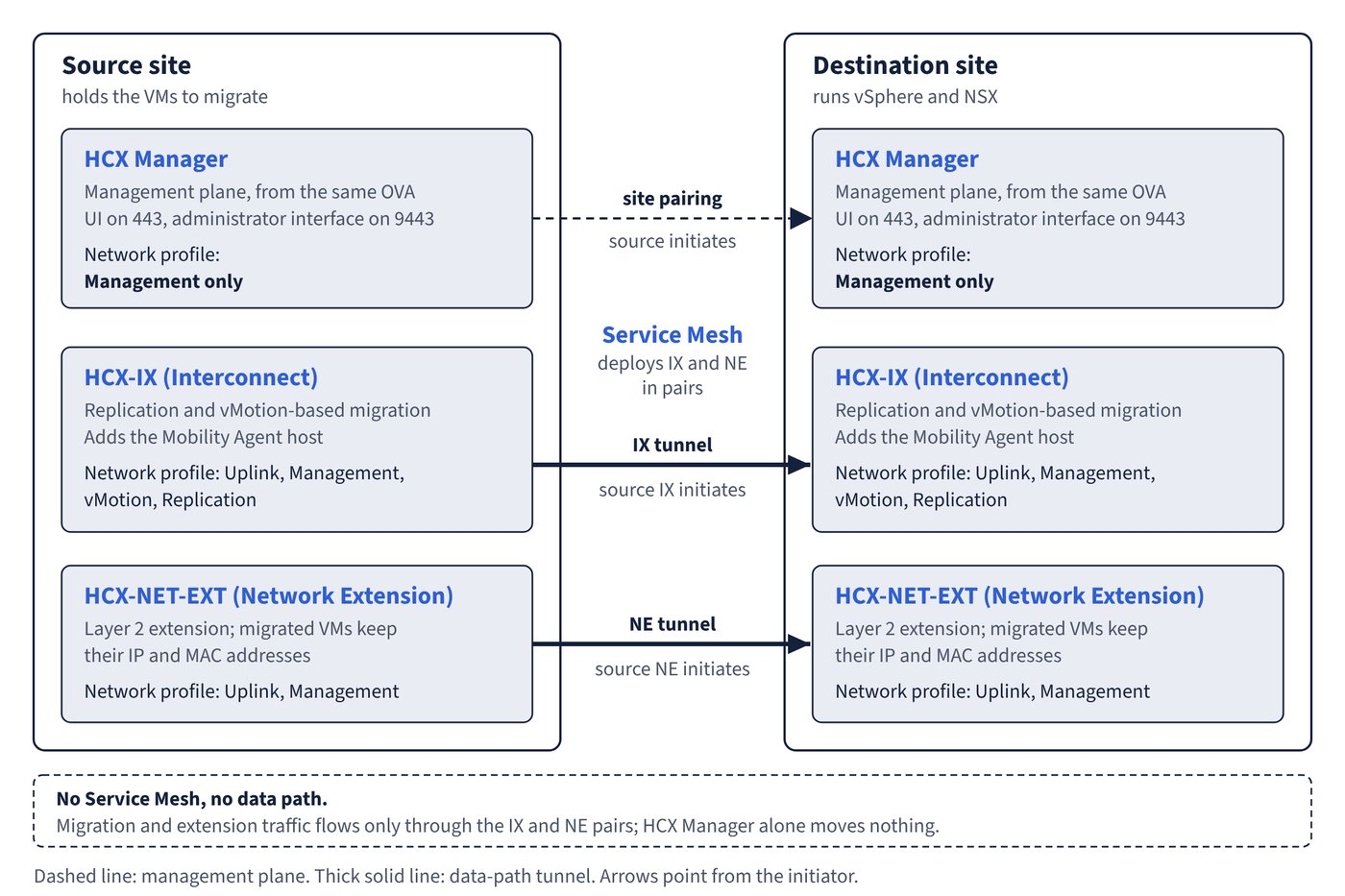
Bulk, Cold, vMotion, Replication Assisted vMotion and OS Assisted Migration compared, and the VM attributes that block each one.
A free week-by-week plan through the book at a 4-week or 8-week pace, with the study notes and exam skill areas for each week.