vSphere HA restarts VMs after host failures; when it is unhealthy, VMs are silently unprotected. The host’s HA state on the cluster and the host’s events tell you why.
How HA decides
- Every active host (not in standby, maintenance mode or disconnected) takes part in an election for the primary host; the host mounting the most datastores has an advantage. The primary monitors secondaries, tracks protected VMs, orchestrates restarts and reports cluster health to vCenter. A disconnected host’s VMs are unprotected.
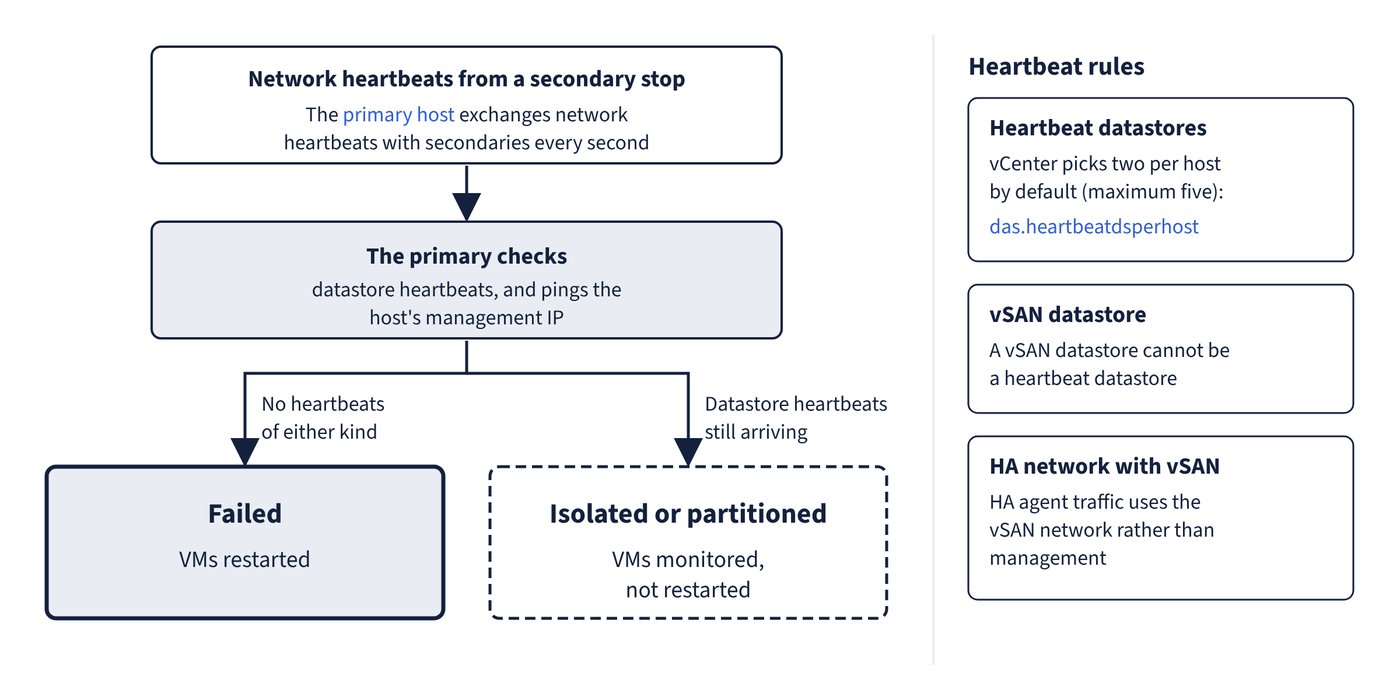
- The primary exchanges network heartbeats with secondaries every second. When they stop, it checks datastore heartbeats and pings the management IP. No heartbeats of either kind means failed (VMs restarted); datastore heartbeats still arriving means isolated or partitioned (VMs monitored, not restarted). Figure 10.1 shows the decision.
- vCenter picks two heartbeat datastores per host by default (
das.heartbeatdsperhost, maximum five). HA keeps state in a.vSphere-HAdirectory on each datastore; do not delete it. A vSAN datastore cannot be a heartbeat datastore. - A host is isolated if it cannot reach other HA agents and cannot ping its isolation addresses (by default the gateway; add others with
das.isolationaddress[...]). It then applies the isolation response (Disabled, Shut down and restart VMs, or Power off and restart VMs). Shutdown needs VMware Tools and falls back to power-off after 300 seconds (das.isolationshutdowntimeout). - With vSAN, HA agent traffic uses the vSAN network rather than management, and a host is isolated only when the isolation addresses and the vSAN network are both unreachable. After changing the vSAN network: deactivate Host Monitoring, make the change, Reconfigure for vSphere HA on every host, reactivate Host Monitoring. HA with vSAN needs at least three hosts.
- HA uses TCP and UDP 8182 between agents, logs to syslog as
fdmand runs as vpxuser. Advanced options persist until reset in the vSphere Client or removed fromfdm.cfgon all hosts.
HA agent states
| State | Meaning | Documented fix |
|---|---|---|
| Agent Unreachable | vCenter or the primary cannot contact the agent (usually a network problem, all hosts failed, or the host agent failed and the watchdog could not restart it); no failover is triggered | If vCenter shows the host not responding, fix the network or agent; otherwise reconfigure HA on the host |
| Uninitialized | The agent cannot enter the run state; most often the host has no datastore access, or its local datastore, agent, firewall ports or host agent are unavailable | Read the event vSphere HA Agent for the host has an error; fix datastore access, restart the host agent, free port 8182, then reconfigure HA |
| Initialization Error | The last Configure HA task failed | Host communication error: fix and retry; timeout: check vCenter-to-host communication; lack of resources: free about 75 MB of disk or unreserved memory; reboot pending: reboot and retry |
| Uninitialization Error | vCenter lost the host while unconfiguring HA; the stray agent can elect itself primary and lock datastores | Add the host back to vCenter (standalone or into any cluster) |
| Host Failed | The primary cannot reach the host or its heartbeat datastores (may be a real failure, or storage plus network failure) | Check and resolve the failure conditions |
| Network Partitioned | The primary reaches the host only through heartbeat datastores; causes include wrong VLAN tagging, NIC or switch failure, mixed IPv4-only and IPv6-only hosts, or moving management networks without maintenance mode | Fix the management (or vSAN) network |
| Network Isolated | The host cannot ping its isolation addresses and cannot reach other agents | Fix the network path |
| Configure HA times out on a large cluster | Installation exceeded the timeout | Set vCenter advanced option config.vpxd.das.electionWaitTimeSec to 240 |
Admission control
- Admission control blocks power-ons, migrations and reservation increases that would break failover capacity. It needs at least 3 hosts. The policies are cluster resource percentage (the VCF default), slot policy and dedicated failover hosts. In the percentage calculation a VM with no reservation counts as 32 MHz CPU and 0 MB memory; the slot policy also uses 32 MHz for CPU (
das.vmcpuminmhz). - Dedicated failover hosts refuse power-on and vMotion of VMs, and DRS does not use them for load balancing.
- With vSAN, the vSAN failures-to-tolerate must not be lower than the capacity HA reserves.
- VM Component Protection (VMCP) responds to PDL and APD datastore conditions (Disabled, Issue events, Power off and restart VMs); it needs the APD timeout enabled on hosts.
- VM Monitoring resets a VM whose VMware Tools heartbeats and I/O stop for the failure interval (High 30 s, Medium 60 s, Low 120 s), at most 3 times in the reset window.
Common trap: Expecting HA to restart VMs from a host in the Agent Unreachable or Network Partitioned state - neither triggers a failover; the primary keeps monitoring through datastore heartbeats. Fix the network, then reconfigure HA on the host if the state does not clear.
Common trap: Relying on the vSAN datastore for HA datastore heartbeating - a vSAN datastore cannot be used; without other shared storage, no heartbeat datastores exist, so partitions and isolation are judged on network alone.