A host becomes a transport node when a transport node profile (TNP) is applied to its vCenter cluster. NSX Manager then installs the NSX components on every host and creates the TEPs. A TNP is not used for standalone hosts. A host moved into a TNP-prepared cluster is prepared automatically, and a host moved out has its NSX configuration and VIBs removed. Before a host can be prepared, it must be on a VDS (vCenter 7.0 and ESX 7.0 or later) with an MTU of at least 1600 bytes; if the MTU is lower, NSX Manager notifies you that it will be raised to 1600 automatically.
Communication channels
| Channel | Port | Check on the host | Alarm |
|---|---|---|---|
| Management plane (Appliance Proxy Hub) to host | TCP 1234 | get managers |
management_channel_to_transport_node_down after 5 minutes; ..._down_long after 15; network_latency_high above 150 ms for 5 minutes |
| Central control plane to host (nsx-proxy) | TCP 1235 | get controllers |
control_channel_to_manager_node_down after 3 minutes; ..._too_long after 15 |
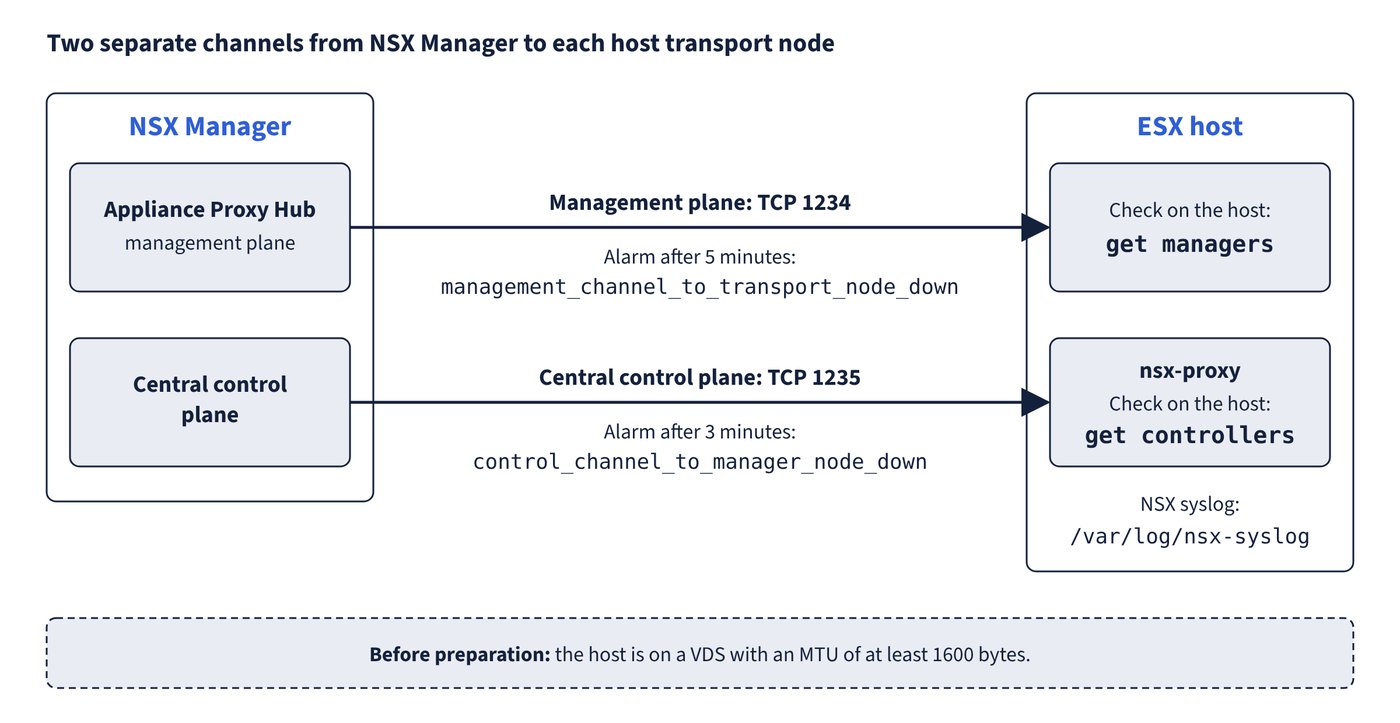
esxcli network ip connection list | grep 1235 and | grep 5671 show the established nsx-proxy and mpa connections. On the host, nsxcli -c <command> runs one NSX CLI command and nsxcli alone opens interactive mode. NSX syslog on ESX is under /var/log/nsx-syslog. When connectivity returns, a full configuration or runtime state sync is sent to the host. Figure 12.1 shows the two channels and how to check each one.
Preparation and state faults
| Symptom | Cause | Fix |
|---|---|---|
| “Failed to download NSX components on host” when many hosts prepare at once | Connectivity, /tmp space, or too many hosts at the same time |
Check connectivity and /tmp, wait for the others, then retry from the UI or API |
Install task fails; vim-cmd hostsvc/hostsummary shows rebootRequired = true |
A previous VIB install or upgrade left a pending reboot | Reboot and retry |
esxupdate.log: the pending transaction requires more free space than the bootbank allows |
Unused VIBs fill the bootbank or alt-bootbank | Remove unneeded VIBs |
| TNP error “The requested object <uuid> could not be found” | The TNP references an object (IP pool, profile) that no longer exists in NSX or vCenter | Search the UUID, edit the TNP to remove it, re-trigger host configuration |
| Partial success: “LogicalSwitch full-sync realization query skipped” | Uplink profile teaming with no active uplinks, host switch uplinks down, or TEP creation failure | Give every teaming an active uplink; check NIC link with esxcli network nic get -n <vmnic>; check TEP count and IPs with net-vdl2 -l |
| Node already exists; host orphaned; incorrect credentials | NSX removal didn’t clean up after a race under load | Hosts page > Force Delete > Remove NSX, or the force-delete API; then the clean_stale_entries API |
| Degraded | An interface used by the host switch is down | Fix the physical link |
| Disconnected or Unknown: “Heart beating between NSX management node and host <uuid> is down” | Full ESX disks or memory leak crashed services | get core-dumps, esxtop, df -h; free space, start services with /etc/init.d/<service> start; open a support case if cores exist |
| Agent down on the Monitor tab | nsx-cfgagent, nsx-opsagent or nsx-nestdb stopped | /etc/init.d/<service> status, then start it |
| Manager up but no active controller | Host in NSX Maintenance Mode, FQDN publishing problem, stale controller-info | get maintenance-mode / set maintenance-mode false; check publish_fqdns; restart nsx-proxy to rebuild /etc/vmware/nsx/controller-info.xml |
| VMs on NSX segments won’t power on or vMotion: “vdl2 down” | VDL2 component down: bad TEP IP or gateway, MTU below 1600, uplinks down, or DHCP not giving TEP addresses | net-dvs \| grep "component.vdl2", net-vdl2 -l, esxcfg-vswitch -l; correct the TEP pool, VLAN, VDS MTU and NIC status |
- NSX Maintenance Mode stops a transport node from taking part in networking. Evacuate VMs first; VMs can’t be vMotioned to it. A node enters it automatically when its upgrade fails, and nodes in it are not upgraded.
- In VCF, hosts are prepared through the cluster’s TNP as part of the domain and cluster workflows (Chapter 5, “Workload domains, clusters and hosts”);
DELETE .../transport-nodes/<id>?force=trueskips all checks, so the N-VDS, the VIBs and any compute-manager entry must then be cleaned up by hand.
Common trap: Reading “manager connected” in
get managersas proof the host is healthy - the control plane is a separate channel on TCP 1235;get controllersmust show a connected controller with the session up.